DeepVista AI
An AI-native email copilot for founders that turns inbox overload into prioritized next steps, draft replies, and execution-ready plans.
MY ROLE
Product Designer
MY TEAM






TIMELINE
Q2 & Q3 of 2025
PROBLEM
Founders deal with constant inbox pressure (often 50–200 emails/day), and the most important signals get buried. Email tools help you read messages, but not decide what matters, respond confidently, or turn conversations into clear execution.
OUTCOME
We designed and shipped an email-first MVP that converts messy threads into structured outputs: priority classification, context-aware draft replies with user control, and actionable tasks and plans founders can actually use day to day.
150+
Pre-Launch Signups
50-200
Emails per day (Founders)
0 → 1
MVP Shipped
DeepVista AI
An AI-native email copilot for founders that turns inbox overload into prioritized next steps, draft replies, and execution-ready plans.
MY ROLE
Product Designer
MY TEAM

TIMELINE
Q2 & Q3 of 2025
PROBLEM
Founders deal with constant inbox pressure (often 50–200 emails/day), and the most important signals get buried. Email tools help you read messages, but not decide what matters, respond confidently, or turn conversations into clear execution.
OUTCOME
We designed and shipped an email-first MVP that converts messy threads into structured outputs: priority classification, context-aware draft replies with user control, and actionable tasks and plans founders can actually use day to day.
150+
Pre-Launch Signups
50-200
Emails per day (Founders)
0 → 1
MVP Shipped

Context
Context
DeepVista began as a early PRD + big idea from the founder, a founding member of FounderCoho. Through the community, he saw founders repeatedly struggling with lack of clarity, overwhelm, and no mentorship. The goal was to turn that broad vision into a shipped MVP founders would actually use.
DeepVista began as a early PRD + big idea from the founder, a founding member of FounderCoho. Through the community, he saw founders repeatedly struggling with lack of clarity, overwhelm, and no mentorship. The goal was to turn that broad vision into a shipped MVP founders would actually use.
FounderCoHo
(Founder Community)
FounderCoHo
(Founder Community)


Early-stage
Early-stage
Founder Insights
Founder Insights
Early PRD
Early PRD
+
+
Broad AI Workspace
Broad AI Workspace
Focussed MPV
Focussed MPV
shipped
shipped

Early stage founders had no mentorship
Early stage founders struggled with findng a clear direction
Founders often felt overwhelmed
Founders had too many responsibilities
Early stage founders had no mentorship
Early stage founders struggled with findng a clear direction
Founders often felt overwhelmed
Founders had too many responsibilities
Stake
Vague PRD and ship a focused MVP.
Prove real value for founders, not just a concept.
Constraint
Too broad to start
The PRD covered “AI workspace for everything”
→ unclear wedge, high scope risk.
Success
Clarity → action
Founders leave with next steps + usable/shareable outputs (plans, tasks, drafts).
Stake
Vague PRD and ship a focused MVP.
Prove real value for founders, not just a concept.
Constraint
Too broad to start
The PRD covered “AI workspace for everything”
→ unclear wedge, high scope risk.
Success
Clarity → action
Founders leave with next steps + usable/shareable outputs (plans, tasks, drafts).
User Research
User Research
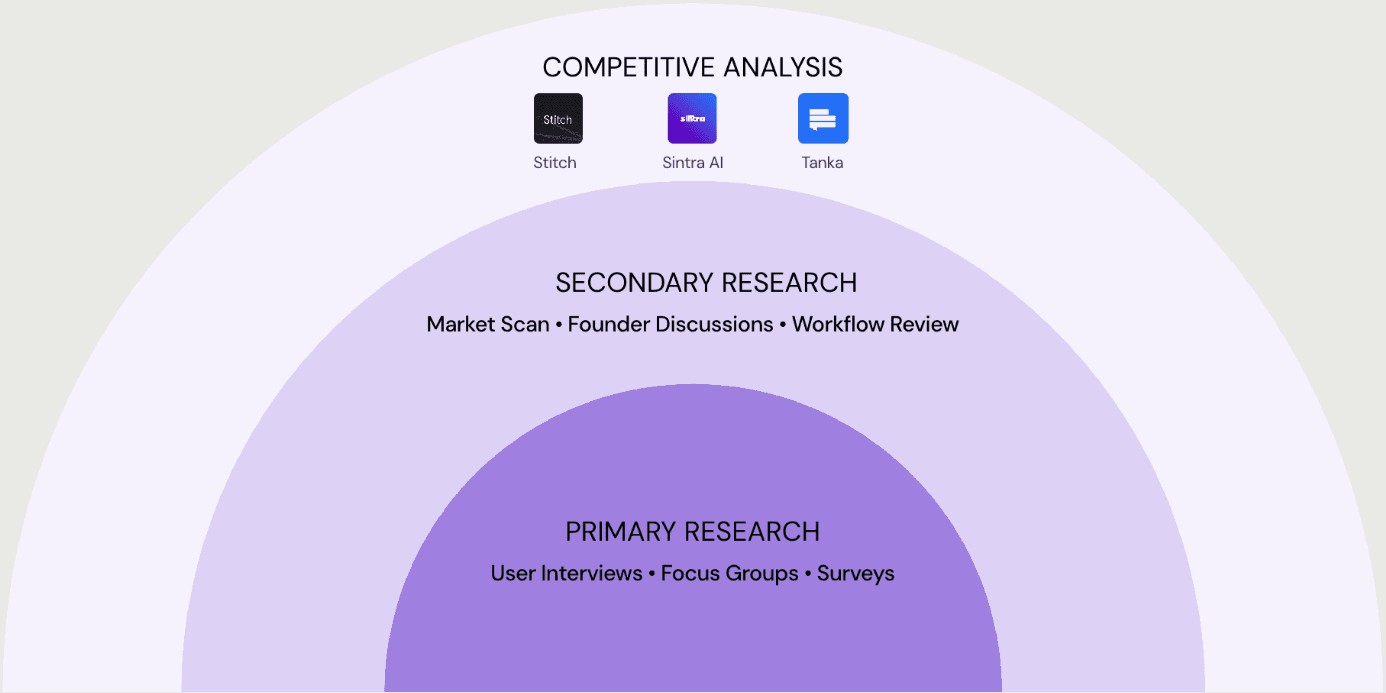
We combined primary + secondary research and competitive analysis to understand founder workflows, trust needs, and where an AI copilot could create real value.
We combined primary + secondary research and competitive analysis to understand founder workflows, trust needs, and where an AI copilot could create real value.

User Interviews • Focus Groups • Surveys
Market Scan • Founder Discussions • Workflow Review
Sintra AI
Stitch
Tanka
PRIMARY RESEARCH
SECONDARY RESEARCH
COMPETITIVE ANALYSIS


User Interviews • Focus Groups • Surveys
Market Scan • Founder Discussions • Workflow Review
Sintra AI
Stitch
Tanka
PRIMARY RESEARCH
SECONDARY RESEARCH
COMPETITIVE ANALYSIS
Key Patterns
Key Patterns
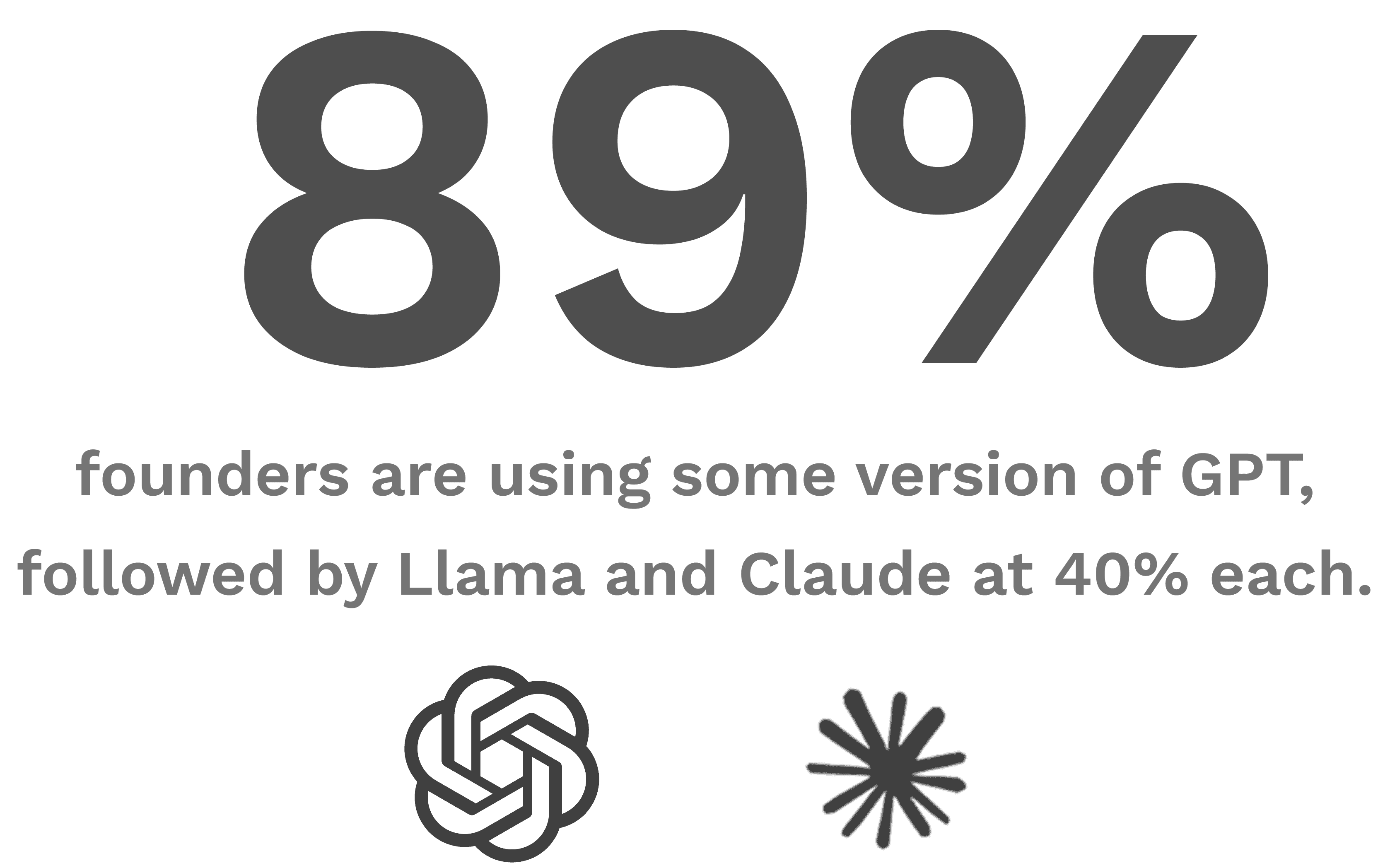
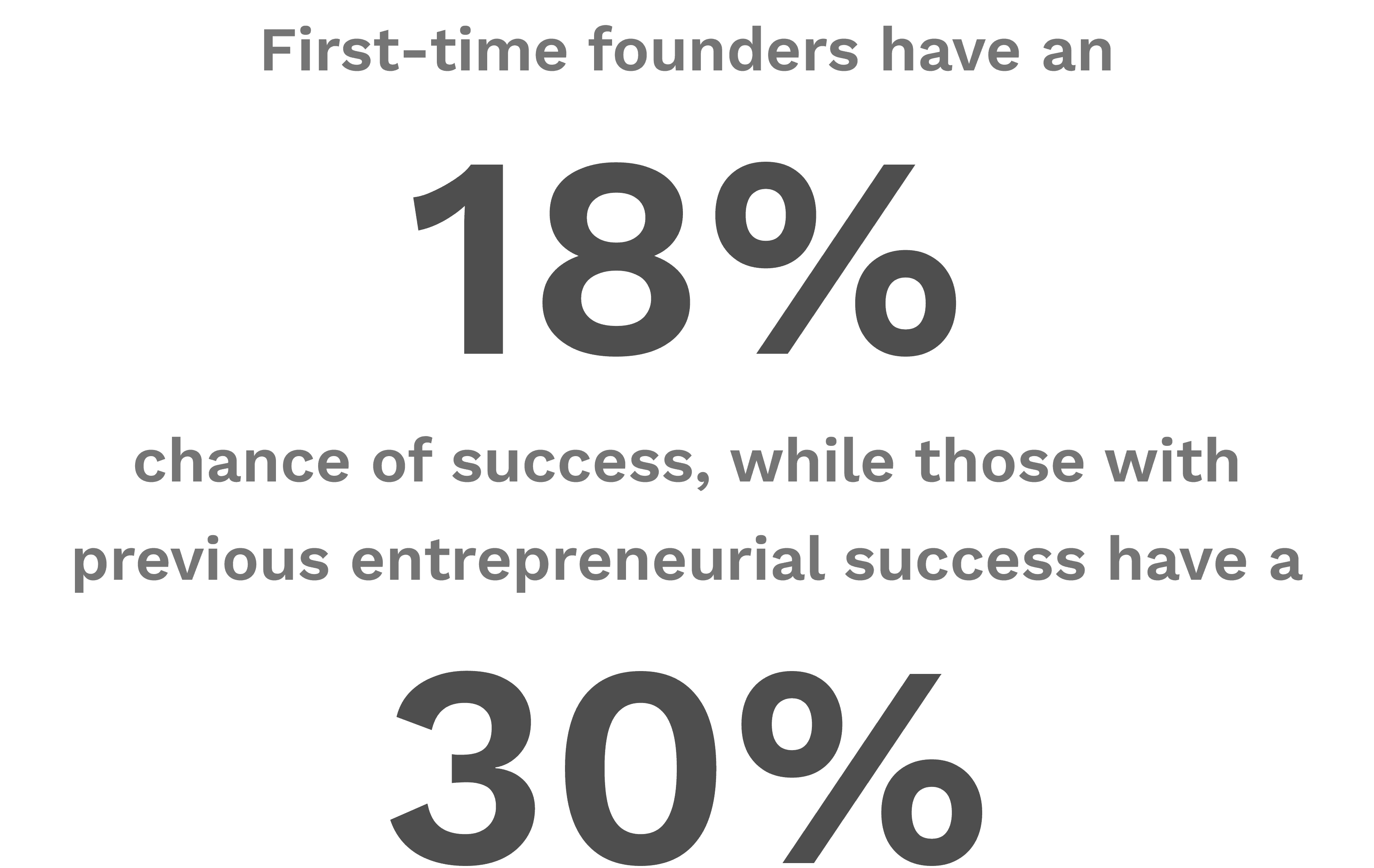
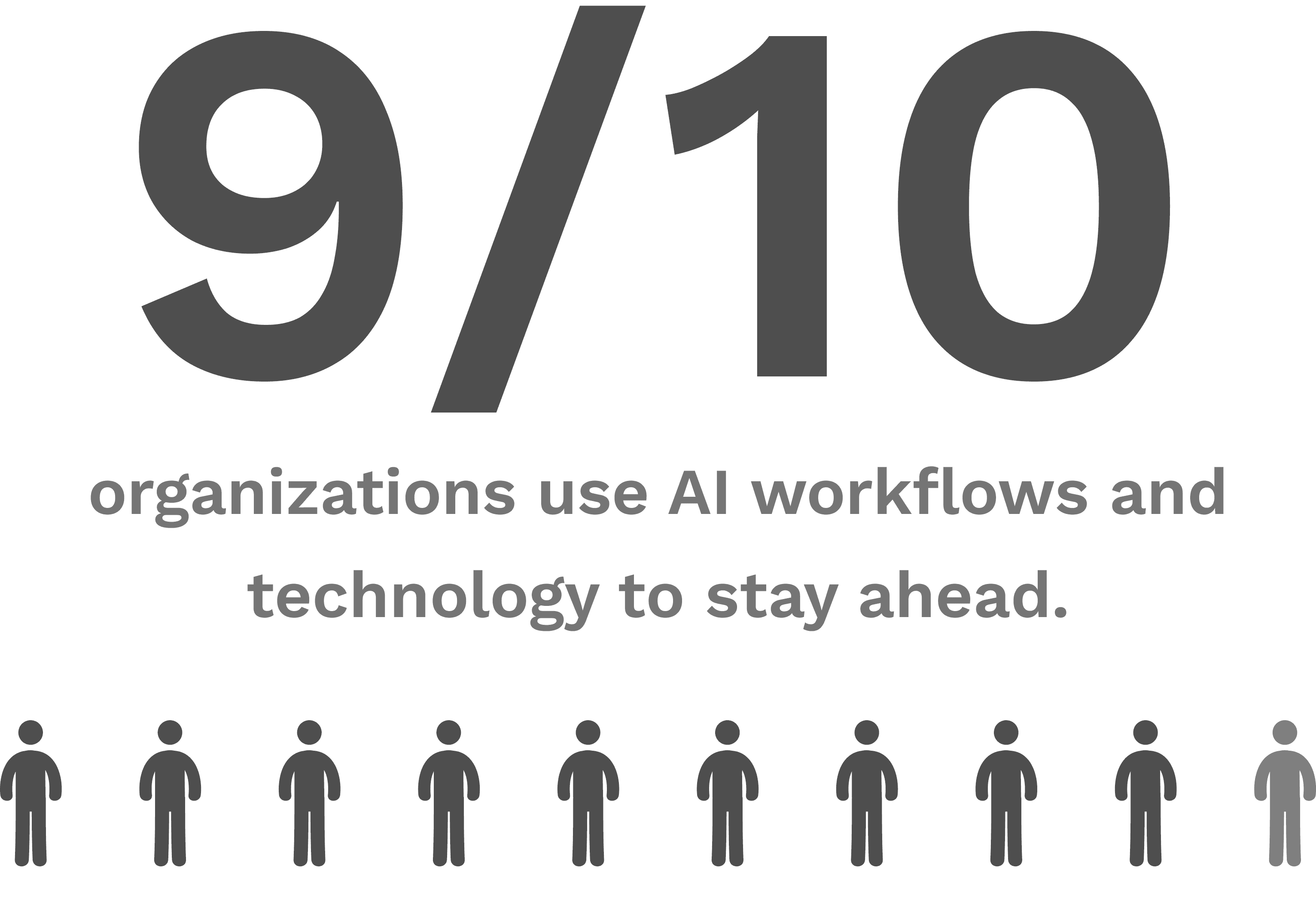
Final Research Impact
Final Research Impact
Research revealed the highest-value opportunity was not a broad workspace, it was a repeatable daily workflow where AI can reduce decision fatigue and produce usable outputs.
Research revealed the highest-value opportunity was not a broad workspace, it was a repeatable daily workflow where AI can reduce decision fatigue and produce usable outputs.
INPUTS
INPUTS

INSIGHTS
INSIGHTS
DIRECTION
DIRECTION
Problem & Opportunity
Problem & Opportunity
Founders operate in a constant stream of communication and context switching, where the most important signals get buried and execution falls through.
Founders operate in a constant stream of communication and context switching, where the most important signals get buried and execution falls through.
Before
Before
Founder Work = Scattered Signals
Founder Work = Scattered Signals
Emails • Docs • Chats • Tools
Emails • Docs • Chats • Tools
Constant Context Switching
Constant Context Switching

Missing
Missing
Clarity + Execution Loop
Clarity + Execution Loop
Prioritise what matters • Respond confidently • Converts threads into actions
Prioritise what matters • Respond confidently • Converts threads into actions
Opportunity
Opportunity
AI Co-pilot for founder decisions
AI Co-pilot for founder decisions
Turn messy conversations into prioritized next steps, editable drafts, and execution-ready tasks/plans
Turn messy conversations into prioritized next steps, editable drafts, and execution-ready tasks/plans
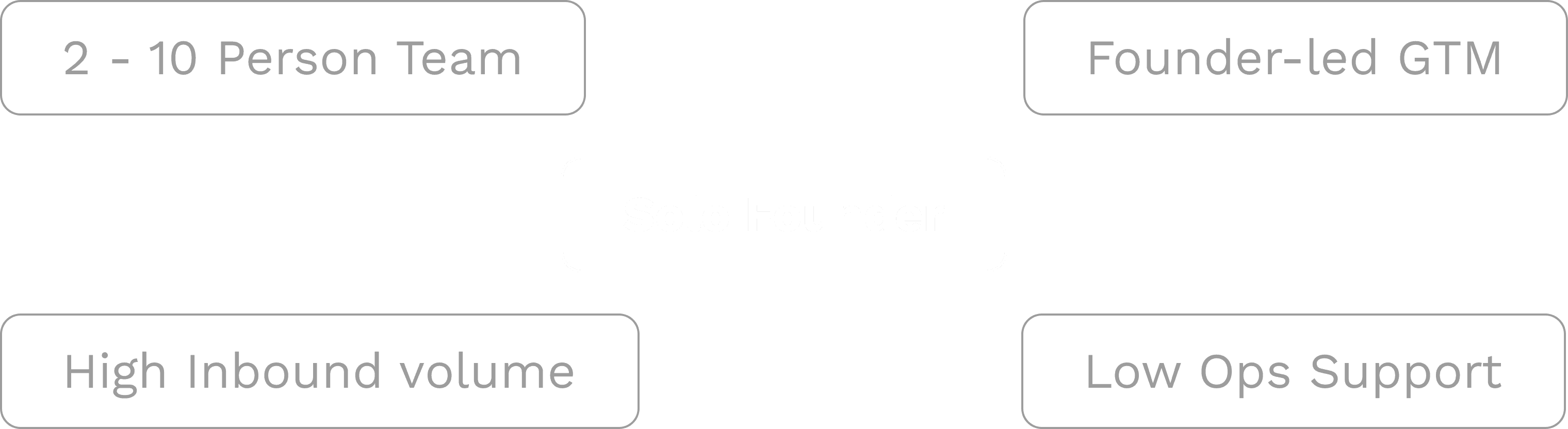
Target User
Target User
User Core Needs
User Core Needs

Priority Clarity
Priority Clarity
Fast Next Steps
Fast Next Steps
Draft Support
Draft Support
Trust + Control
Trust + Control
Execution Outputs
Execution Outputs
Ideation
Ideation
Directions Explored
Directions Explored
DIRECTION 1
DIRECTION 1

Founder Canvas
Clarify product/market + roadmap from founder inputs
Founder Canvas
Clarify product/market + roadmap from founder inputs
Value: Structured clarity + confident steps
Value: Structured clarity + confident steps
Risk: Needs confidence cues + “ask for more input” moments
Risk: Needs confidence cues + “ask for more input” moments
DIRECTION 2
DIRECTION 2
AI Note Taker
Transcribe calls → generate structured outputs after the call
AI Note Taker
Transcribe calls → generate structured outputs after the call
Value: High-signal capture with automatic summaries
Value: High-signal capture with automatic summaries
Risk: Output overload if not prioritized
Risk: Output overload if not prioritized
DIRECTION 3
DIRECTION 3
Email Assistant
Generate draft replies with user selection/control
Email Assistant
Generate draft replies with user selection/control
Value: Faster replies without losing control
Value: Faster replies without losing control
Risk: Trust + tone accuracy must be editable
Risk: Trust + tone accuracy must be editable
Convergence
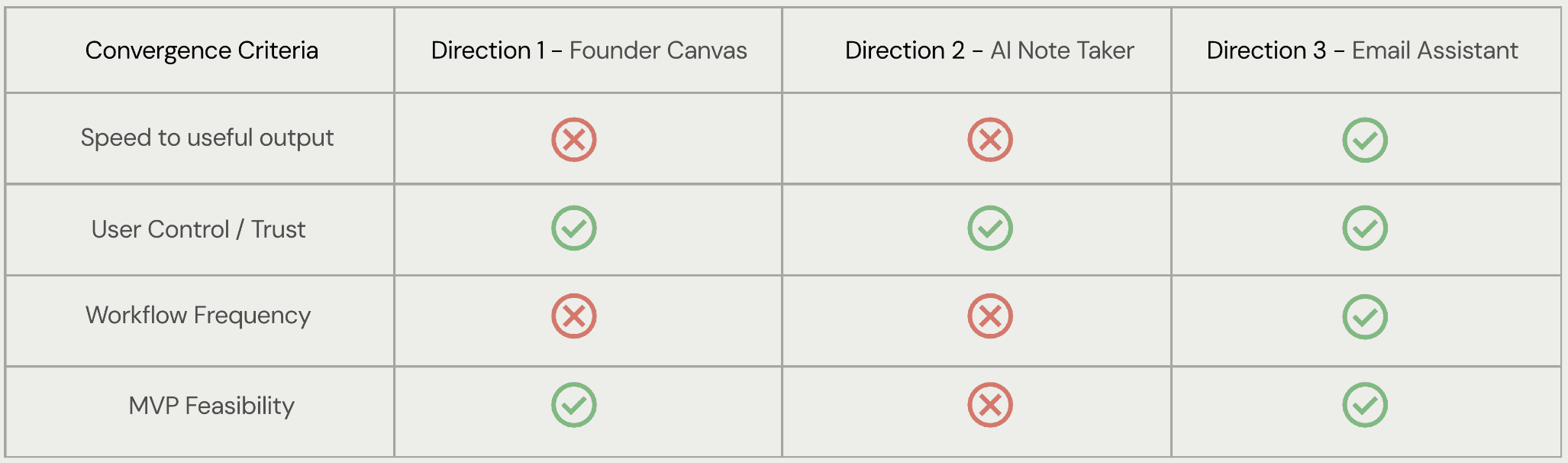
Convergence Criteria
Speed to useful output
User Control / Trust
Workflow Frequency
MVP Feasibility
Direction 1 - Founder Canvas
Direction 2 - AI Note Taker
Direction 3 - Email Assistant


What we showed the Founder
OPTION A
Build the AI Copilot
A single copilot that generates multiple outputs across workflows
Founder Canvas • Email Drafts • Tasks • Calendar Updates •Scenario Updates • Transcripts
OPTION B
Converge on one Direction
Start with one repeatable workflow and ship a wedge that proves the daily value fast

AI Powered
Email Assistant
Convergence
Convergence Criteria
Speed to useful output
User Control / Trust
Workflow Frequency
MVP Feasibility
Direction 1 - Founder Canvas
Direction 2 - AI Note Taker
Direction 3 - Email Assistant
What we showed the Founder
OPTION A
Build the AI Copilot
A single copilot that generates multiple outputs across workflows
Founder Canvas • Email Drafts • Tasks • Calendar Updates •Scenario Updates • Transcripts
OPTION B
Converge on one Direction
Start with one repeatable workflow and ship a wedge that proves the daily value fast
AI Powered
Email Assistant
Pivot
Pivot
After exploring multiple copilot directions and validating trust/control needs, we narrowed scope to a single wedge that could ship, earn adoption, and expand later.
After exploring multiple copilot directions and validating trust/control needs, we narrowed scope to a single wedge that could ship, earn adoption, and expand later.
Before
Before
AI copilot across multiple workflows
AI copilot across multiple workflows
After
After
focussed assistant with one repeatable workflow (email-led)
focussed assistant with one repeatable workflow (email-led)
Why we pivoted
Why we pivoted
Scope Reality
Scope Reality
Too many workflows to build + validate within the MVP timeline.
Too many workflows to build + validate within the MVP timeline.
Adoption Wedge
Adoption Wedge
Founders needed value inside a daily habit, not another surface.
Founders needed value inside a daily habit, not another surface.
Trust + User Control
Trust + User Control
AI had to stay reviewable and user-led to earn consistent user
AI had to stay reviewable and user-led to earn consistent user
Narrowing the Scope
Narrowing the Scope
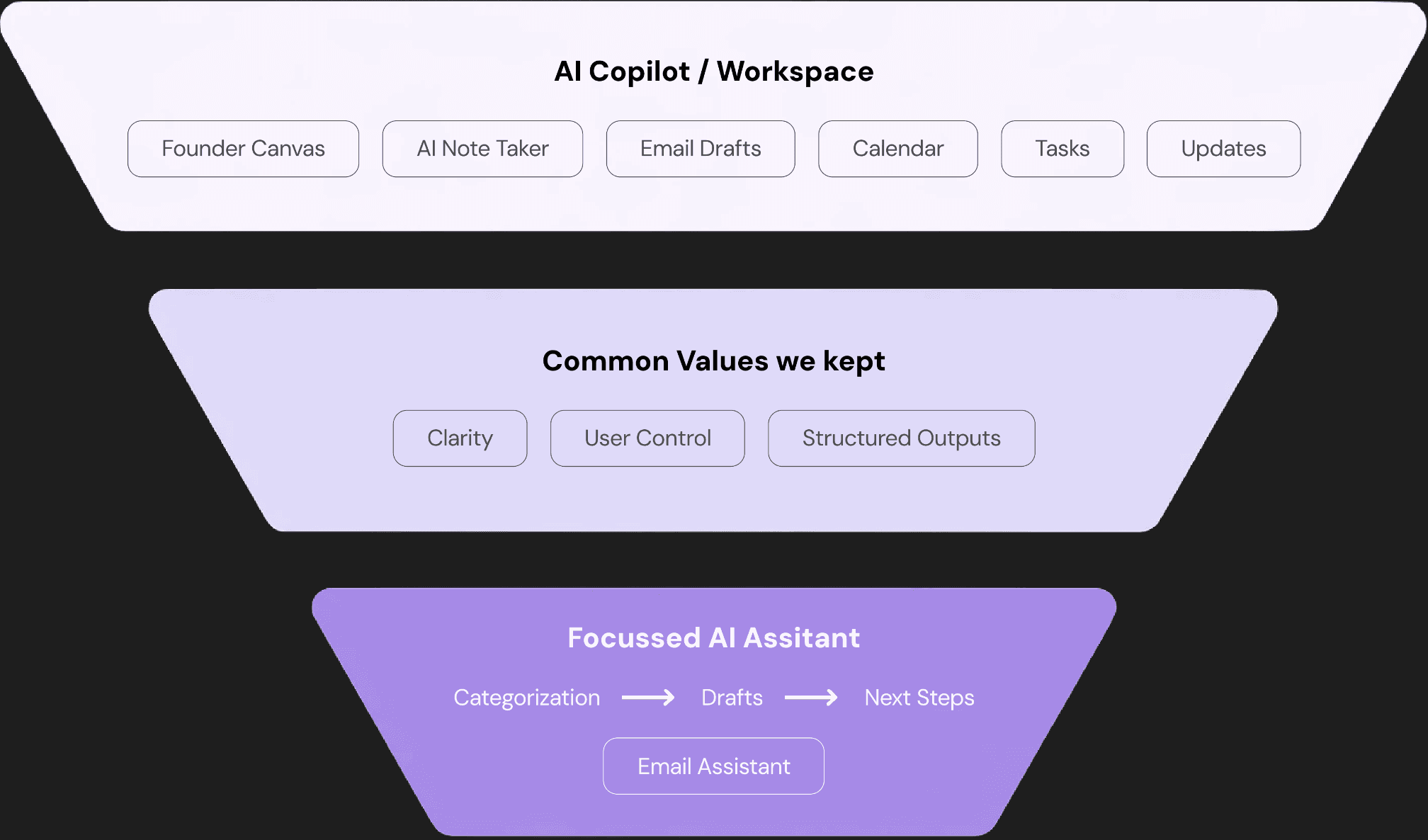
We kept the core value (clarity + control + outputs) and narrowed the surface area to a wedge we could ship and validate fast.
We kept the core value (clarity + control + outputs) and narrowed the surface area to a wedge we could ship and validate fast.

AI Copilot / Workspace
Founder Canvas
AI Note Taker
Email Drafts
Calendar
Tasks
Updates
Common Values we kept
Clarity
User Control
Structured Outputs
Focussed AI Assitant
Categorization
Drafts
Next Steps
Email Assistant
AI Copilot / Workspace
Founder Canvas
AI Note Taker
Email Drafts
Calendar
Tasks
Updates
Common Values we kept
Clarity
User Control
Structured Outputs
Focussed AI Assitant
Categorization
Drafts
Next Steps
Email Assistant
Narrowing the Scope
Narrowing the Scope

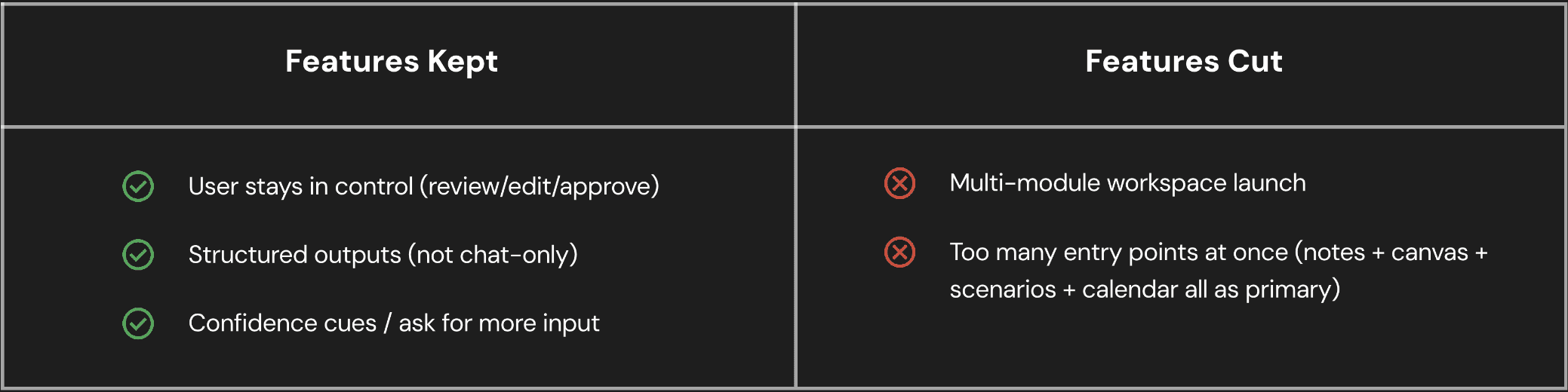
Features Kept
Features Cut
User stays in control (review/edit/approve)
Structured outputs (not chat-only)
Confidence cues / ask for more input
Multi-module workspace launch
Too many entry points at once (notes + canvas + scenarios + calendar all as primary)
Features Kept
Features Cut
User stays in control (review/edit/approve)
Structured outputs (not chat-only)
Confidence cues / ask for more input
Multi-module workspace launch
Too many entry points at once (notes + canvas + scenarios + calendar all as primary)
Final Direction
Final Direction
An AI-native email assistant that turns messy threads into priorities, editable drafts, and execution-ready next steps, with the founder in control.
An AI-native email assistant that turns messy threads into priorities, editable drafts, and execution-ready next steps, with the founder in control.
PRIORITIZE
PRIORITIZE
Categorization
Categorization
DRAFT
DRAFT
AI-Generated Replies
AI-Generated Replies
ACTIONIZE
ACTIONIZE
Tasks / Plan
Tasks / Plan
The Plan
The Plan
A repeatable loop founders can use daily: fast value first, expandable later.
A repeatable loop founders can use daily: fast value first, expandable later.
Categorization
Categorization
What matters now
What matters now
Thread Context
Thread Context
Why it matters
Why it matters
Draft Options
Draft Options
Tone + Intent
Tone + Intent
Approve & Send
Approve & Send
User Control
User Control
Tasks
Tasks
Execution Ready
Execution Ready
Design System & Visual Language
Design System & Visual Language
Moodboard
Moodboard
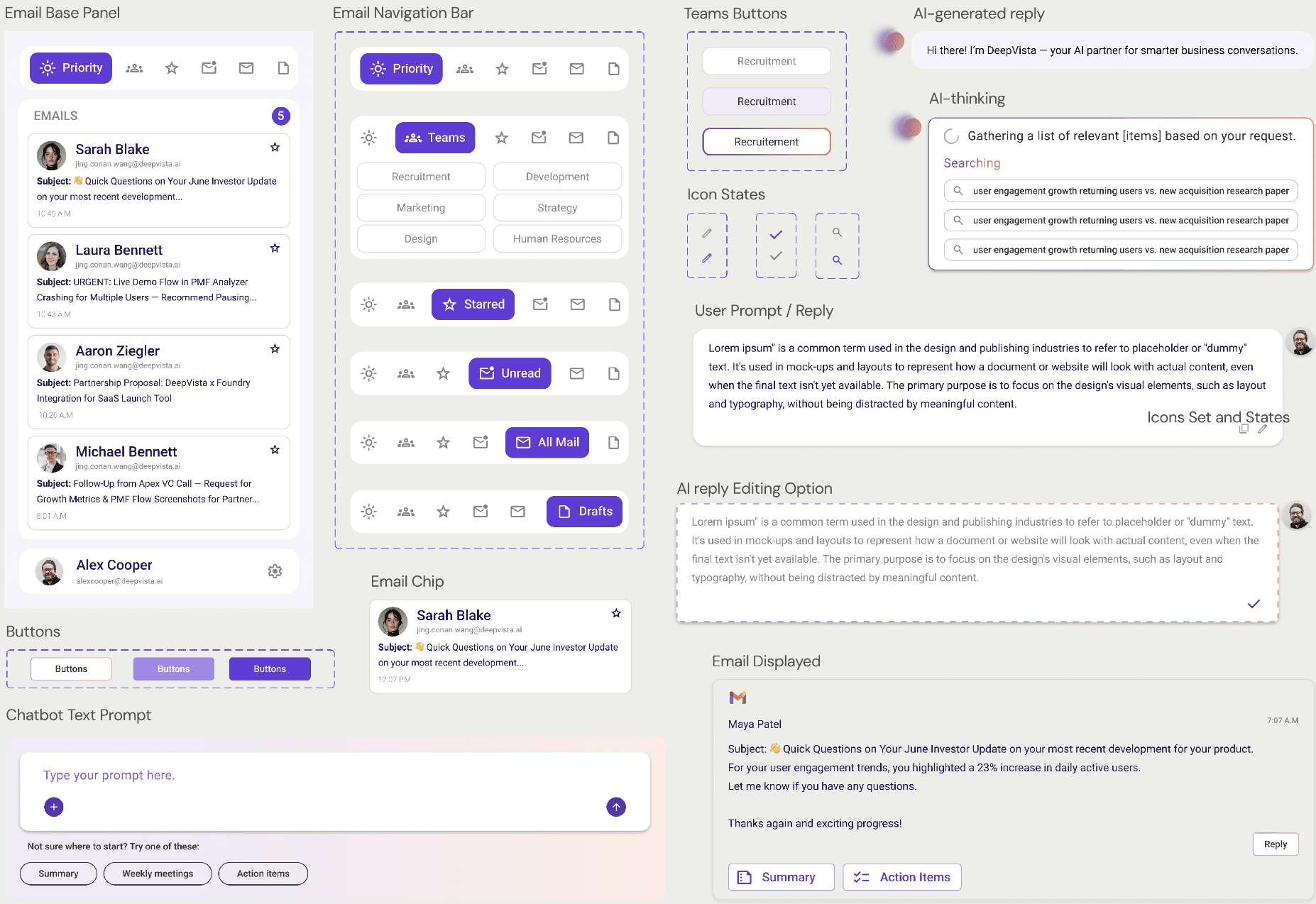
We wanted DeepVista to feel high-tech, but not harsh. We used glass-like layers, blur, and soft gradients to signal “AI in the background,” while keeping the palette warm so the product feels calm during busy inbox moments.
We wanted DeepVista to feel high-tech, but not harsh. We used glass-like layers, blur, and soft gradients to signal “AI in the background,” while keeping the palette warm so the product feels calm during busy inbox moments.

Icons Set and States
Icons Set and States
Typography
Typography
Aa
Aa
Google Sans
Google Sans
Light, Regular, Medium, Semibold, and Bold
Light, Regular, Medium, Semibold, and Bold
Display
Display
Display Main
Display Main
Display Sub
Display Sub
R - Light
R - Light
R- Light
R- Light
48 pt
48 pt
40 pt
40 pt
Header
Header
Extra - Large
Extra - Large
Large
Large
Medium
Medium
Small
Small
R - SemiBold, Bold
R - SemiBold, Bold
R - SemiBold, Bold
R - SemiBold, Bold
R - SemiBold, Bold
R - SemiBold, Bold
R - SemiBold, Bold
R - SemiBold, Bold
32 pt
32 pt
28 pt
28 pt
24 pt
24 pt
20 pt
20 pt
Body
Body
Large
Large
Medium
Medium
Small
Small
R - Light, Regular, Medium, Bold
R - Light, Regular, Medium, Bold
R - Light, Regular, Medium, Bold
R - Light, Regular, Medium, Bold
R - Light, Regular, Medium, Bold
R - Light, Regular, Medium, Bold
20 pt
20 pt
16 pt
16 pt
12 pt
12 pt
Header
Header
Extra - Large
Extra - Large
Large
Large
Medium
Medium
R - SemiBold, Bold
R - SemiBold, Bold
R - SemiBold, Bold
R - SemiBold, Bold
R - SemiBold, Bold
R - SemiBold, Bold
32 pt
32 pt
28 pt
28 pt
24 pt
24 pt
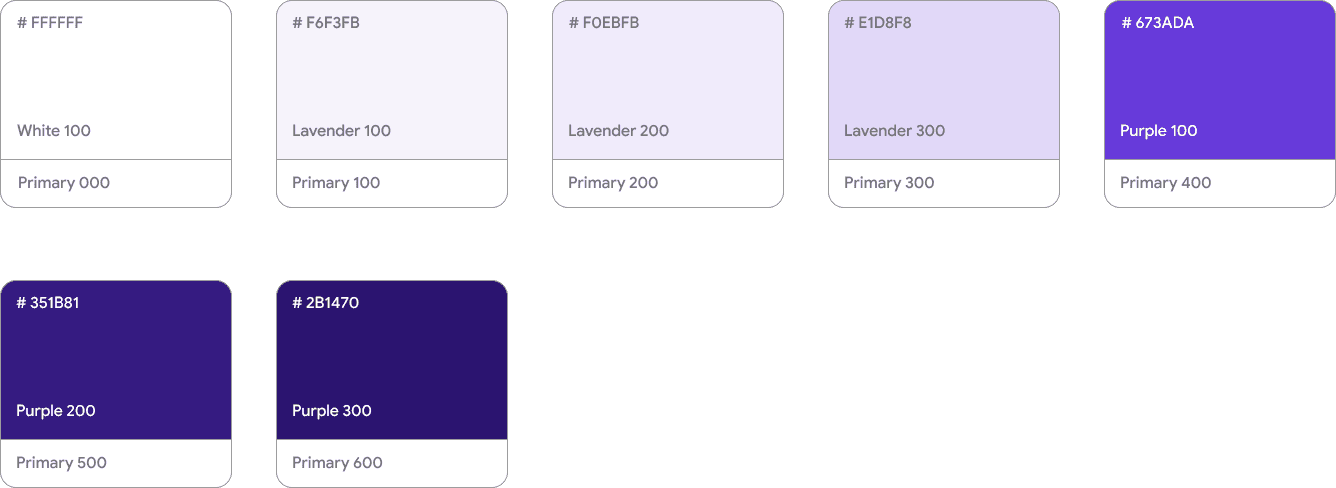
Color Palette
Color Palette
Primary Brand Colors
Primary Brand Colors

Secondary Brand Colors
Secondary Brand Colors
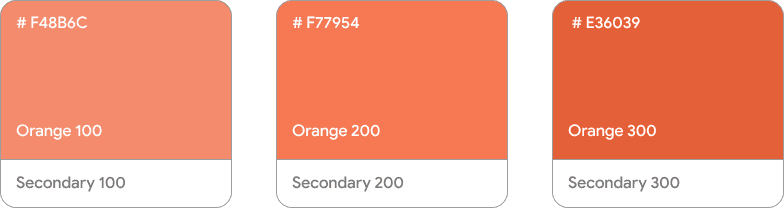
Background Colors
Background Colors

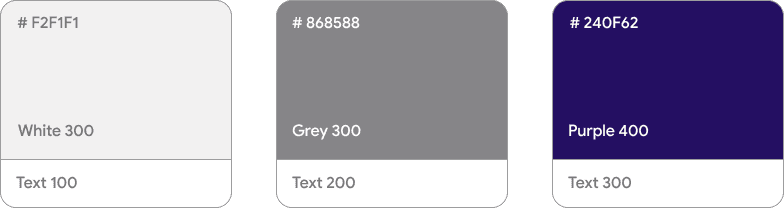
Icons Colors
Icons Colors

Text Colors
Text Colors
Addition to Design System
Addition to Design System
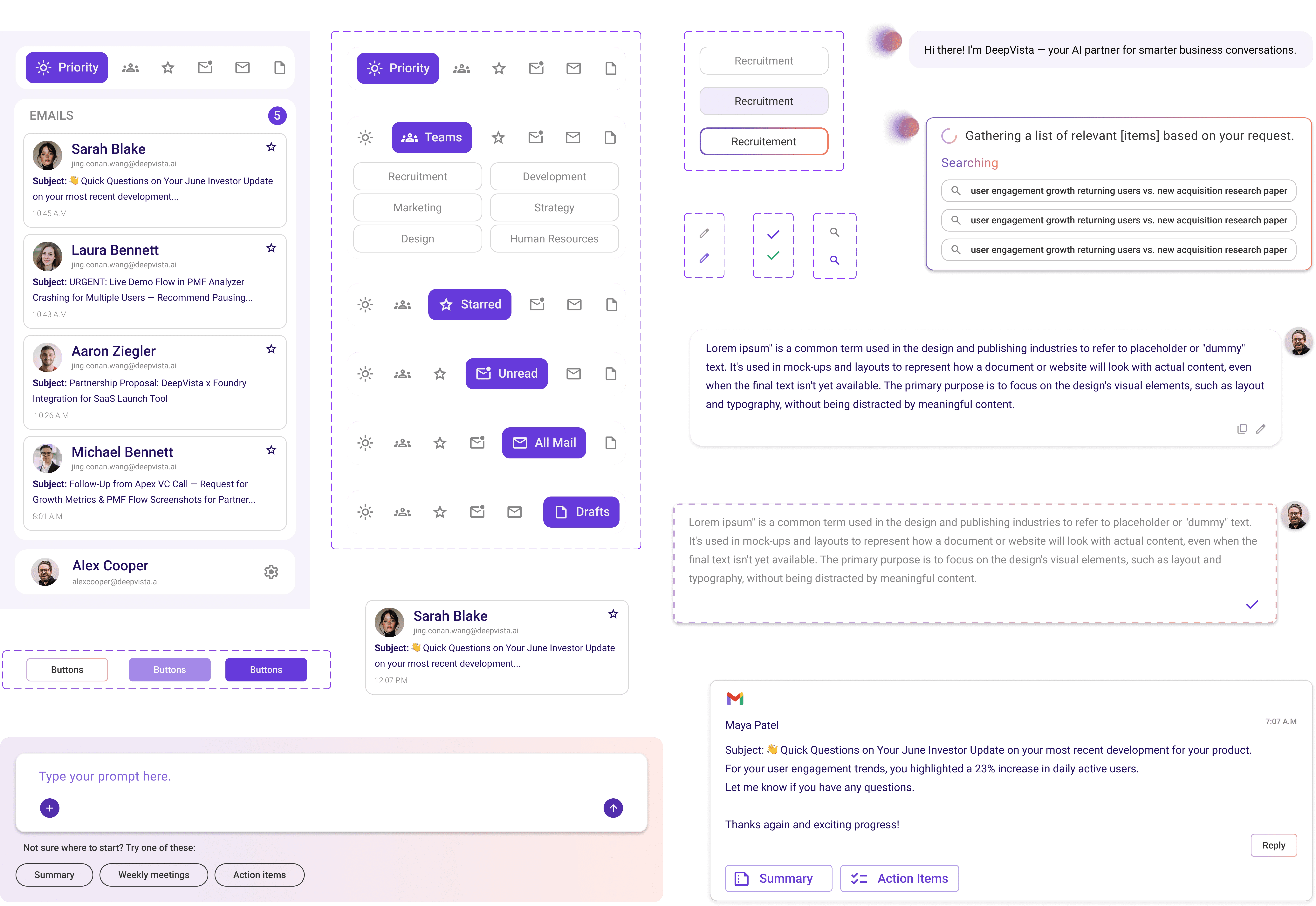
Email Base Panel
Email Navigation Bar
Teams Buttons
AI-thinking
Icon States
User Prompt / Reply
AI reply Editing Option
Email Displayed
Email Chip
Chatbot Text Prompt
Buttons
Icons Set and States
AI-generated reply
Teams Buttons
AI-generated reply
Email Base Panel
Email Navigation Bar
Teams Buttons
AI-thinking
Icon States
User Prompt / Reply
AI reply Editing Option
Email Displayed
Email Chip
Chatbot Text Prompt
Buttons
Icons Set and States
AI-generated reply
Teams Buttons
AI-generated reply
Key Screens
Key Screens
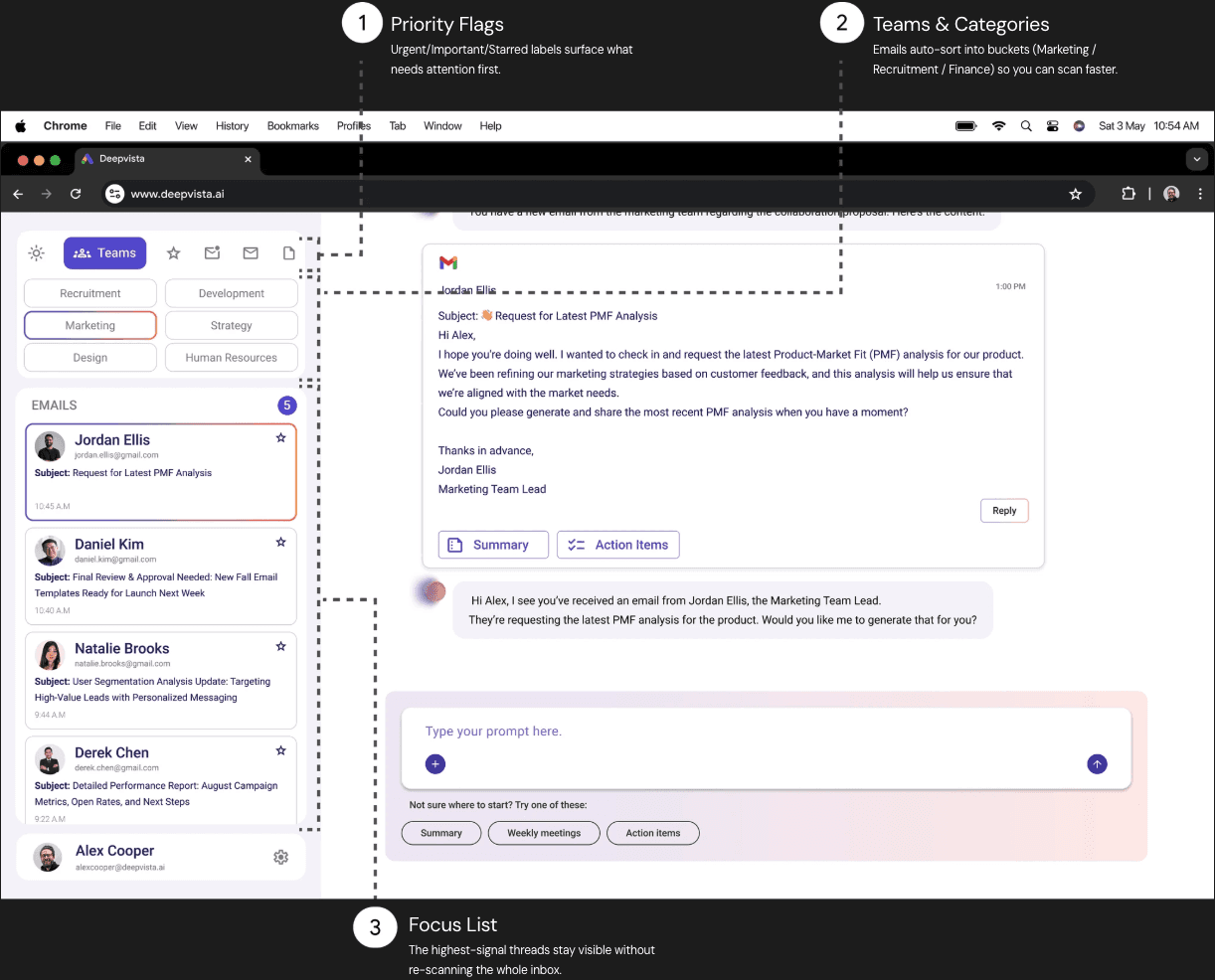
Smart Segregation
Smart Segregation
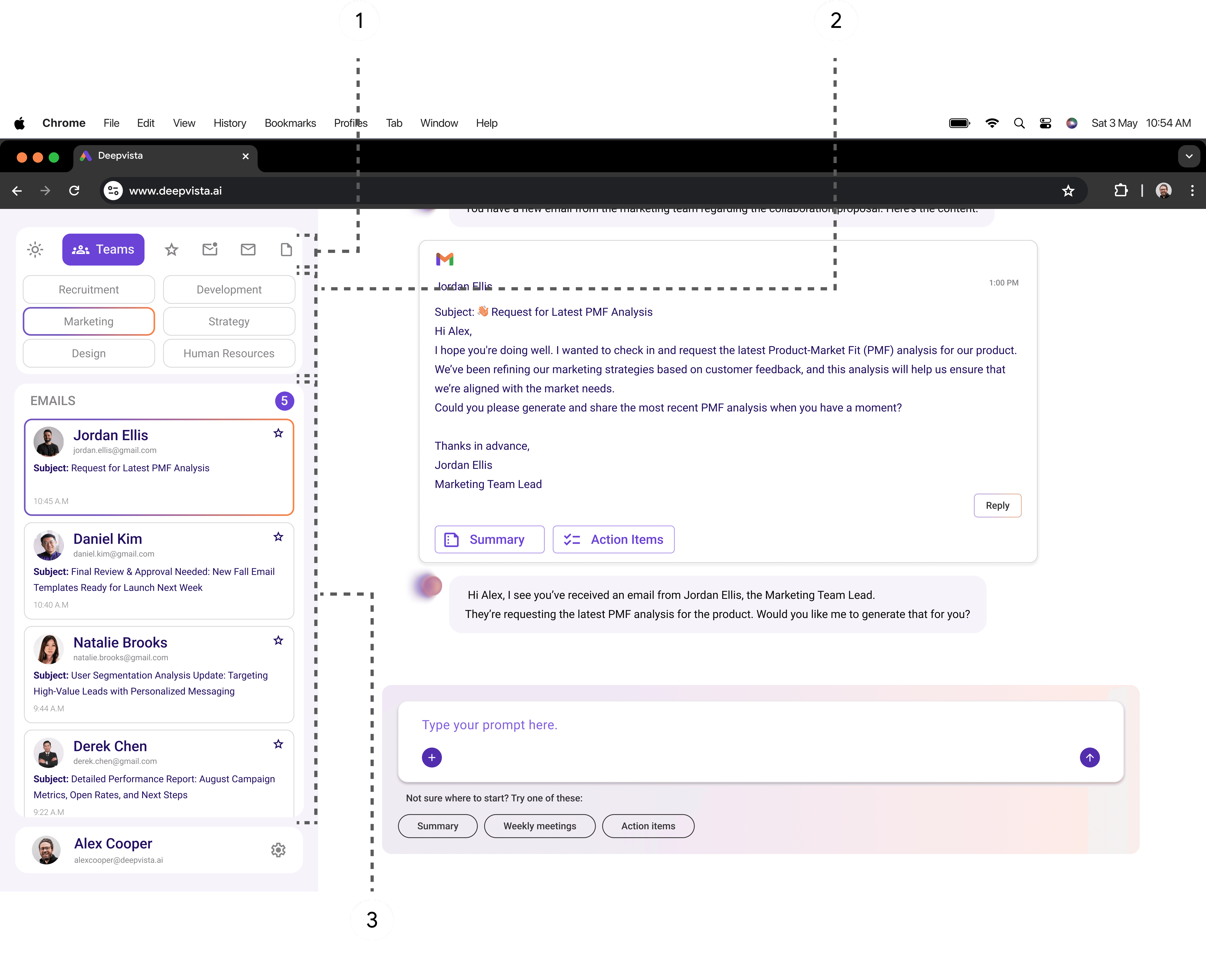
Focus List
The highest-signal threads stay visible without re-scanning the whole inbox.
Priority Flags
Urgent/Important/Starred labels surface what needs attention first.
Teams & Categories
Emails auto-sort into buckets (Marketing / Recruitment / Finance) so you can scan faster.
Focus List
The highest-signal threads stay visible without re-scanning the whole inbox.
Priority Flags
Urgent/Important/Starred labels surface what needs attention first.
Teams & Categories
Emails auto-sort into buckets (Marketing / Recruitment / Finance) so you can scan faster.
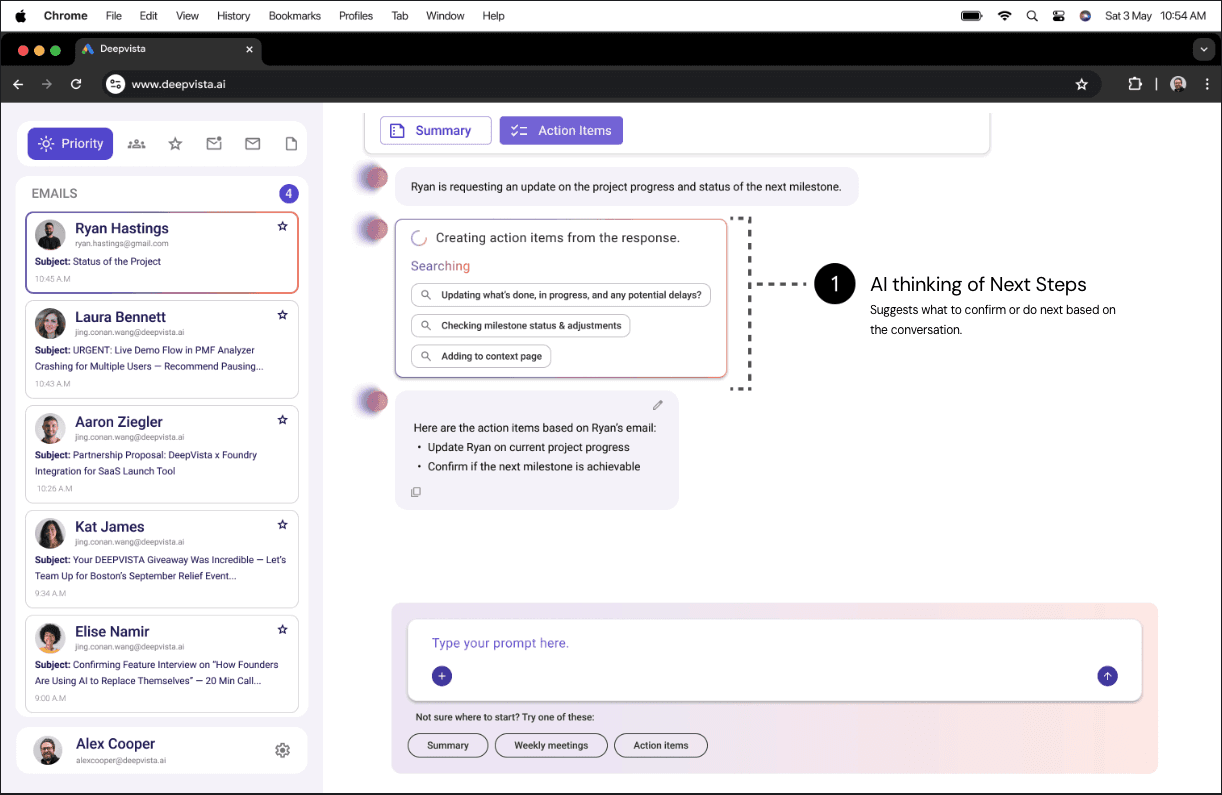
AI Thinking
AI Thinking
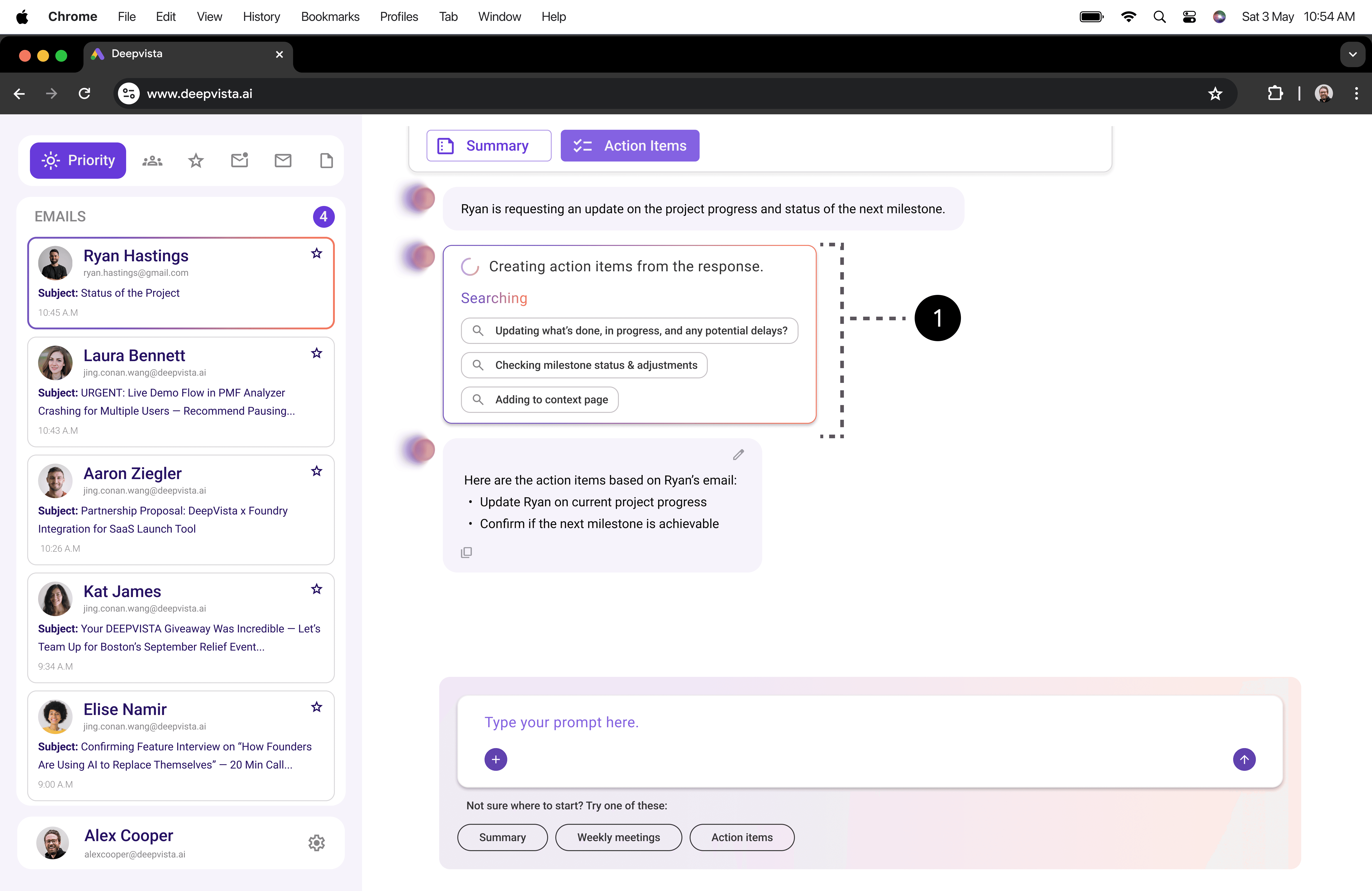
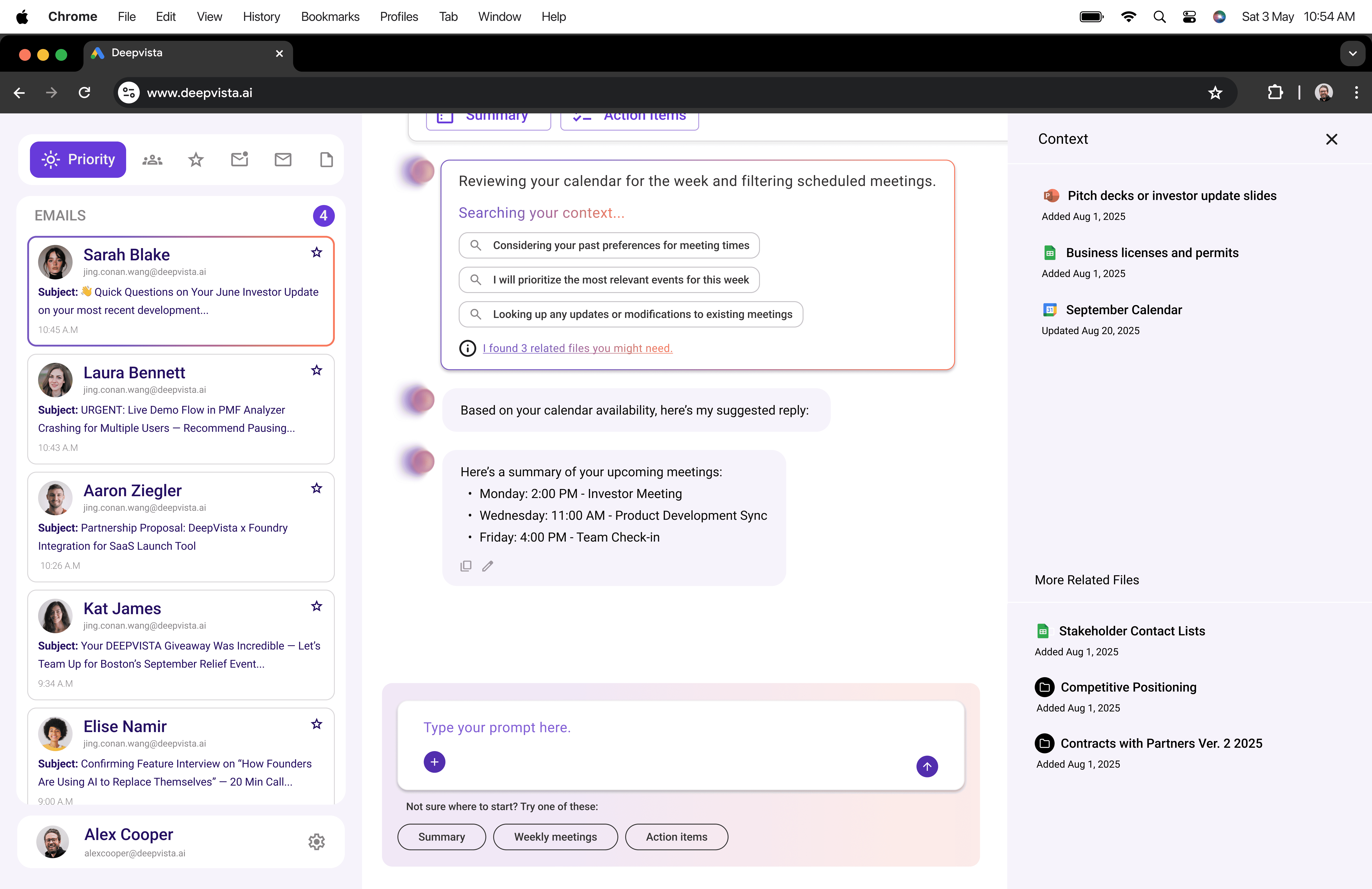
AI thinking of Next Steps
Suggests what to confirm or do next based on the conversation.
AI thinking of Next Steps
Suggests what to confirm or do next based on the conversation.
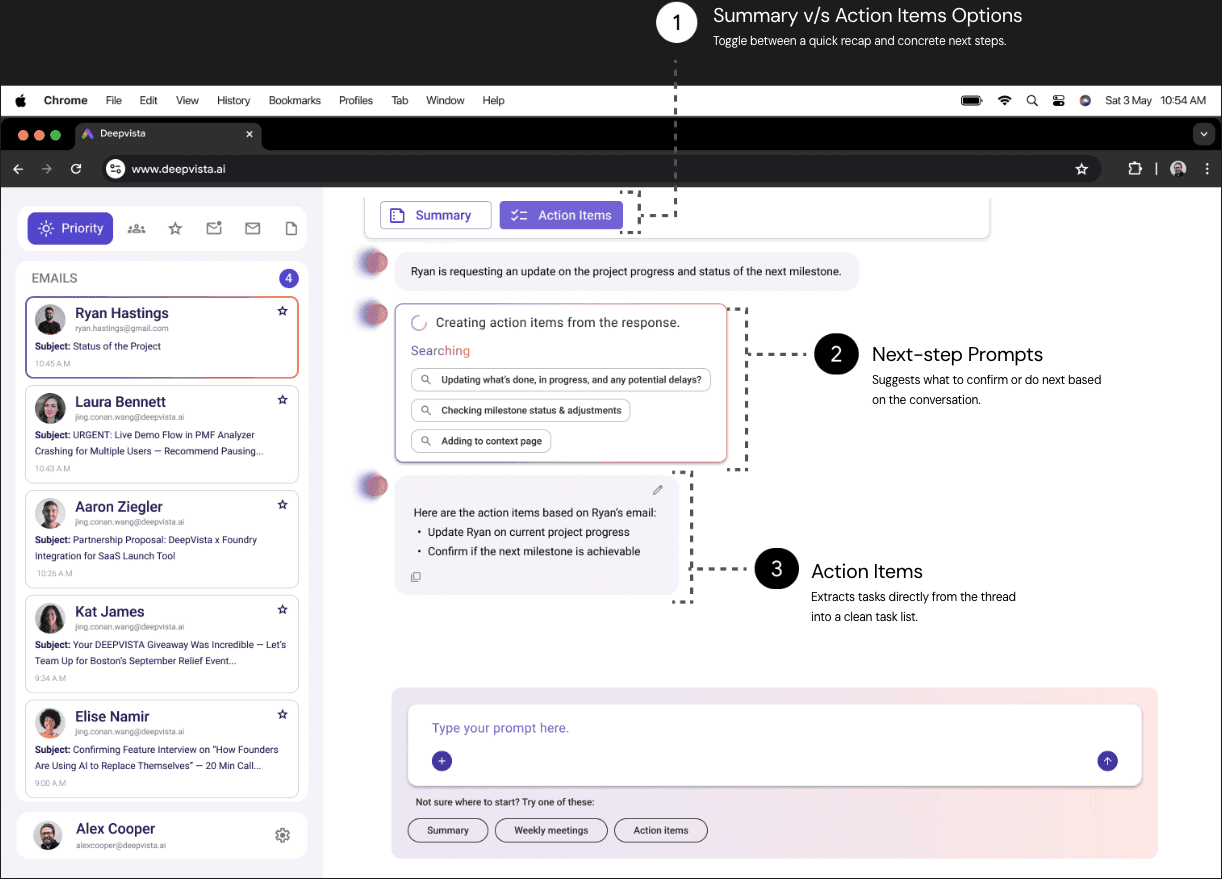
Plans & To-Dos
Plans & To-Dos
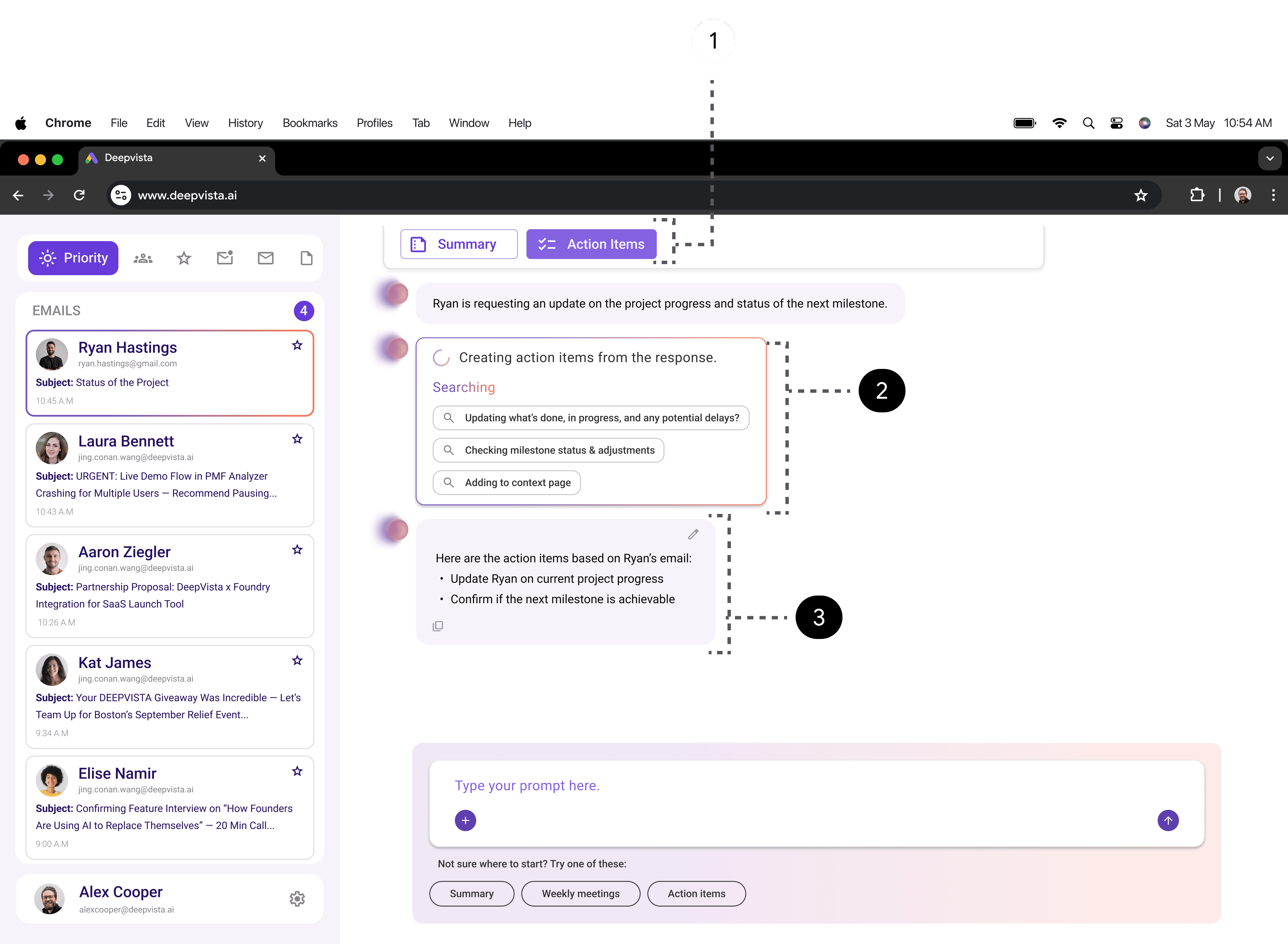
Action Items
Extracts tasks directly from the thread into a clean task list.
Next-step Prompts
Suggests what to confirm or do next based on the conversation.
Summary v/s Action Items Options
Toggle between a quick recap and concrete next steps.
Action Items
Extracts tasks directly from the thread into a clean task list.
Next-step Prompts
Suggests what to confirm or do next based on the conversation.
Summary v/s Action Items Options
Toggle between a quick recap and concrete next steps.
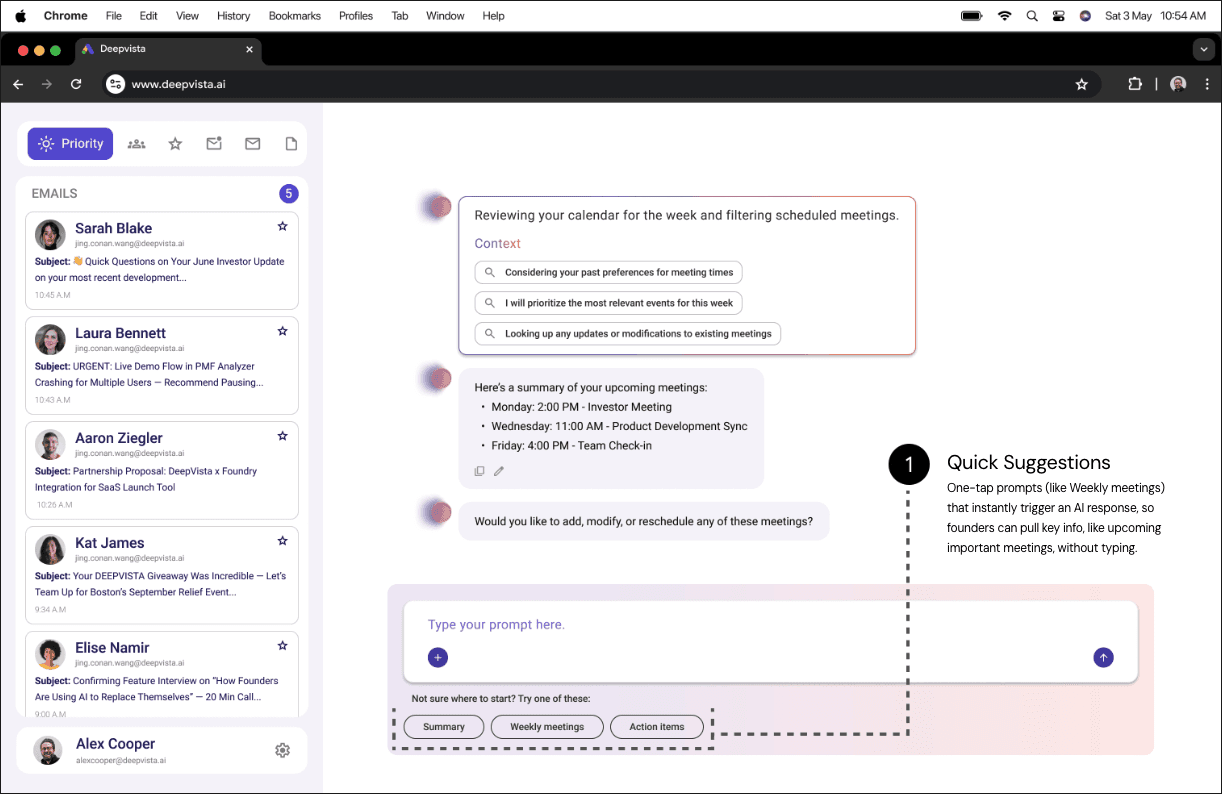
Quick Suggestion Prompts
Quick Suggestion Prompts
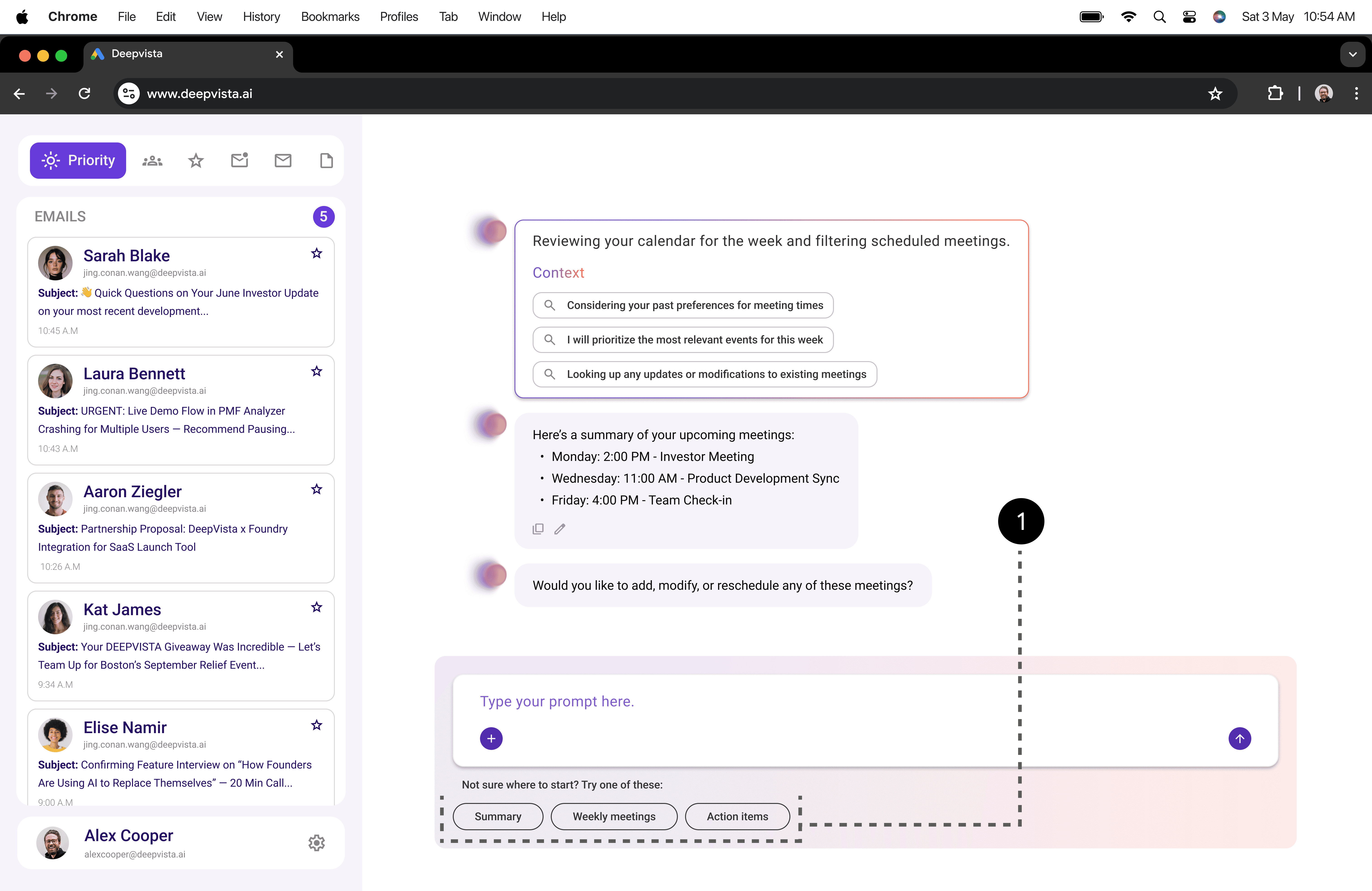
Quick Suggestions
One-tap prompts (like Weekly meetings) that instantly trigger an AI response, so founders can pull key info, like upcoming important meetings, without typing.
Quick Suggestions
One-tap prompts (like Weekly meetings) that instantly trigger an AI response, so founders can pull key info, like upcoming important meetings, without typing.
Usability Testing Plan
Usability Testing Plan
At a glance
At a glance
10 Founders
Usability Sessions
10 Founders
Usability Sessions
30 Outcomes
Shipped from Insights
30 Outcomes
Shipped from Insights
4 Key Flows
Tested end-to-end
4 Key Flows
Tested end-to-end
What we heard
What we heard
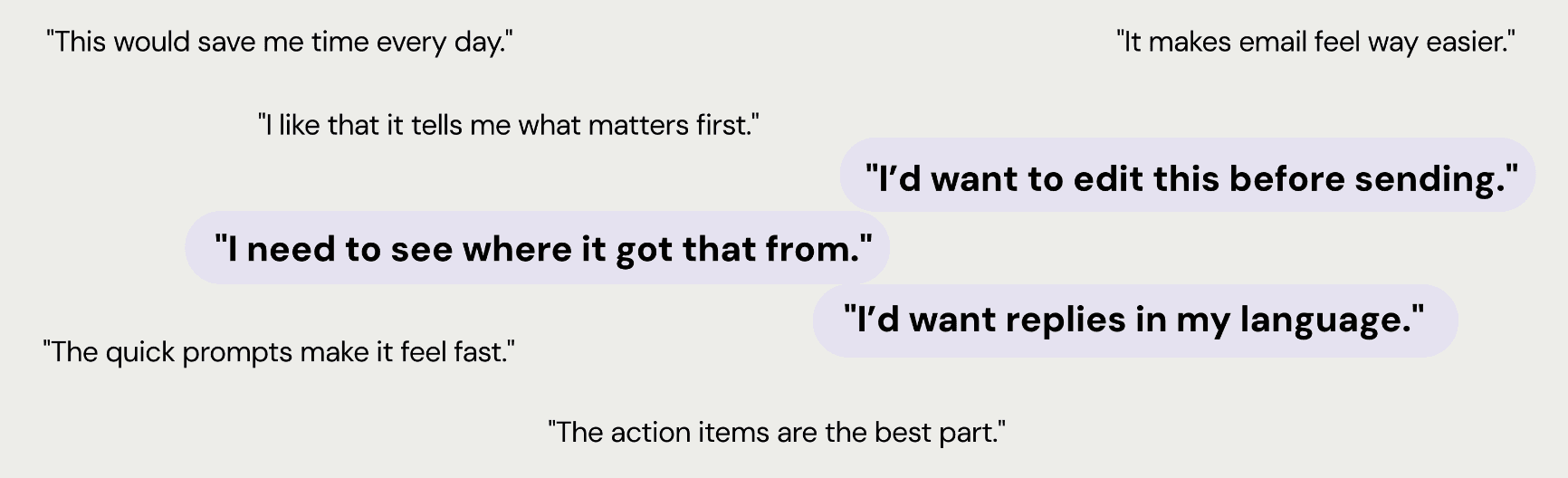
"I’d want to edit this before sending."
"I’d want to edit this before sending."
"This would save me time every day."
"This would save me time every day."
"It makes email feel way easier."
"It makes email feel way easier."
"I like that it tells me what matters first."
"I like that it tells me what matters first."
"The action items are the best part."
"The action items are the best part."
"The quick prompts make it feel fast."
"The quick prompts make it feel fast."
"I need to see where it got that from."
"I need to see where it got that from."
"I’d want replies in my language."
"I’d want replies in my language."
Insights & Results
Insights & Results
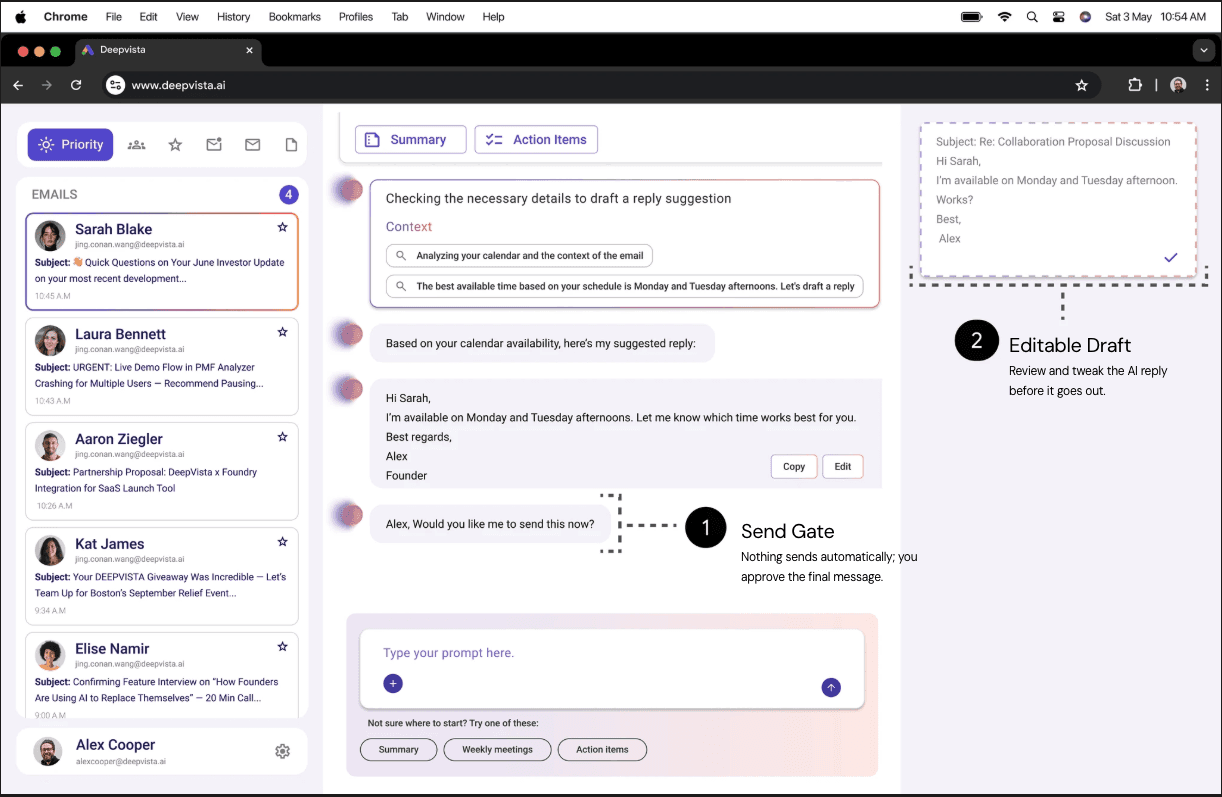
Editable AI Response
Editable AI Response
Founder faced: Replies felt risky to send if they sounded “too AI” or off-tone.
Founder faced: Replies felt risky to send if they sounded “too AI” or off-tone.
What helps: Give them a quick way to adjust wording and tone before anything goes out.
What helps: Give them a quick way to adjust wording and tone before anything goes out.
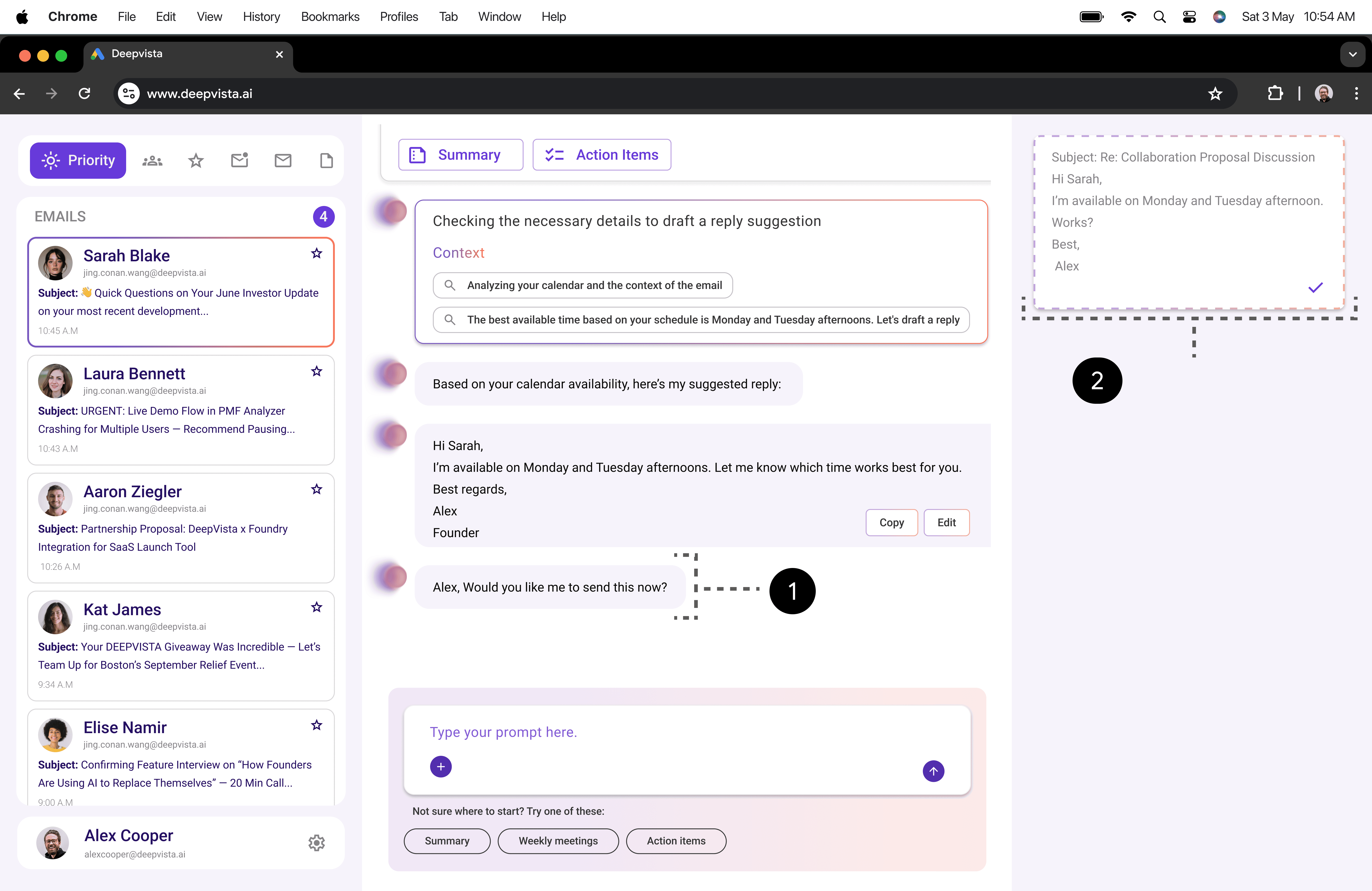
Editable Draft
Review and tweak the AI reply before it goes out.
Send Gate
Nothing sends automatically; you approve the final message.
Editable Draft
Review and tweak the AI reply before it goes out.
Send Gate
Nothing sends automatically; you approve the final message.
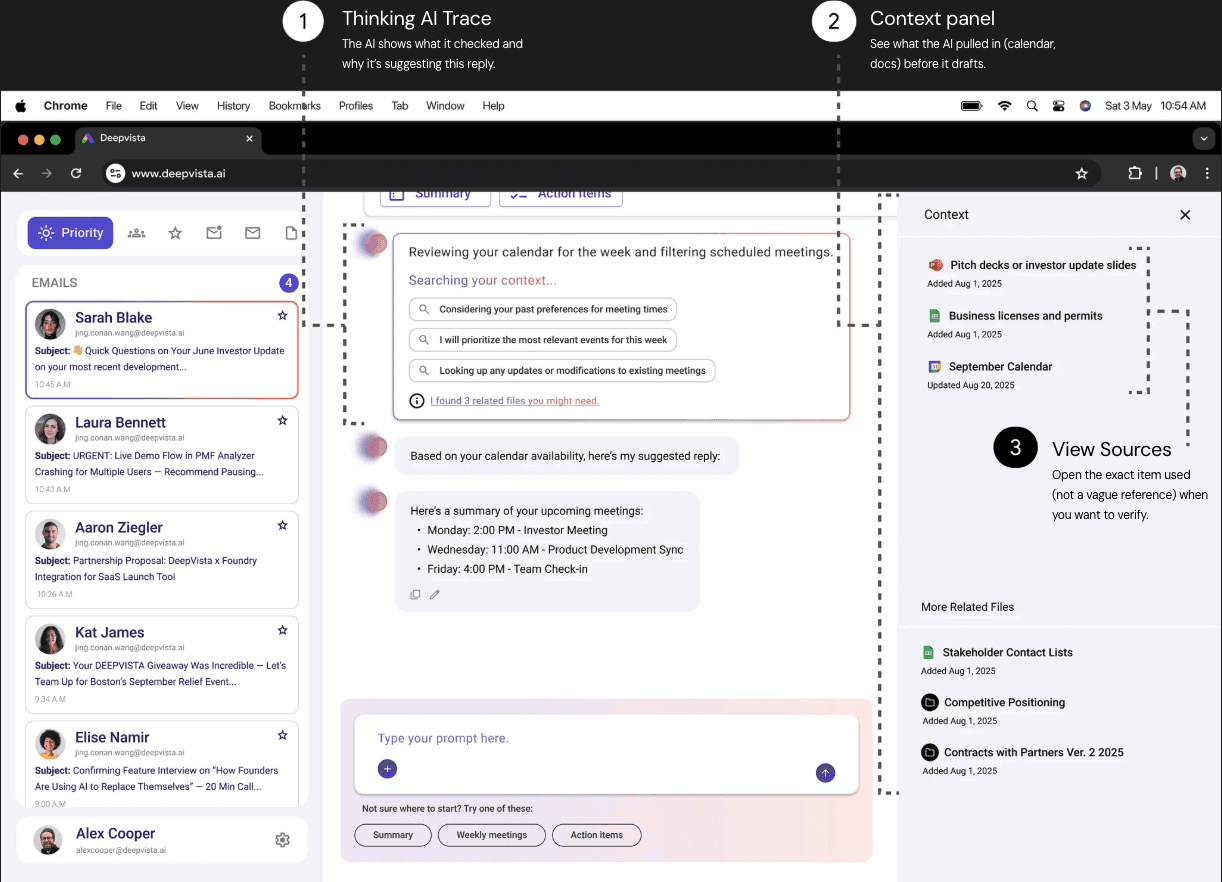
Context Transparency
Context Transparency
Founder faced: “Where is the AI getting this from?”, they didn’t want hidden assumptions.
Founder faced: “Where is the AI getting this from?”, they didn’t want hidden assumptions.
What helps: Show the exact context used (thread + docs/calendar inputs) so they can verify.
What helps: Show the exact context used (thread + docs/calendar inputs) so they can verify.
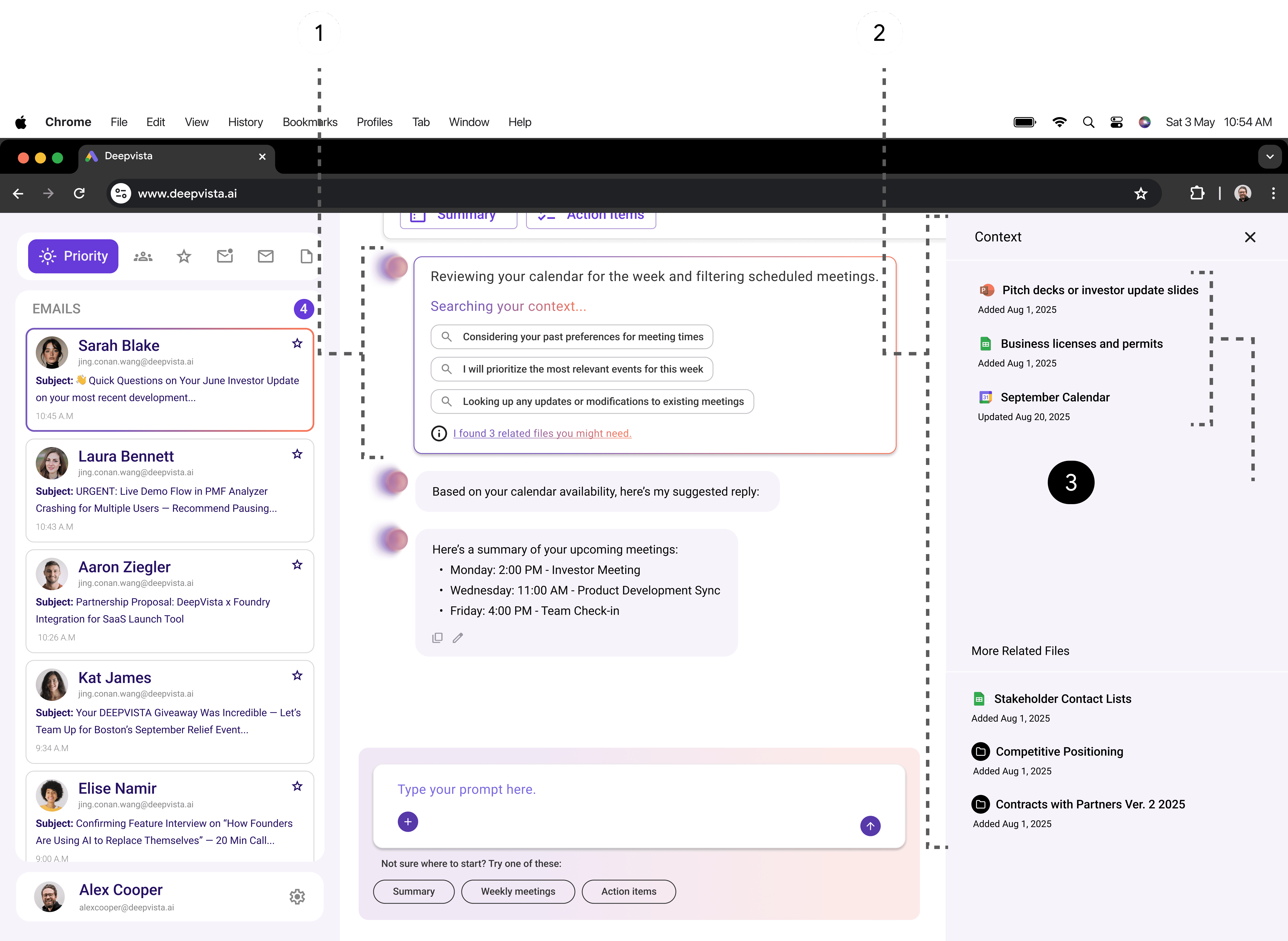
View Sources
Open the exact item used (not a vague reference) when you want to verify.
Thinking AI Trace
The AI shows what it checked and why it’s suggesting this reply.
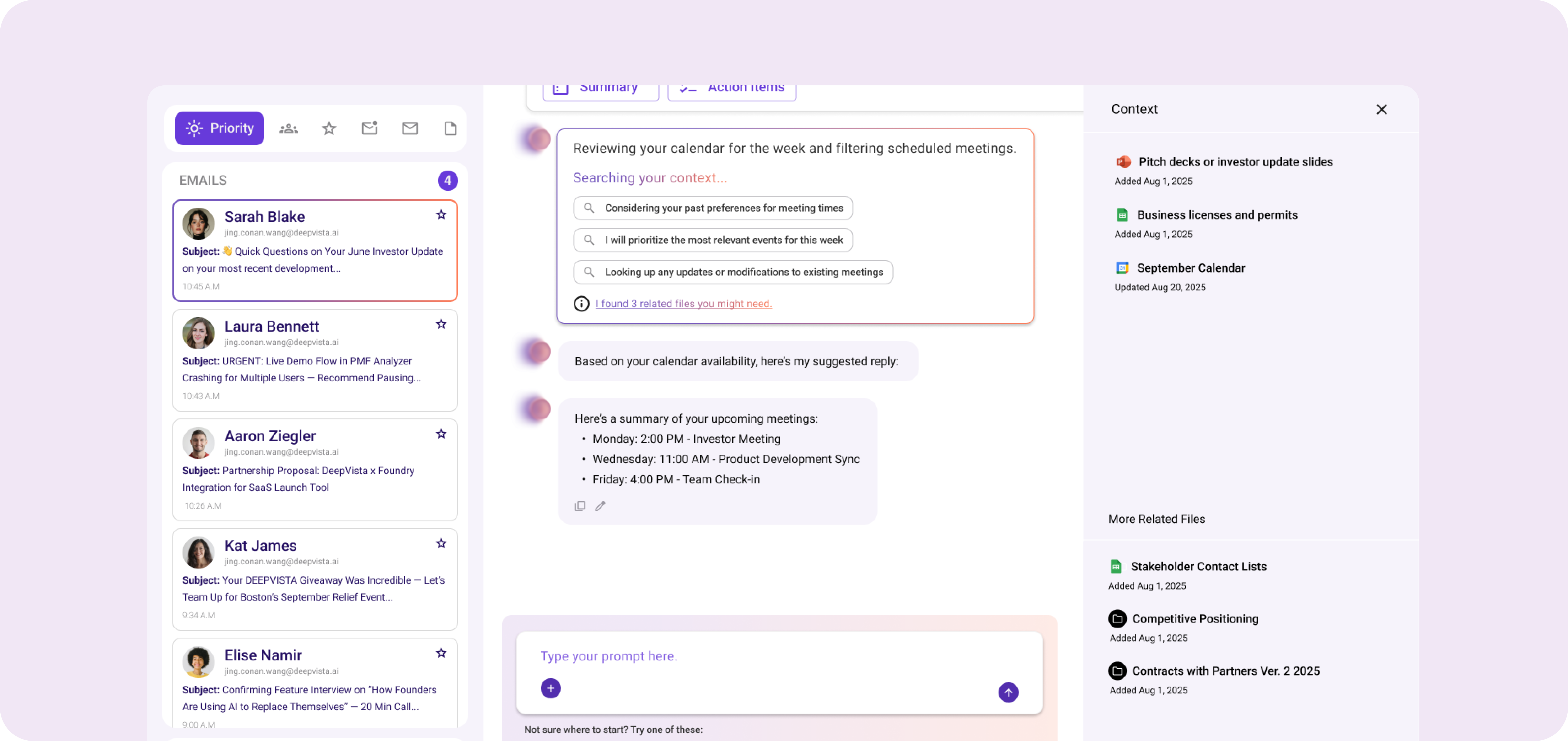
Context panel
See what the AI pulled in (calendar, docs) before it drafts.
View Sources
Open the exact item used (not a vague reference) when you want to verify.
Thinking AI Trace
The AI shows what it checked and why it’s suggesting this reply.
Context panel
See what the AI pulled in (calendar, docs) before it drafts.
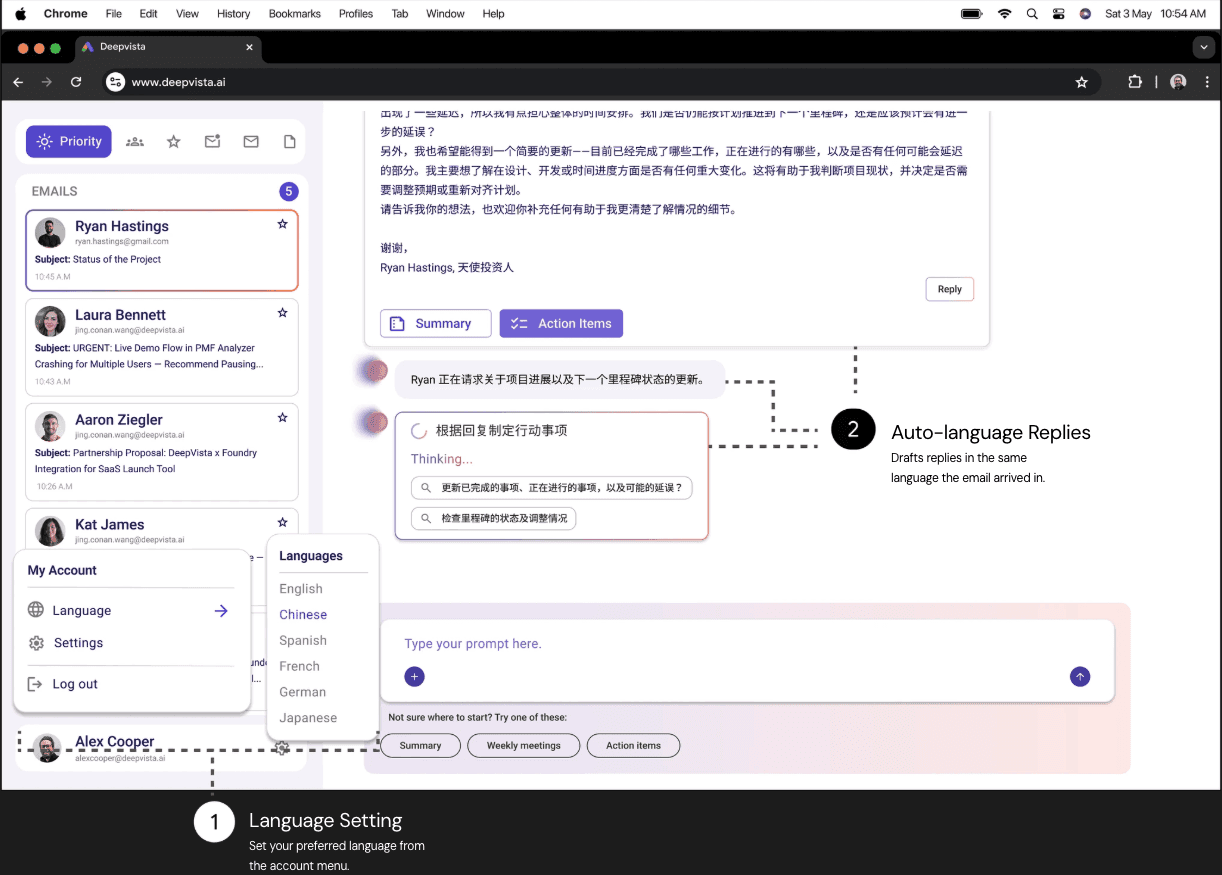
Multilingual Support
Multilingual Support
Founder faced: Many founders operate in multiple languages and don’t want translation friction.
Founder faced: Many founders operate in multiple languages and don’t want translation friction.
What helps: Support reading + drafting replies in their preferred language, in the same workflow.
What helps: Support reading + drafting replies in their preferred language, in the same workflow.
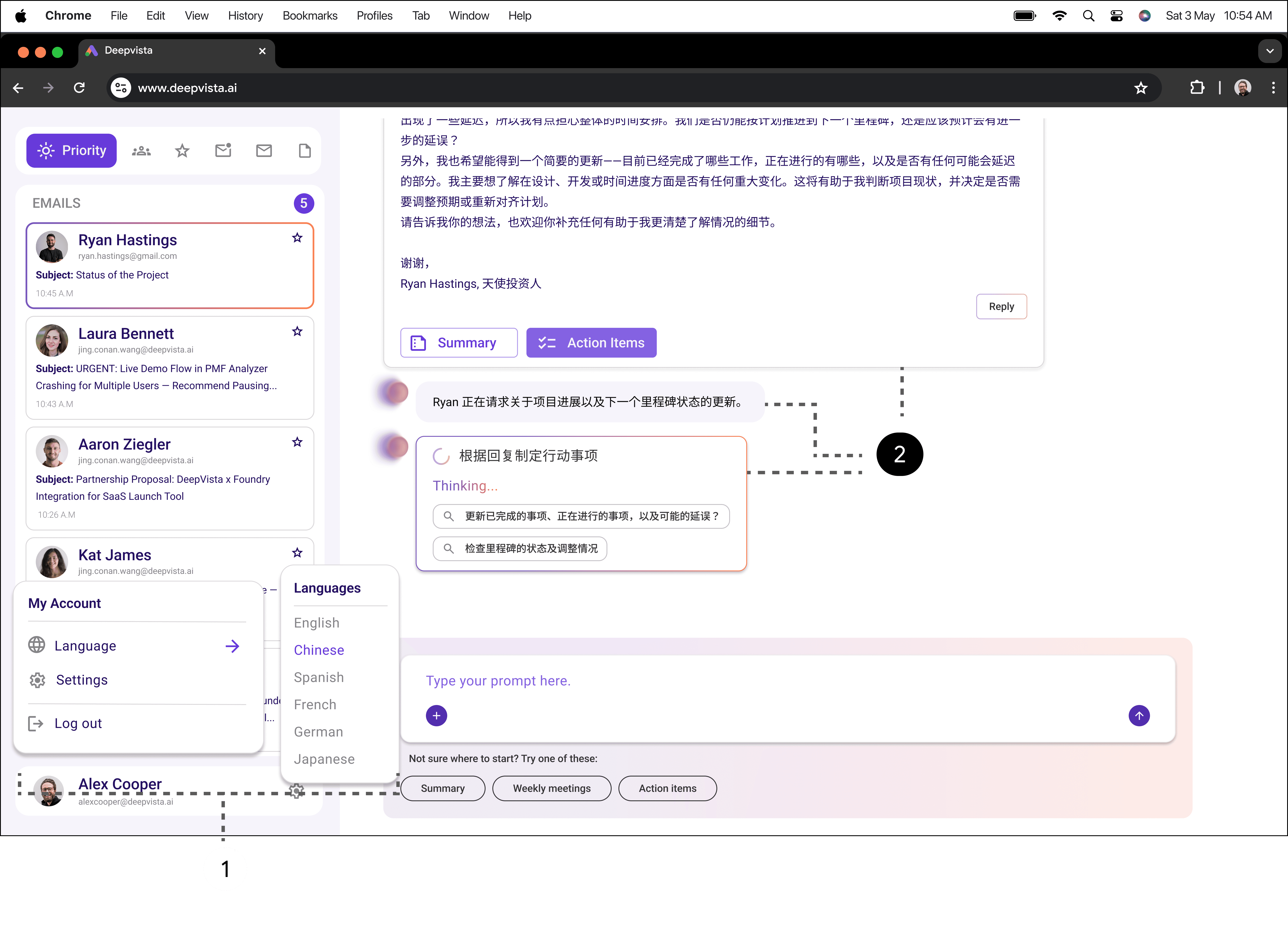
Auto-language Replies
Drafts replies in the same language the email arrived in.
Language Setting
Set your preferred language from the account menu.
Auto-language Replies
Drafts replies in the same language the email arrived in.
Language Setting
Set your preferred language from the account menu.
Outcomes and Ownership
Outcomes and Ownership
Outcomes
Outcomes
We shipped the email-first MVP and it quickly moved from prototype to real usage, bringing in early customers and setting a foundation for continued iteration.
We shipped the email-first MVP and it quickly moved from prototype to real usage, bringing in early customers and setting a foundation for continued iteration.
Post-launch, the product kept evolving with additional features based on real workflows and feedback.
Post-launch, the product kept evolving with additional features based on real workflows and feedback.
MVP Shipped
MVP Shipped
Early Customers Onboarded
Early Customers Onboarded
Real usage
Real usage
Validated Daily Founder Flow
Validated Daily Founder Flow
Post-launch Iteration
Post-launch Iteration
Feature Set Expanded
Feature Set Expanded
Ownership
Ownership
I was part of the founding team and led the 0→1 build of the first MVP, from UX architecture and core workflows to design system foundations and engineering handoff.
I was part of the founding team and led the 0→1 build of the first MVP, from UX architecture and core workflows to design system foundations and engineering handoff.
I also accelerated delivery using AI-assisted development tools
I also accelerated delivery using AI-assisted development tools

,
,

,
,

to prototype faster, validate sooner, and ship with a
to prototype faster, validate sooner, and ship with a
tight feedback loop.
tight feedback loop.
Ownership Flow
Ownership Flow
Research
Research
Product
Product
Strategy
Strategy
UX
UX
Architecture
Architecture
System
System
Design
Design
Prototyping
Prototyping
Usability
Usability
Testing
Testing
Engineering
Engineering
Handoff
Handoff
Post-launch
Post-launch
Iteration
Iteration
DeepVista AI
An AI-native email copilot for founders that turns inbox overload into prioritized next steps, draft replies, and execution-ready plans.
MY ROLE
Product Designer
MY TEAM
TIMELINE
Q2 & Q3 of 2025
150+
Pre-Launch Signups
50-200
Emails per day (Founders)
0 → 1
MVP Shipped
PROBLEM
Founders deal with constant inbox pressure (often 50–200 emails/day), and the most important signals get buried. Email tools help you read messages, but not decide what matters, respond confidently, or turn conversations into clear execution.
OUTCOME
We designed and shipped an email-first MVP that converts messy threads into structured outputs: priority classification, context-aware draft replies with user control, and actionable tasks and plans founders can actually use day to day.
Context
DeepVista began as a early PRD + big idea from the founder, a founding member of FounderCoho. Through the community, he saw founders repeatedly struggling with lack of clarity, overwhelm, and no mentorship. The goal was to turn that broad vision into a shipped MVP founders would actually use.
FounderCoHo
(Founder Community)
Early-stage
Founder Insights
Early PRD
+
Broad AI Workspace
Focussed MPV
shipped
Early stage founders had no mentorship
Early stage founders struggled with findng a clear direction
Founders often felt overwhelmed
Founders had too many responsibilities
Stake
Help SMBs produce video ads without agency-level time or budgets.
Prove real value for founders, not just a concept.
Constraint
Limited access to production resources and end users.
The PRD covered “AI workspace for everything”
→ unclear wedge, high scope risk.
Success
~90% reduction in time to first
video ad.
Founders leave with next steps + usable/shareable outputs (plans, tasks, drafts).
User Research
We combined primary + secondary research and competitive analysis to understand founder workflows, trust needs, and where an AI copilot could create real value.
Key Patterns
INPUTS
INSIGHTS
DIRECTION
Research revealed the highest-value opportunity was not a broad workspace, it was a repeatable daily workflow where AI can reduce decision fatigue and produce usable outputs.
Final Research Impact
Problem & Opportunity
Founders operate in a constant stream of communication and context switching, where the most important signals get buried and execution falls through.
Before
Founder Work = Scattered Signals
Emails • Docs • Chats • Tools
Constant Context Switching
Missing
Clarity + Execution Loop
Prioritise what matters • Respond confidently • Converts threads into actions
Opportunity
AI Co-pilot for founder decisions
Turn messy conversations into prioritized next steps, editable drafts, and execution-ready tasks/plans
Target User
User Core Needs
Priority Clarity
Priority Clarity
Fast Next Steps
Fast Next Steps
Draft Support
Draft Support
Trust + Control
Trust + Control
Execution Outputs
Execution Outputs
Pivot
After exploring multiple copilot directions and validating trust/control needs, we narrowed scope to a single wedge that could ship, earn adoption, and expand later.
Before
AI copilot across multiple workflows
After
focussed assistant with one repeatable workflow (email-led)
Why we pivoted
Scope Reality
Too many workflows to build + validate within the MVP timeline.
Adoption Wedge
Founders needed value inside a daily habit, not another surface.
Trust + User Control
AI had to stay reviewable and user-led to earn consistent user
Final Direction
An AI-native email assistant that turns messy threads into priorities, editable drafts, and execution-ready next steps, with the founder in control.
PRIORITIZE
Categorization
DRAFT
AI-Generated Replies
ACTIONIZE
Tasks / Plan
Narrowing the Scope
After exploring multiple copilot directions and validating trust/control needs, we narrowed scope to a single wedge that could ship, earn adoption, and expand later.
Narrowing the Scope
Categorization
What matters now
Thread Context
Why it matters
Draft Options
Tone + Intent
Approve & Send
User Control
Tasks
Execution Ready
The Plan
A repeatable loop founders can use daily: fast value first, expandable later.
Directions Explored
DIRECTION 1
Founder Canvas
Clarify product/market + roadmap from founder inputs
Value: Structured clarity + confident steps
Risk: Needs confidence cues + “ask for more input” moments
DIRECTION 2
AI Note Taker
Transcribe calls → generate structured outputs after the call
Value: High-signal capture with automatic summaries
Risk: Output overload if not prioritized
DIRECTION 3
Email Assistant
Generate draft replies with user selection/control
Value: Faster replies without losing control
Risk: Trust + tone accuracy must be editable
Ideation
Directions Explored
What we showed the Founder
OPTION A
Build the AI Copilot
A single copilot that generates multiple outputs across workflows
Founder Canvas • Email Drafts • Tasks • Calendar Updates •Scenario Updates • Transcripts
OPTION B
Converge on one Direction
Start with one repeatable workflow and ship a wedge that proves the daily value fast
AI Powered
Email Assistant
Design System & Visual Language
Typography
Aa
Roboto
Regular and Medium
Display
Display Main
Display Sub
R - Light
R- Light
48 pt
40 pt
Header
Extra - Large
Large
Medium
Small
R - SemiBold, Bold
R - SemiBold, Bold
R - SemiBold, Bold
R - SemiBold, Bold
32 pt
28 pt
24 pt
20 pt
Body
Large
Medium
Small
R - Light, Regular, Medium, Bold
R - Light, Regular, Medium, Bold
R - Light, Regular, Medium, Bold
20 pt
16 pt
12 pt
Header
Extra - Large
Large
Medium
R - SemiBold, Bold
R - SemiBold, Bold
R - SemiBold, Bold
32 pt
28 pt
24 pt
Color Palette
Primary Brand Colors
Background Colors
Secondary Brand Colors
Icons Colors
Text Colors
Addition to Design System
Moodboard
We wanted DeepVista to feel high-tech, but not harsh. We used glass-like layers, blur, and soft gradients to signal “AI in the background,” while keeping the palette warm so the product feels calm during busy inbox moments.


Key Screens
The final direction combined social presence, reflection, and ambient motivation into a repeatable, low-pressure loop.
Smart Segregation
AI Thinking
Plans & To-Dos
Quick Suggestion Prompts
Insights & Results
Smart Segregation
Founder faced: “Where is the AI getting this from?”, they didn’t want hidden assumptions.
What helps: Give them a quick way to adjust wording and tone before anything goes out.
Context Transparency
Founder faced: “Where is the AI getting this from?”, they didn’t want hidden assumptions.
What helps: Show the exact context used (thread + docs/calendar inputs) so they can verify.
Multilingual Support
Founder faced: Many founders operate in multiple languages and don’t want translation friction.
What helps: Show the exact context used (thread + docs/calendar inputs) so they can verify.
Outcomes
Post-launch, the product kept evolving with additional features based on real workflows and feedback.
We shipped the email-first MVP and it quickly moved from prototype to real usage, bringing in early customers and setting a foundation for continued iteration.
MVP Shipped
Early Customers Onboarded
Real usage
Validated Daily Founder Flow
Post-launch Iteration
Feature Set Expanded
Outcomes & Ownership
Ownership
I was part of the founding team and led the 0→1 build of the first MVP, from UX architecture and core workflows to design system foundations and engineering handoff.
I also accelerated delivery using AI-assisted development
and ship with a tight feedback loop.
tools
to prototype faster, validate sooner,
,
,
Ownership Flow
Research
Product
Strategy
UX
Architecture
System
Design
Prototyping
Usability
Testing
Engineering
Handoff
Post-launch
Iteration
10 Founders
Usability Sessions
30 Outcomes
Shipped from Insights
4 Key Flows
Tested end-to-end
At a glance
Usability Testing Plan
What we heard