
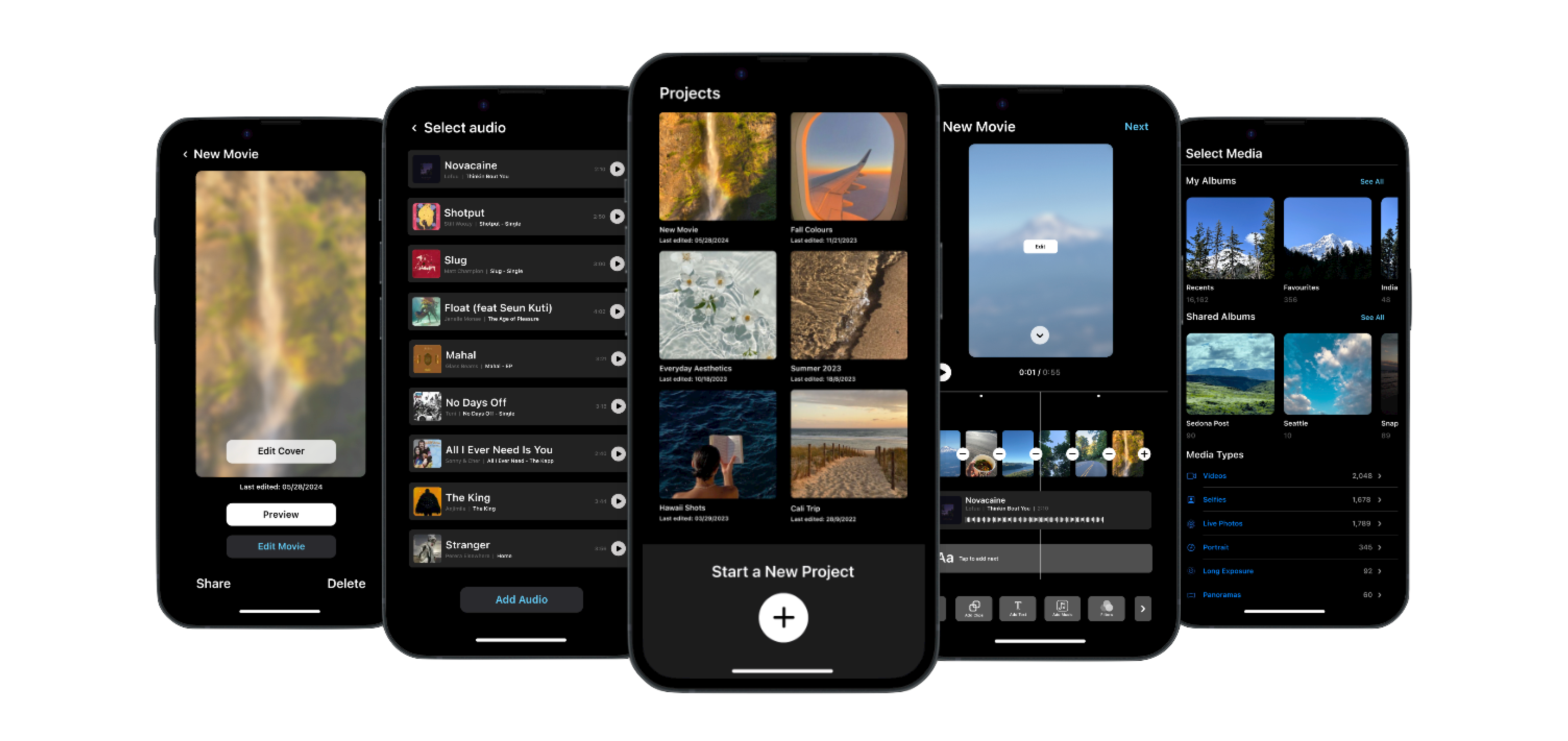
Apple's iMovie
A concept redesign of Apple's iMovie mobile app, making video editing feel intuitive for everyone from casual creators to professional filmmakers.
MY ROLE
Product Designer
MY TEAM


TIMELINE
4 Months
4
User Types Researched
5
Core Flows Designed
4
Fidelity Stages Designed
PROBLEM
iMovie works well enough for first-timers, but its limited controls, clunky clip management, and unfamiliar patterns frustrate everyone beyond the basics, the exact users who need it most.
OUTCOME
Redesigned 5 core editing flows using native Apple design patterns, clip management, audio library, video properties, preview, and cover selection, reducing friction without stripping creative control.
Apple's iMovie
A concept redesign of Apple's iMovie mobile app, making video editing feel intuitive for everyone from casual creators to professional filmmakers.
MY ROLE
Product Designer
MY TEAM
TIMELINE
4 Months
PROBLEM
iMovie works well enough for first-timers, but its limited controls, clunky clip management, and unfamiliar patterns frustrate everyone beyond the basics, the exact users who need it most.
OUTCOME
Redesigned 5 core editing flows using native Apple design patterns, clip management, audio library, video properties, preview, and cover selection, reducing friction without stripping creative control.
4
User Types Researched
5
Core Flows Designed
4
Fidelity Stages Designed
Apple's iMovie
A concept redesign of Apple's iMovie mobile app, making video editing feel intuitive for everyone from casual creators to professional filmmakers.
MY ROLE
Product Designer
MY TEAM
TIMELINE
4 Months
PROBLEM
iMovie works well enough for first-timers, but its limited controls, clunky clip management, and unfamiliar patterns frustrate everyone beyond the basics, the exact users who need it most.
OUTCOME
Redesigned 5 core editing flows using native Apple design patterns, clip management, audio library, video properties, preview, and cover selection, reducing friction without stripping creative control.
4
User Types Researched
5
Core Flows Designed
4
Fidelity Stages Designed

Context
Context
iMovie is Apple's free, built-in video editing app for iOS, designed to let anyone create polished videos without a learning curve, using a simplified timeline, pre-built themes, and basic audio and clip controls.
iMovie is Apple's free, built-in video editing app for iOS, designed to let anyone create polished videos without a learning curve, using a simplified timeline, pre-built themes, and basic audio and clip controls.
Once users go beyond the basics, the app starts to get in the way, limited controls, unfamiliar patterns, and a workflow that doesn't scale.
Once users go beyond the basics, the app starts to get in the way, limited controls, unfamiliar patterns, and a workflow that doesn't scale.
Users found it great for first-time edits
Advanced users hit hard feature ceilings
Audio and clip controls felt unfamiliar and buried
Editing flow didn't match how people actually think about video
Users found it great for first-time edits
Advanced users hit hard feature ceilings
Audio and clip controls felt unfamiliar and buried
Editing flow didn't match how people actually think about video
Stake
Redesign iMovie for all skill levels, not just beginners.
Constraint
Concept project, no access to Apple's design system or real users at scale.
Success
An editing experience that feels native to iOS and grows with the user.
Stake
Redesign iMovie for all skill levels, not just beginners.
Constraint
Concept project, no access to Apple's design system or real users at scale.
Success
An editing experience that feels native to iOS and grows with the user.
User Research
User Research
I combined community signals, direct user research, and competitive analysis to understand where iMovie loses users, and what a better experience could look like.
I combined community signals, direct user research, and competitive analysis to understand where iMovie loses users, and what a better experience could look like.
01 Community Signals
01 Community Signals
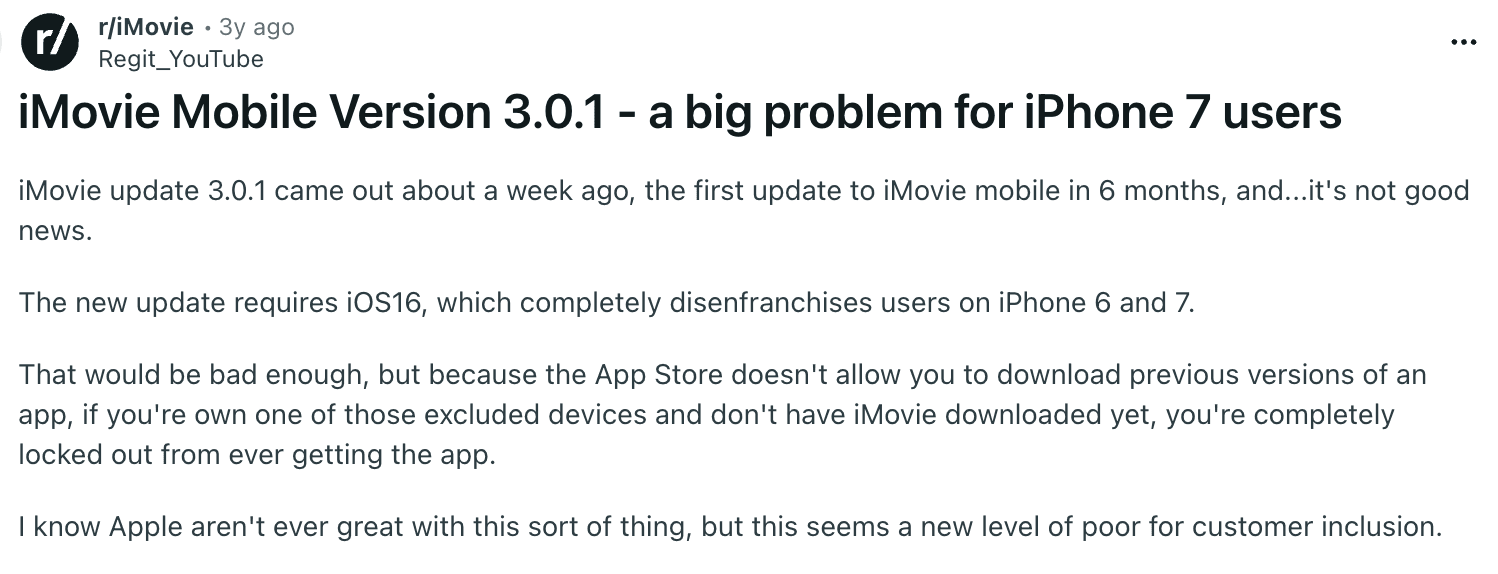
Reddit's r/iMovie community reviewed Mixed sentiment overall, great for first-timers, but frustration spikes the moment users try anything beyond basic edits.
Reddit's r/iMovie community reviewed Mixed sentiment overall, great for first-timers, but frustration spikes the moment users try anything beyond basic edits.
02 Direct User Research
02 Direct User Research
4 user types researched Casual editors, freelancers, influencers, and filmmakers all hit different walls, but shared a common frustration with audio controls and clip management.
4 user types researched Casual editors, freelancers, influencers, and filmmakers all hit different walls, but shared a common frustration with audio controls and clip management.
03 Heuristic Evaluation
03 Heuristic Evaluation
Key usability violations identified Navigation patterns didn't match iOS conventions users already knew, creating unnecessary relearning moments.
Key usability violations identified Navigation patterns didn't match iOS conventions users already knew, creating unnecessary relearning moments.
04 Competitive Landscape
04 Competitive Landscape
Apps analysed: CapCut, VN, Splice, Final Cut Competitors offered more familiar patterns and granular controls, showing what iMovie's ceiling was leaving on the table.
Apps analysed: CapCut, VN, Splice, Final Cut Competitors offered more familiar patterns and granular controls, showing what iMovie's ceiling was leaving on the table.


VN Video
VN Video
InShot
InShot
Research pointed to one clear direction: iMovie needed to feel like the rest of iOS, familiar patterns, native controls, and an experience that didn't ask users to relearn how to edit every time they opened the app.
Research pointed to one clear direction: iMovie needed to feel like the rest of iOS, familiar patterns, native controls, and an experience that didn't ask users to relearn how to edit every time they opened the app.
Problem & Opportunity
Problem & Opportunity
iMovie is capable enough for simple edits, but falls short the moment users want more control, leaving a wide gap between what the app offers and what users actually need.
iMovie is capable enough for simple edits, but falls short the moment users want more control, leaving a wide gap between what the app offers and what users actually need.
Before
Before
iMovie = Simplified but limiting
iMovie = Simplified but limiting
Missing
Missing
Familiarity + Creative Control
Familiarity + Creative Control
Opportunity
Opportunity
A native iOS editing experience that grows with the user
A native iOS editing experience that grows with the user
Target User
Target User
This is for SMBs running their own ads who need speed and results without an agency.
This is for SMBs running their own ads who need speed and results without an agency.
Casual Editor
Casual Editor
Freelance Photographer
Freelance Photographer
Social Media Influencer
Social Media Influencer
Film Maker
Film Maker
User Core Needs
User Core Needs

Familiar Controls
Familiar Controls
Audio Feasibility
Audio Feasibility
Clip Precision
Clip
Precision
Preview Accuracy
Preview Accuracy
Creative Depth
Creative
Depth
Product Goals & Strategy
Product Goals & Strategy
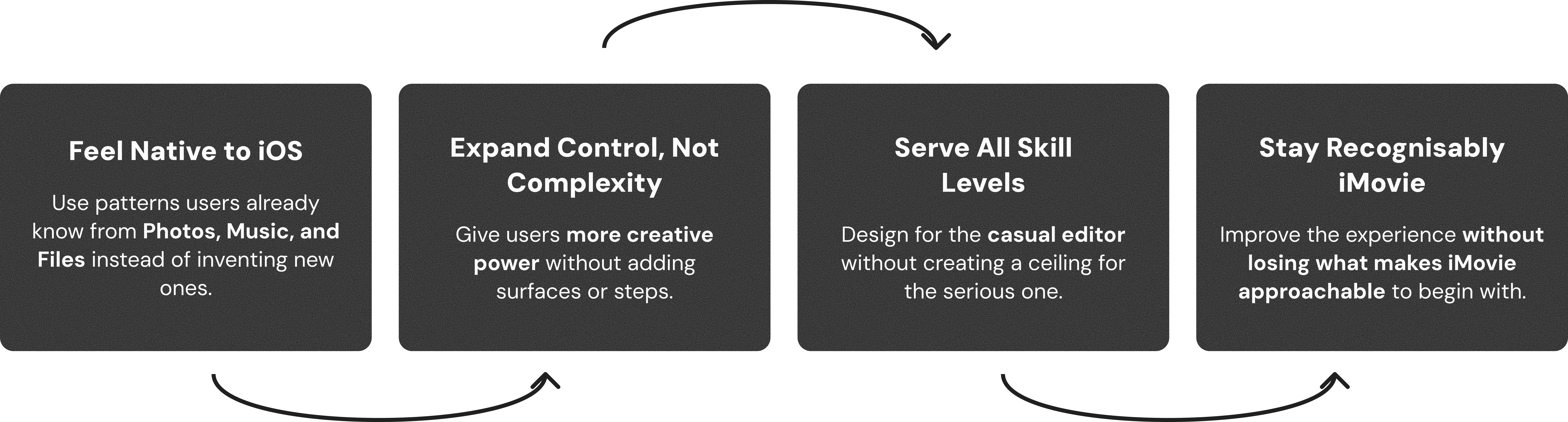
The tradeoff we optimised for:
The tradeoff we optimised for:

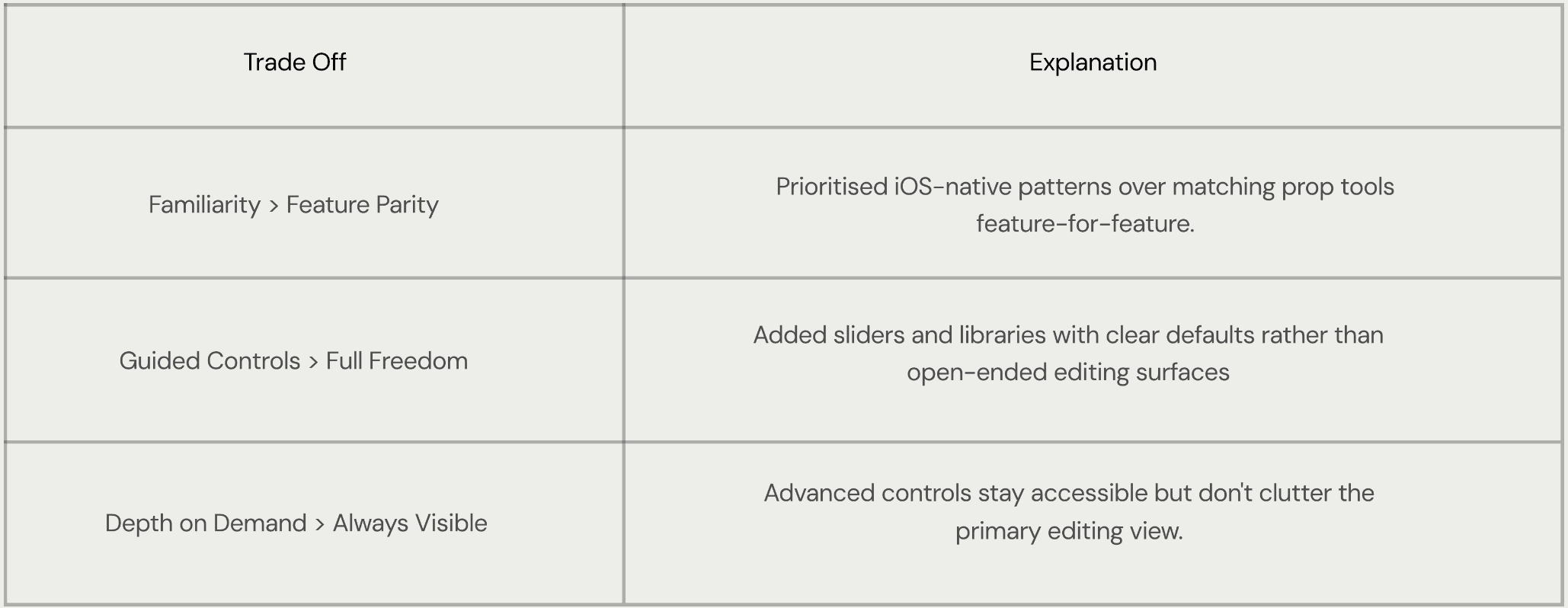
Trade Off
Familiarity > Feature Parity
Prioritised iOS-native patterns over matching prop tools feature-for-feature.
Added sliders and libraries with clear defaults rather than open-ended editing surfaces
Advanced controls stay accessible but don't clutter the primary editing view.
Guided Controls > Full Freedom
Depth on Demand > Always Visible
Explanation
Trade Off
Familiarity > Feature Parity
Prioritised iOS-native patterns over matching prop tools feature-for-feature.
Added sliders and libraries with clear defaults rather than open-ended editing surfaces
Advanced controls stay accessible but don't clutter the primary editing view.
Guided Controls > Full Freedom
Depth on Demand > Always Visible
Explanation
Ideation
Ideation
Directions Explored
Directions Explored
DIRECTION 1
DIRECTION 1

Redesign the Full iMovie Mobile App
Redesign the Full iMovie Mobile App
Value: Complete, cohesive overhaul
Value: Complete, cohesive overhaul
Risk: Too broad for a concept project
Risk: Too broad for a concept project
DIRECTION 2
DIRECTION 2
Introduce New Features
Introduce New Features
Value: Adds missing capabilities
Value: Adds missing capabilities
Risk: Scope creep, loses iMovie identity
Risk: Scope creep, loses iMovie identity
DIRECTION 3
DIRECTION 3
Redesign Core
Editing Flows
Redesign Core
Editing Flows
Value: Focussed, high-impact changes
Value: Focussed, high-impact changes
Risk: Requires sharp prioritisation
Risk: Requires sharp prioritisation
Convergence
Convergence

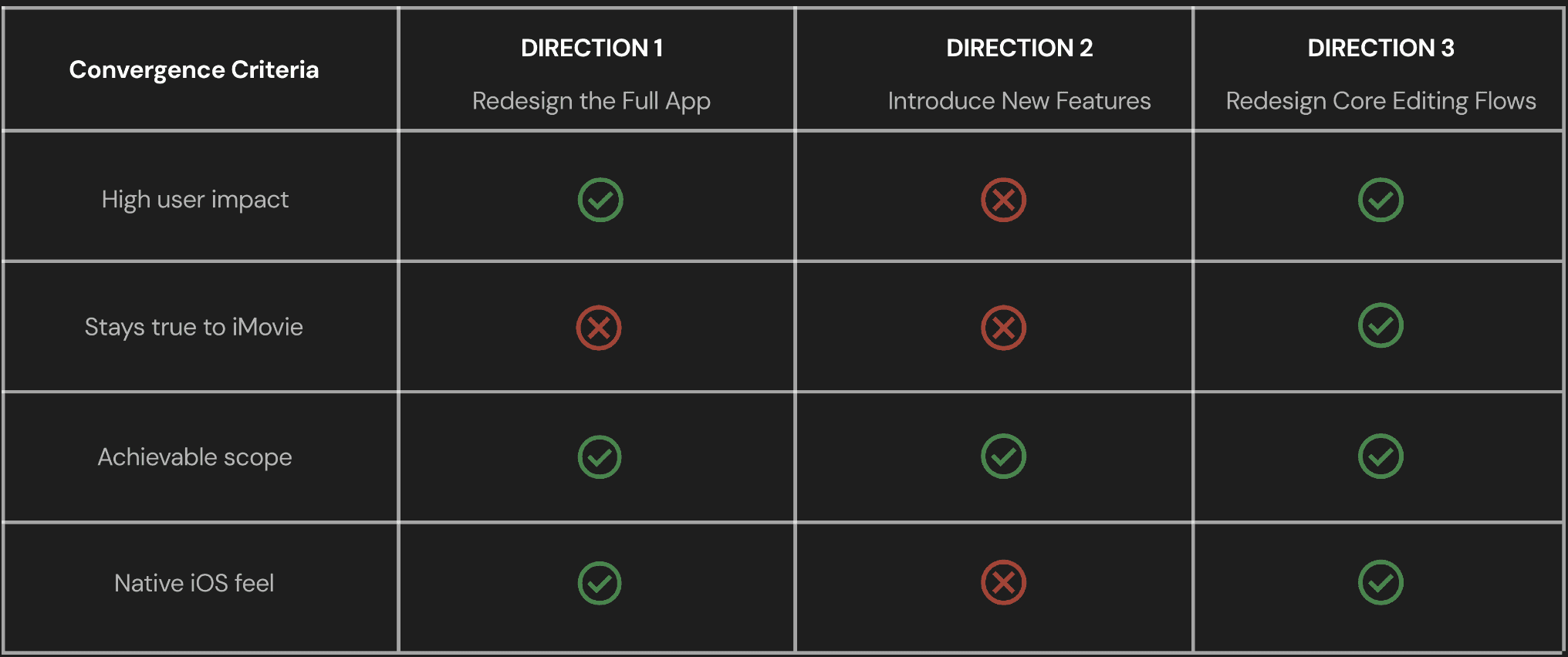
Convergence Criteria
DIRECTION 1
Redesign the Full App
Stays true to iMovie
Achievable scope
High user impact
Native iOS feel
DIRECTION 2
Introduce New Features
DIRECTION 3
Redesign Core Editing Flows


Convergence Criteria
DIRECTION 1
Redesign the Full App
Stays true to iMovie
Achievable scope
High user impact
Native iOS feel
DIRECTION 2
Introduce New Features
DIRECTION 3
Redesign Core Editing Flows
Final Plan
Final Plan
Audit
Existing Flows
Audit
Existing Flows

Identify
Friction Points
Identify
Friction Points
Redesign the
core flows
Redesign the
core flows
Prototype
Refine
Prototype
Refine
Design System & Visual Language
Design System & Visual Language
Since iMovie lives within the Apple ecosystem, I worked within Apple's Human Interface Guidelines, using native iOS components, SF Pro typography, and Apple's color system to ensure every redesigned screen felt like it already belonged.
Since iMovie lives within the Apple ecosystem, I worked within Apple's Human Interface Guidelines, using native iOS components, SF Pro typography, and Apple's color system to ensure every redesigned screen felt like it already belonged.
Typography
Typography
Aa
Aa
SF Pro
SF Pro
Regular, Medium, and Semibold
Regular, Medium, and Semibold
Title Text
Title Text
Title 01
Title 01
Title 02
Title 02
SF Pro - Medium
SF Pro - Medium
SF Pro - Regular
SF Pro - Regular
22 pt
22 pt
20 pt
20 pt
Body Text
Body Text
Body
Body
Body Small
Body Small
SF Pro - Regular
SF Pro - Regular
SF Pro - Regular
SF Pro - Regular
14 pt
14 pt
12 pt
12 pt
Tab Headings
Tab Headings
Main
Main
SF Pro - Medium
SF Pro - Medium
14 pt
14 pt
Buttons
Buttons
Main
Main
SF Pro - Medium
SF Pro - Medium
14 pt
14 pt
Color Palette
Color Palette
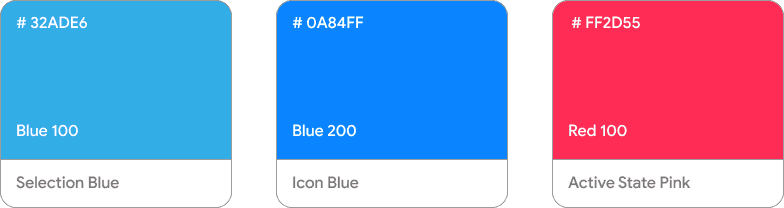
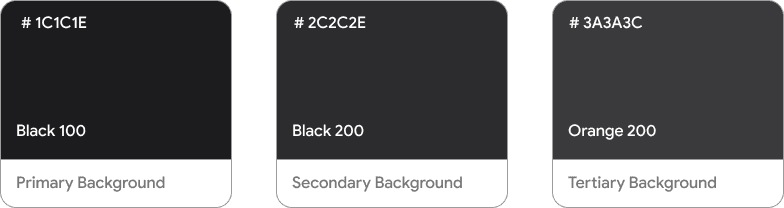
Straight from Apple's iOS system palette, no custom colors introduced. The goal was zero visual friction between iMovie and the rest of the device.
Straight from Apple's iOS system palette, no custom colors introduced. The goal was zero visual friction between iMovie and the rest of the device.
Brand / Accent Colours
Brand / Accent Colours
Background Colours
Background Colours
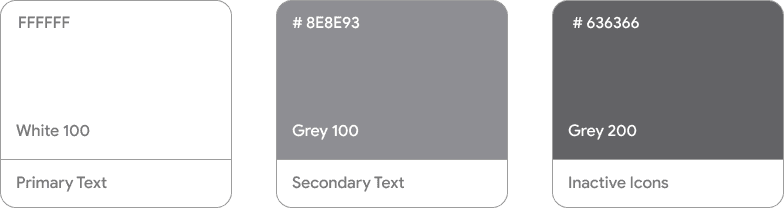
Text & Icon Colours
Text & Icon Colours
Addition to Design System
Addition to Design System
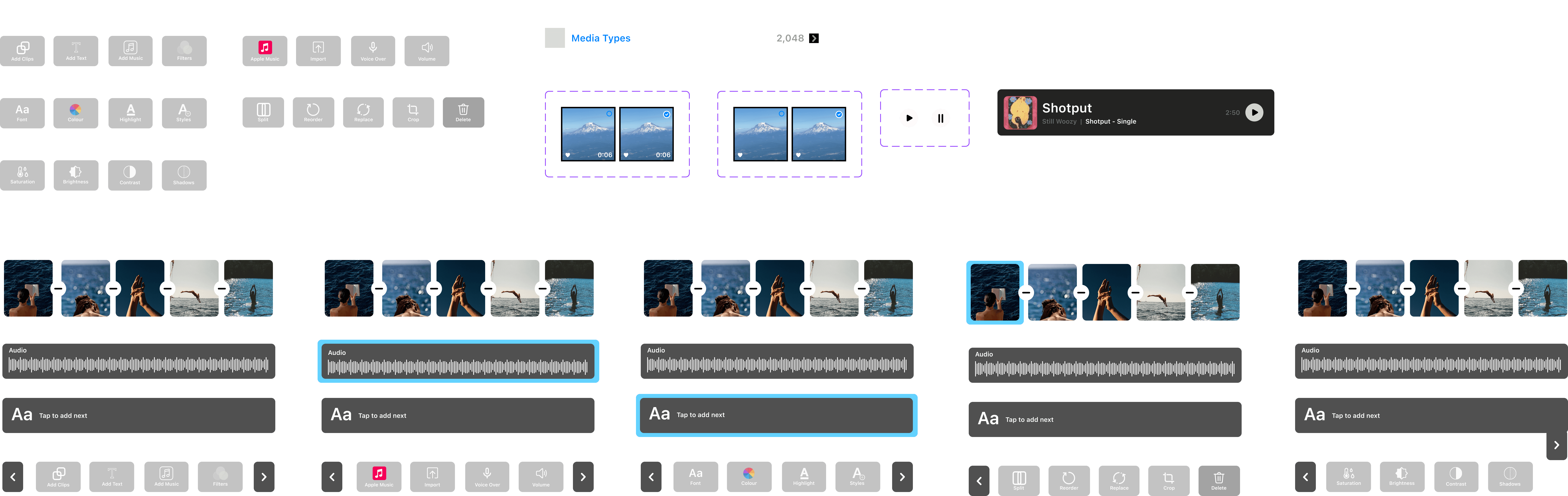
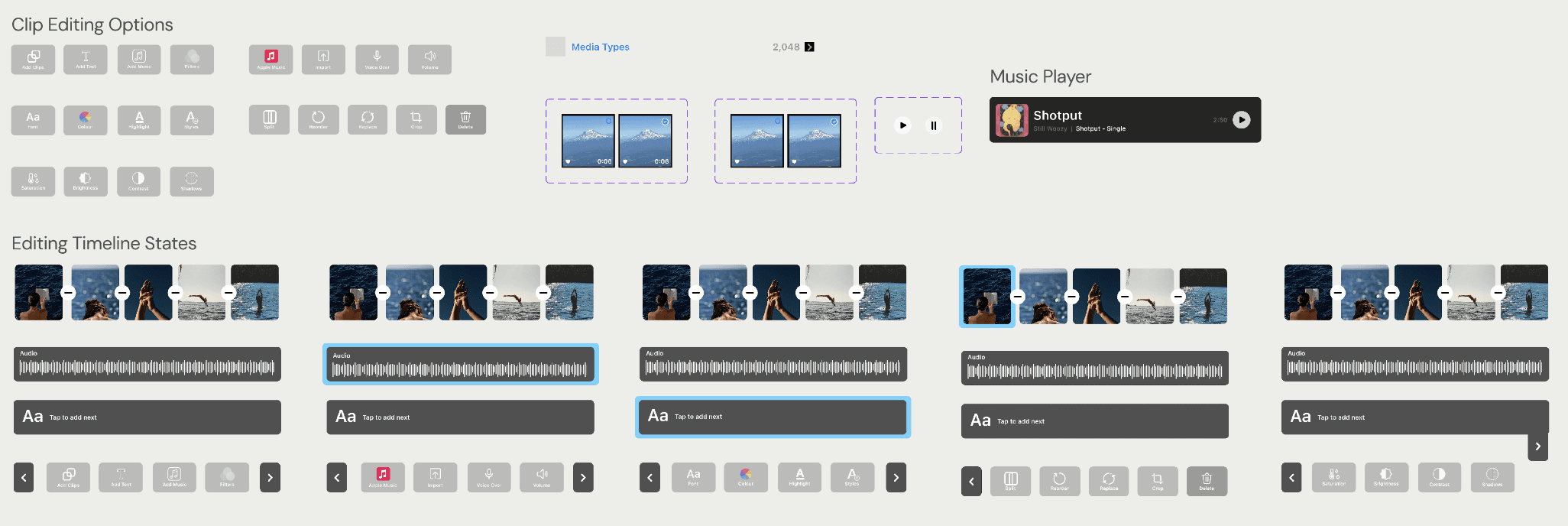
Clip Editing Options
Music Player
Editing Timeline States
Clip Editing Options
Music Player
Editing Timeline States
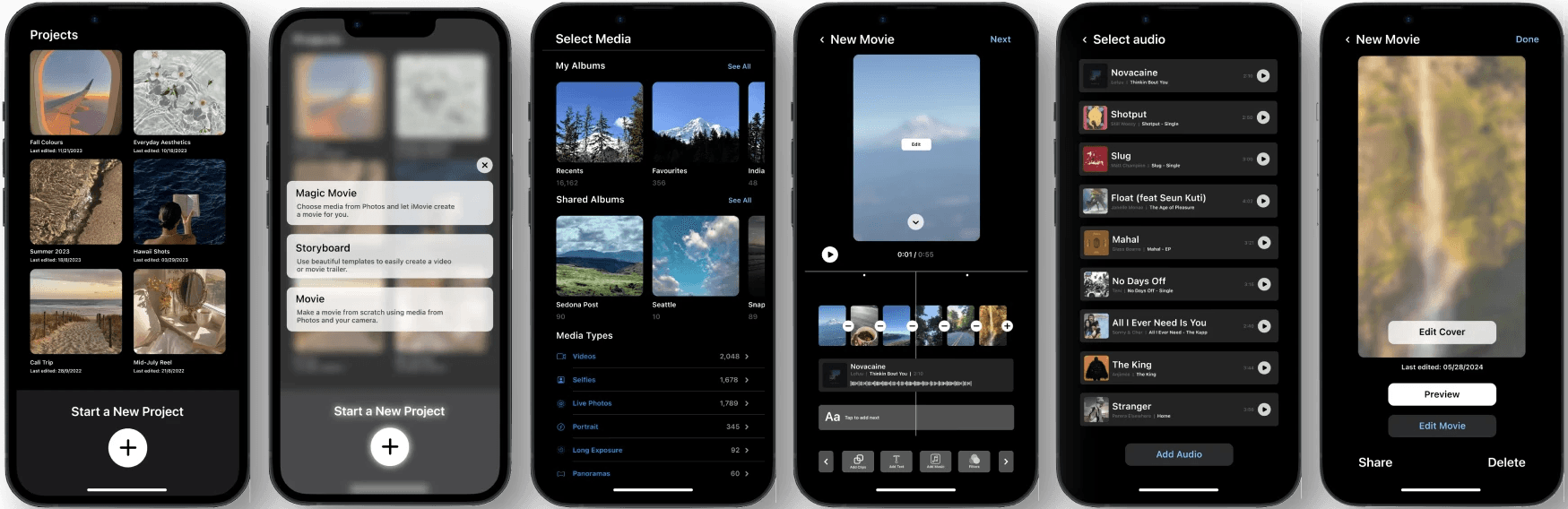
Key Screens
Start the Movie
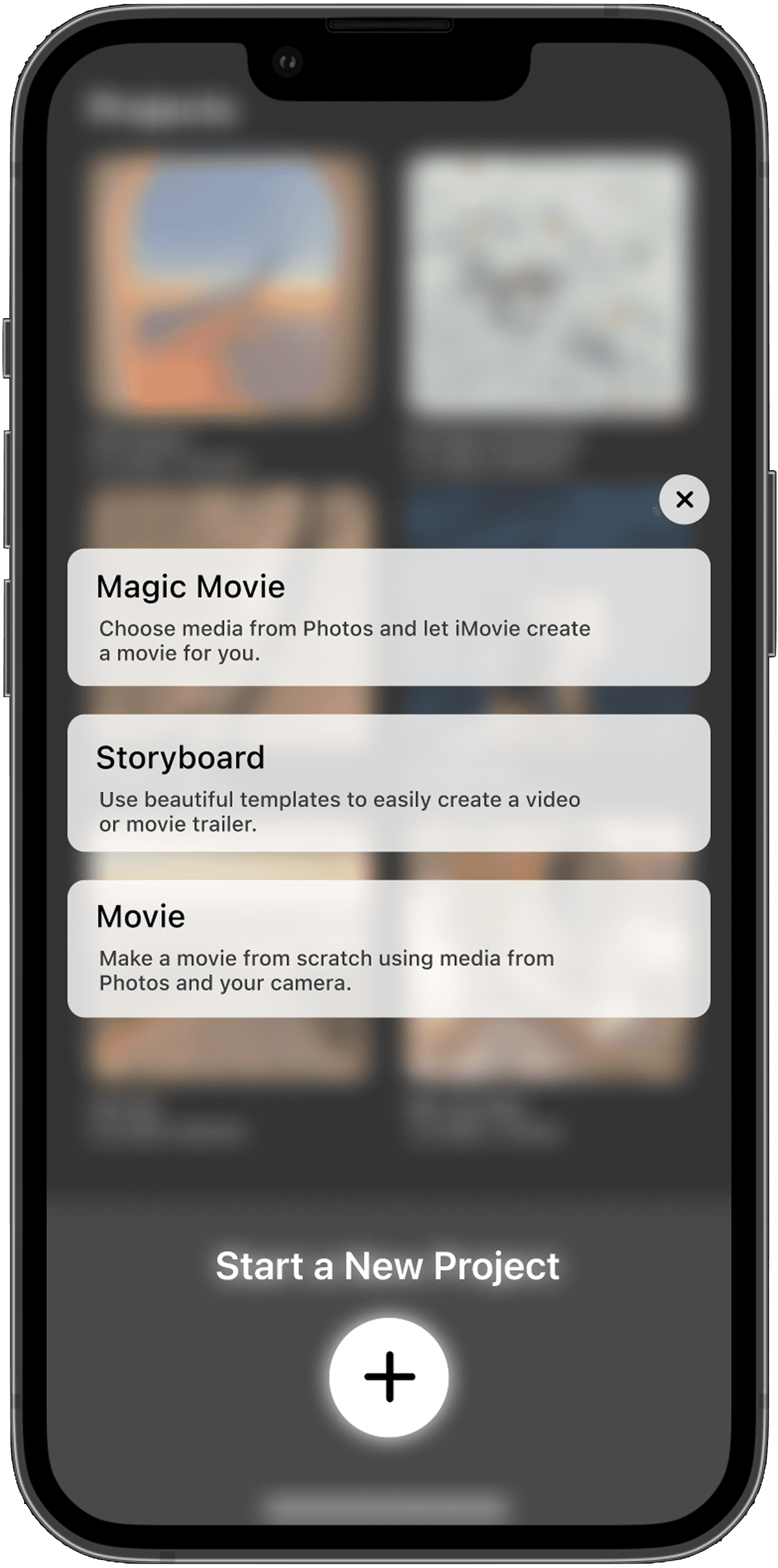
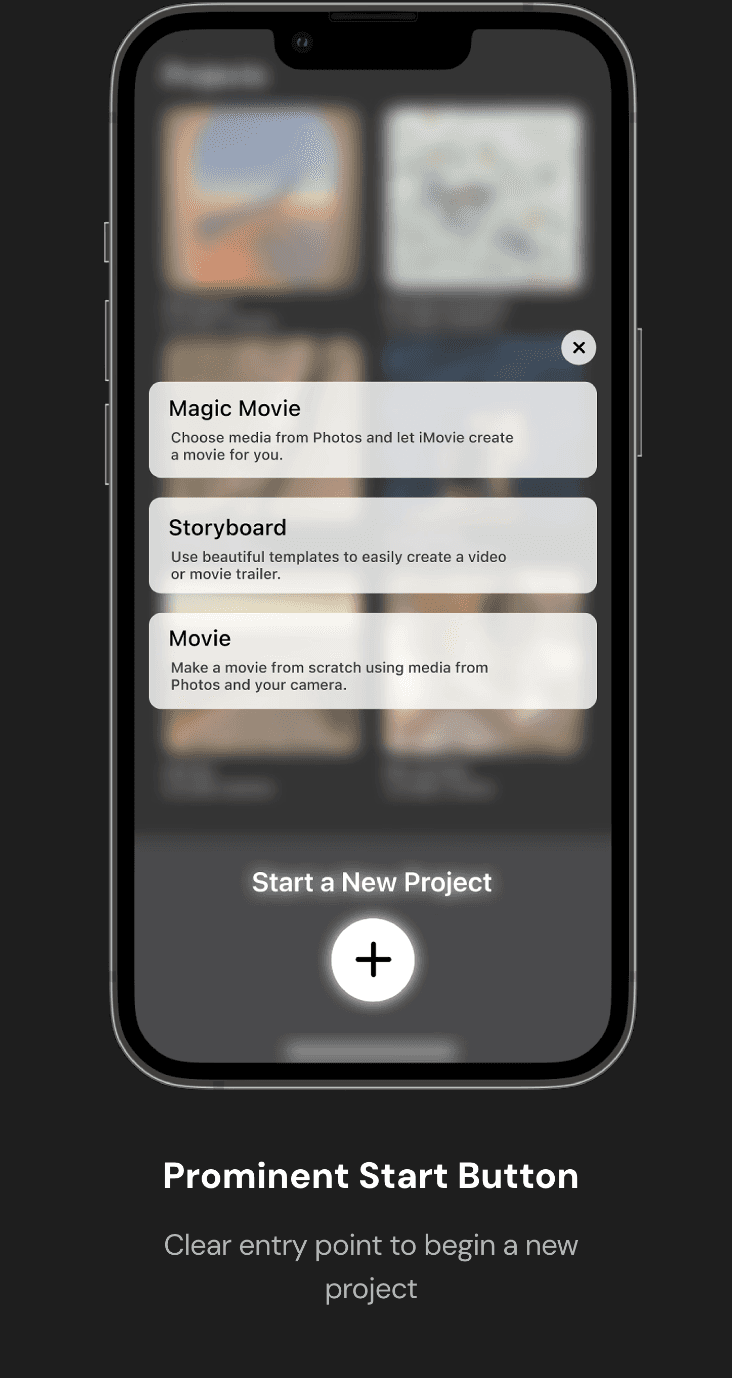
Prominent Start Button
Clear entry point to begin a new project
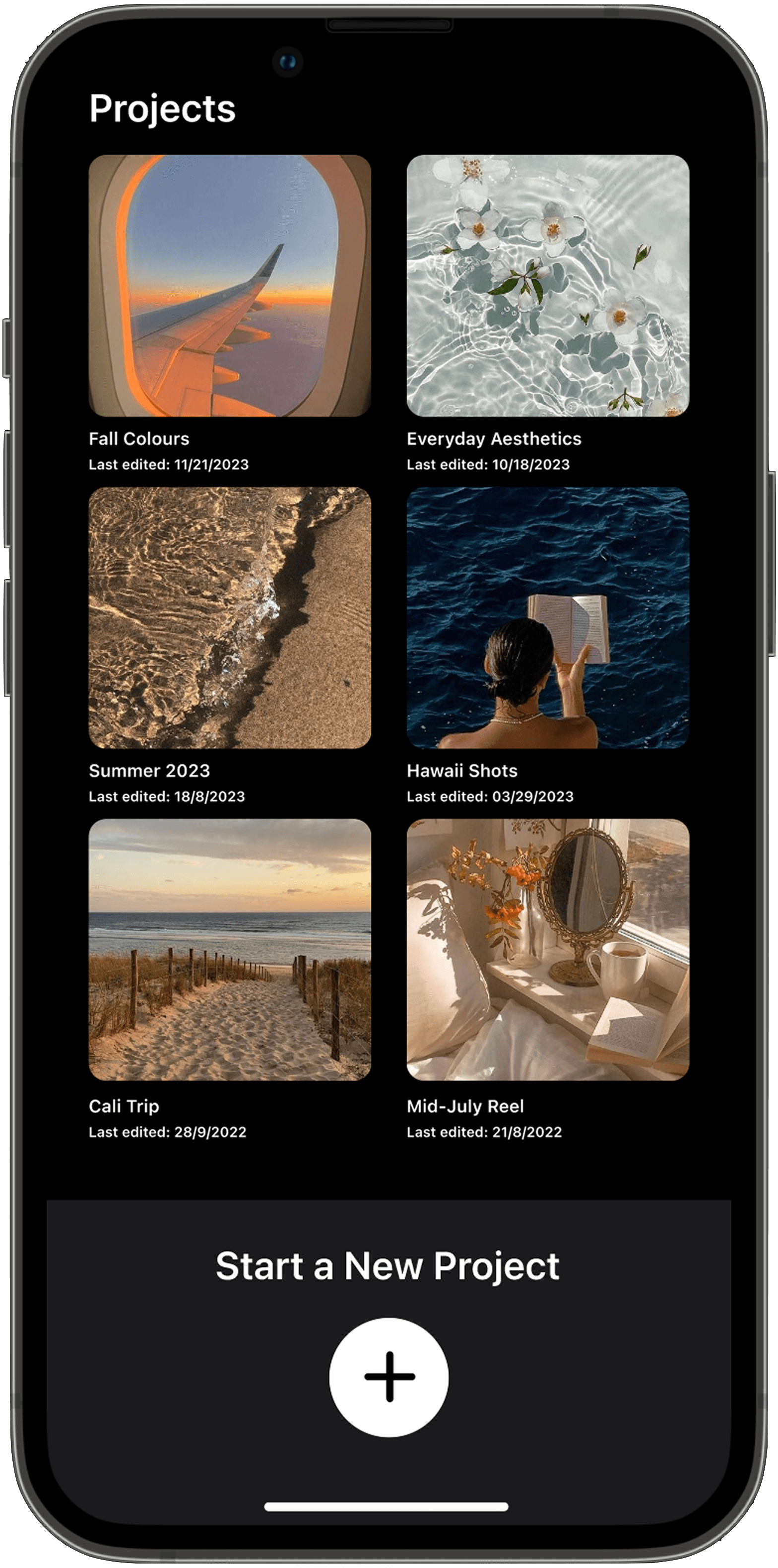
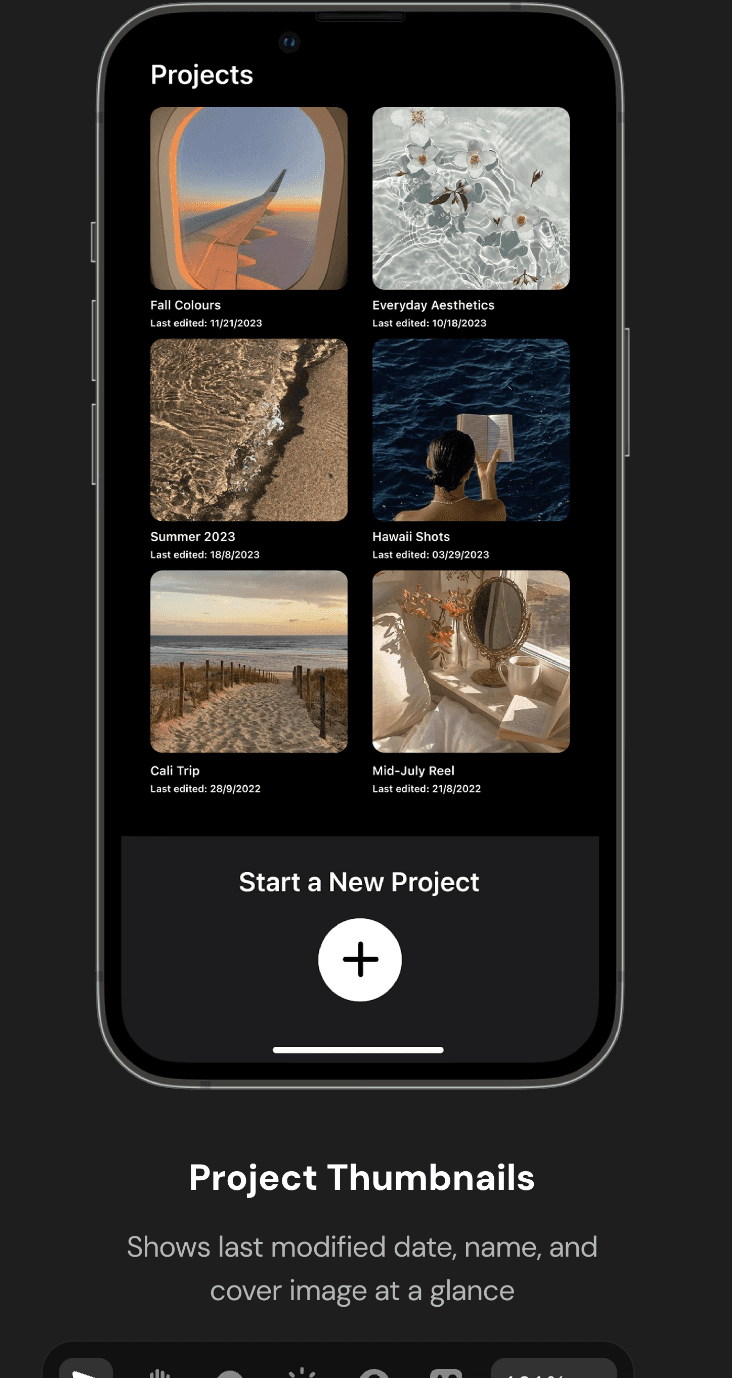
Project Thumbnails
Shows last modified date, name, and cover image at a glance
Add Clips
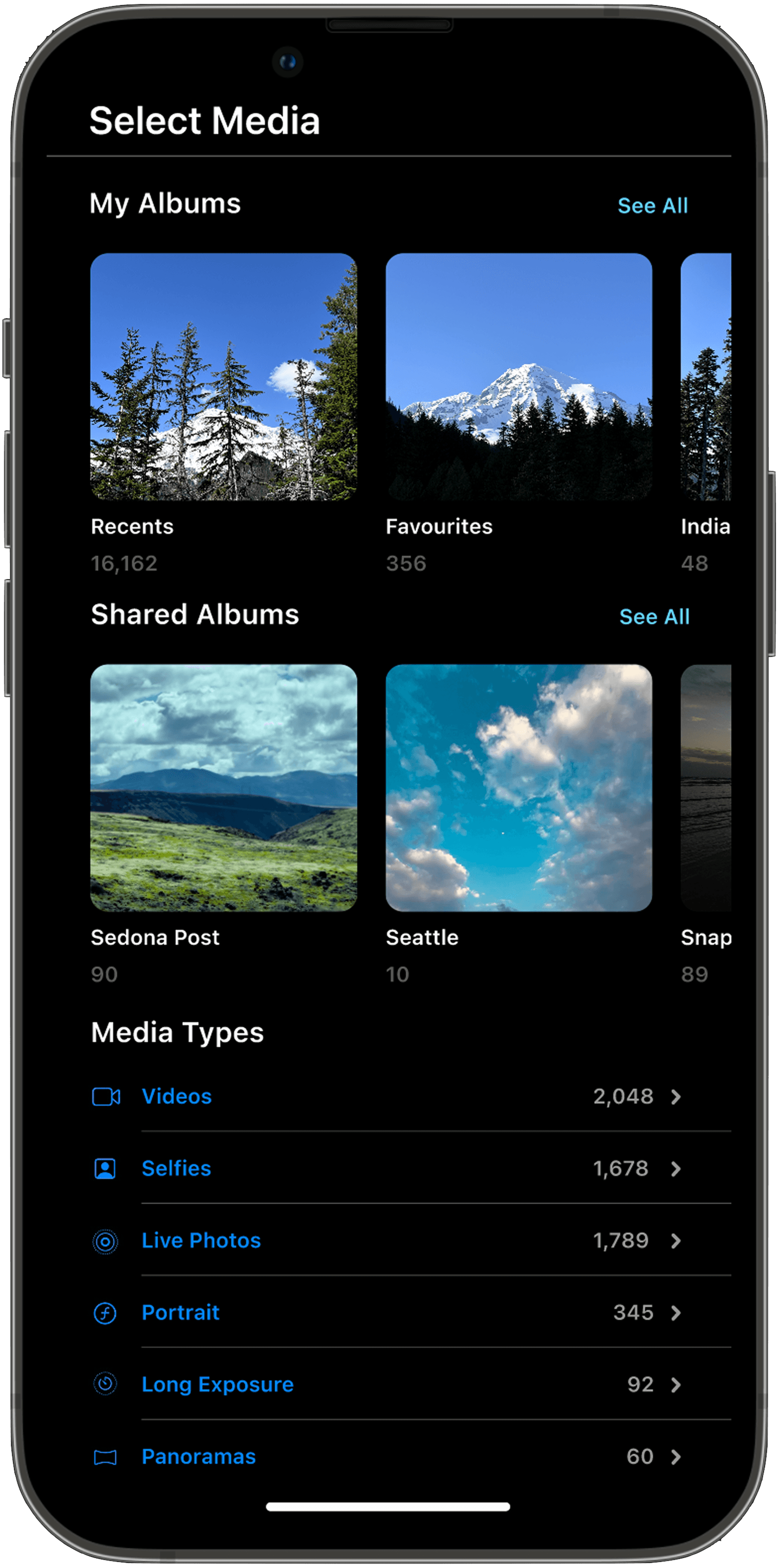
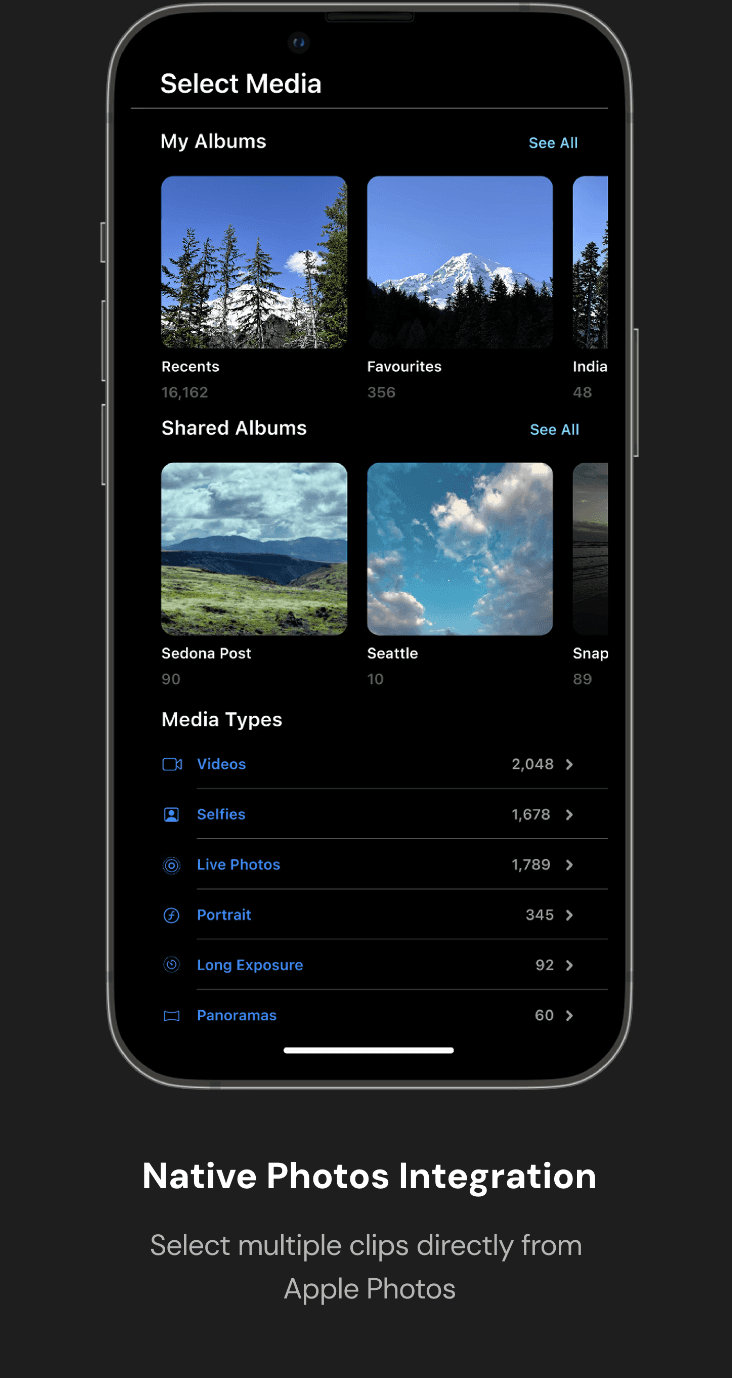
Native Photos Integration
Select multiple clips directly from
Apple Photos
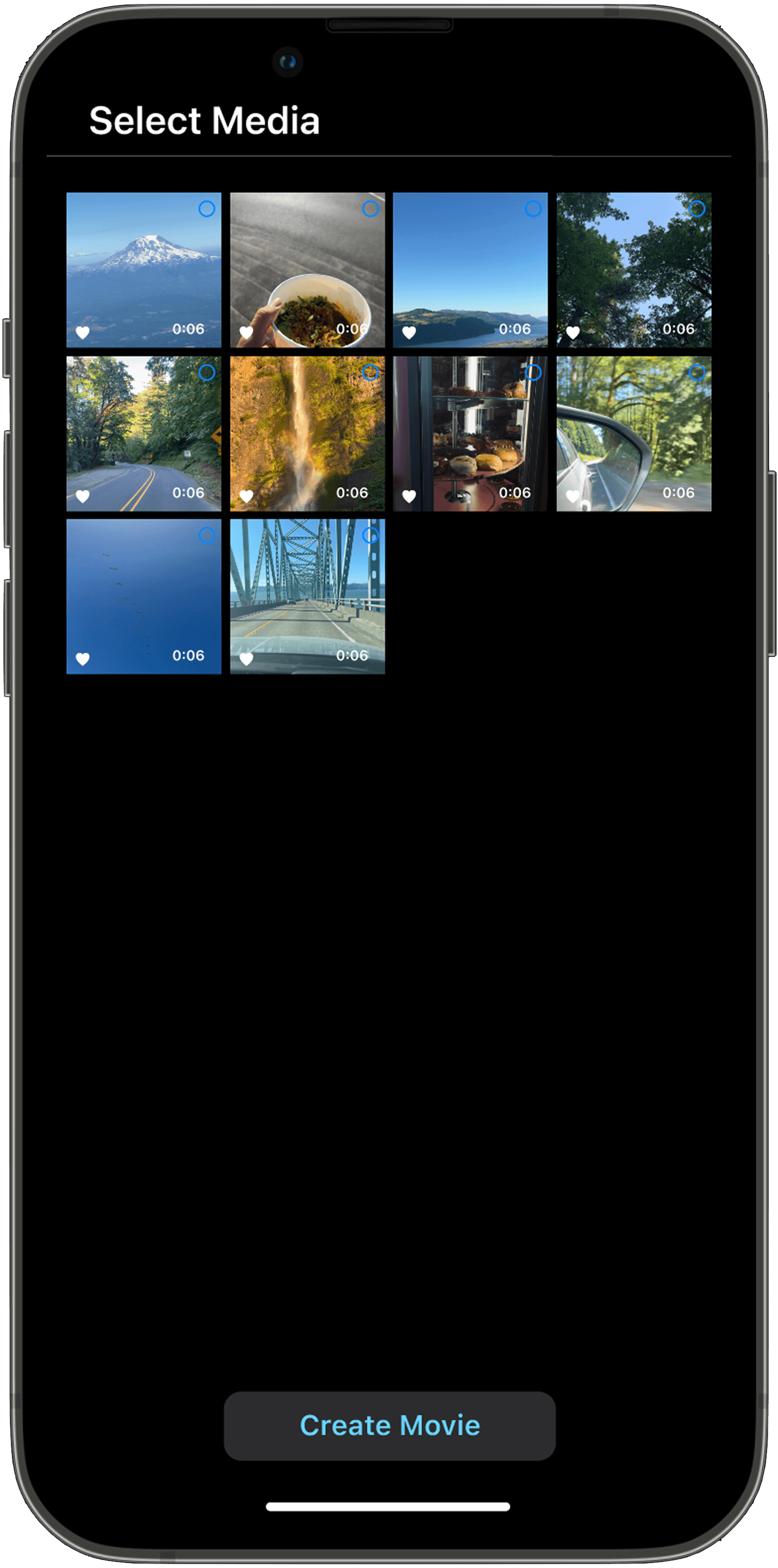
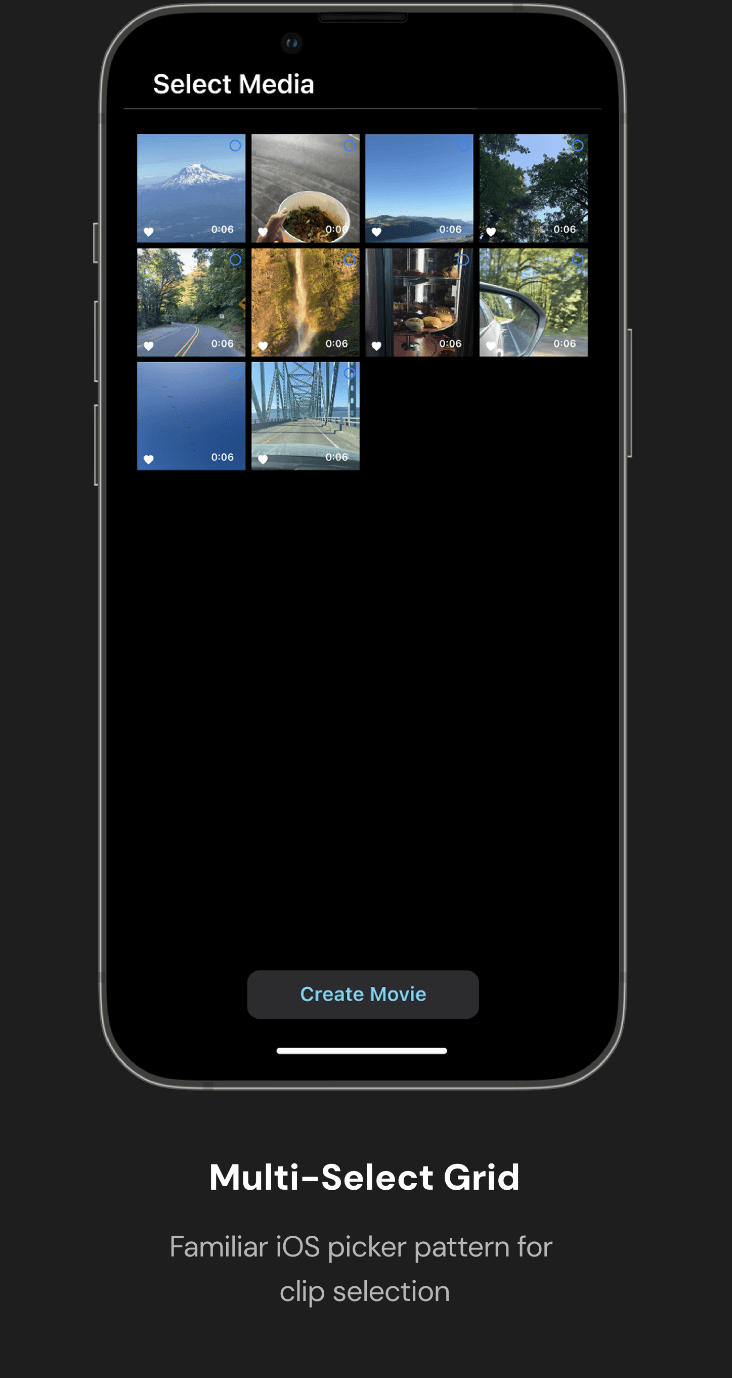
Multi-Select Grid
Familiar iOS picker pattern for
clip selection
Add Audio / Music
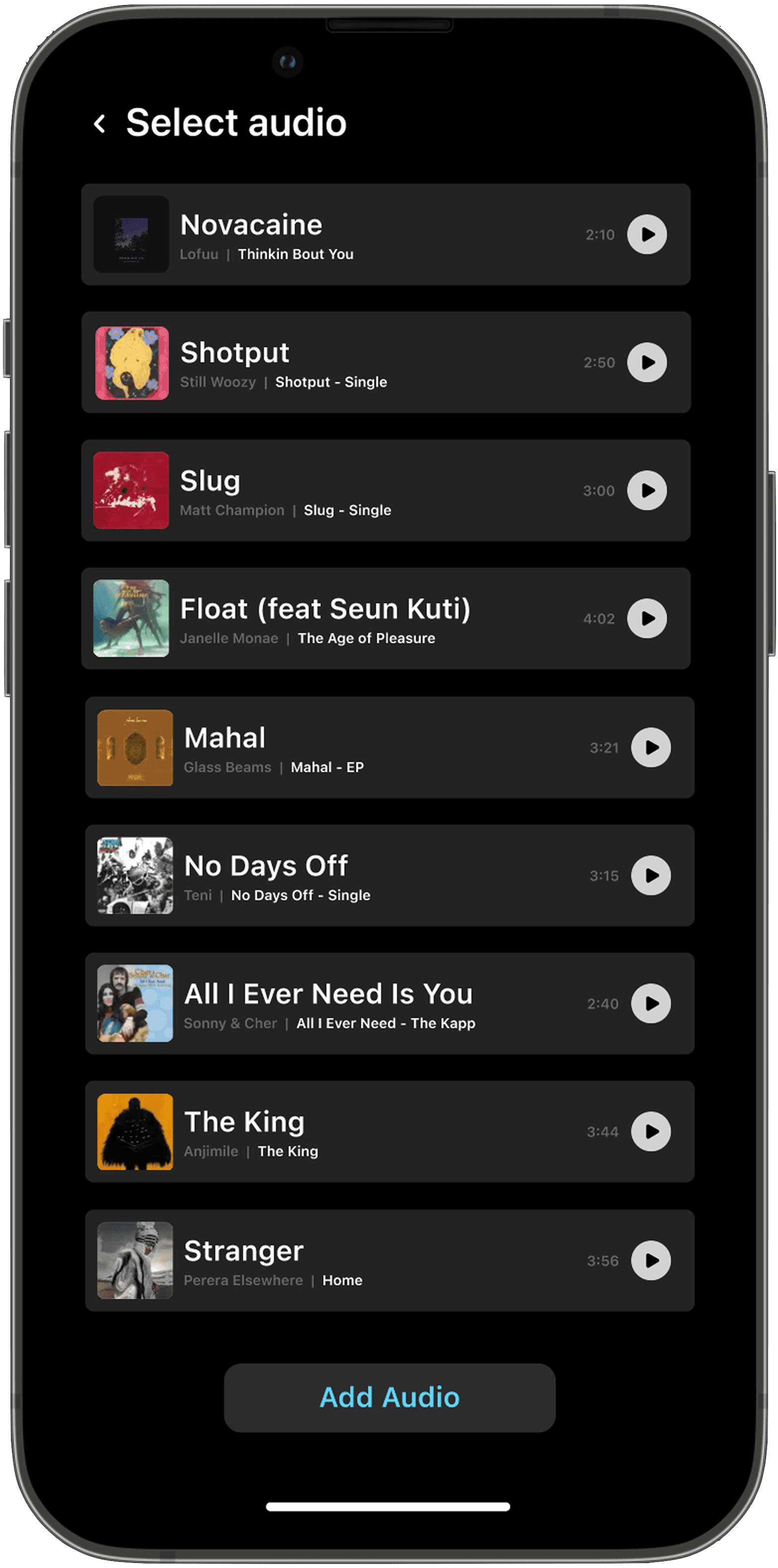
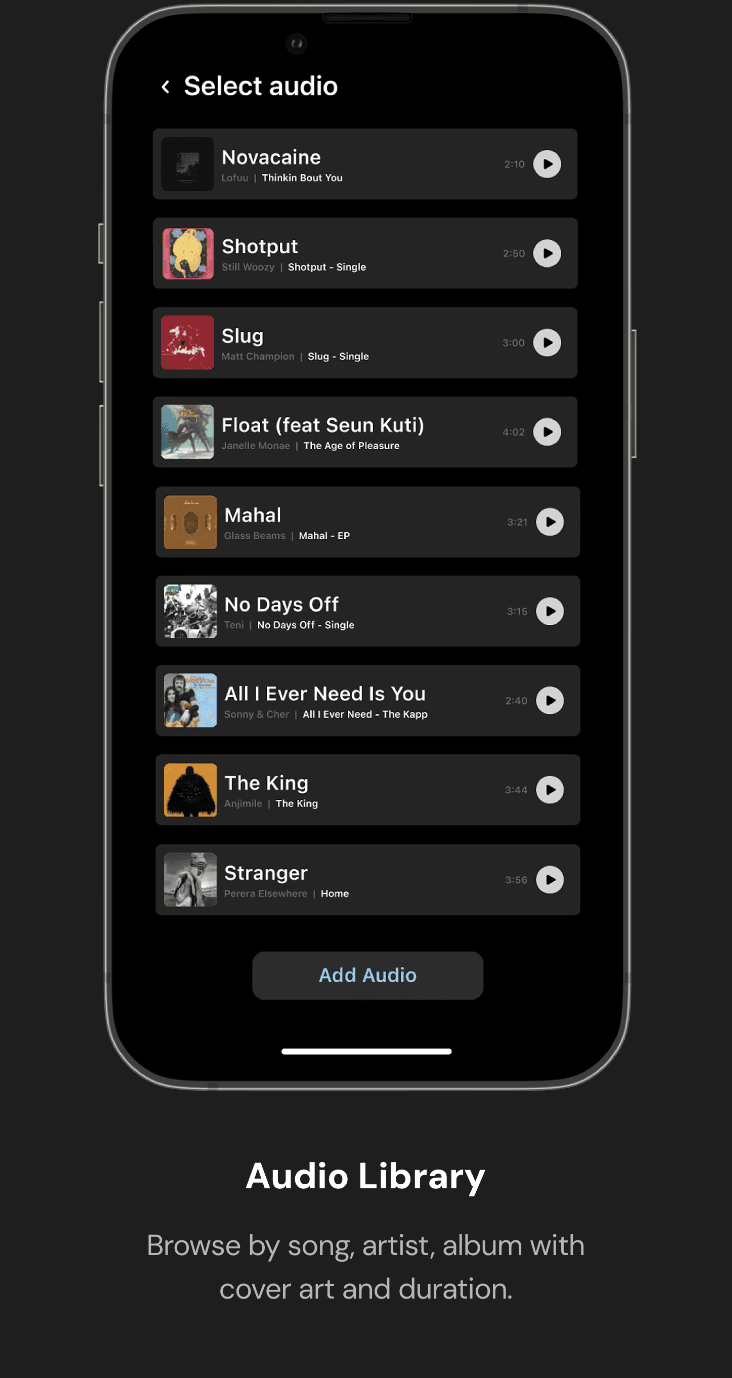
Audio Library
Browse by song, artist, album with cover art and duration.
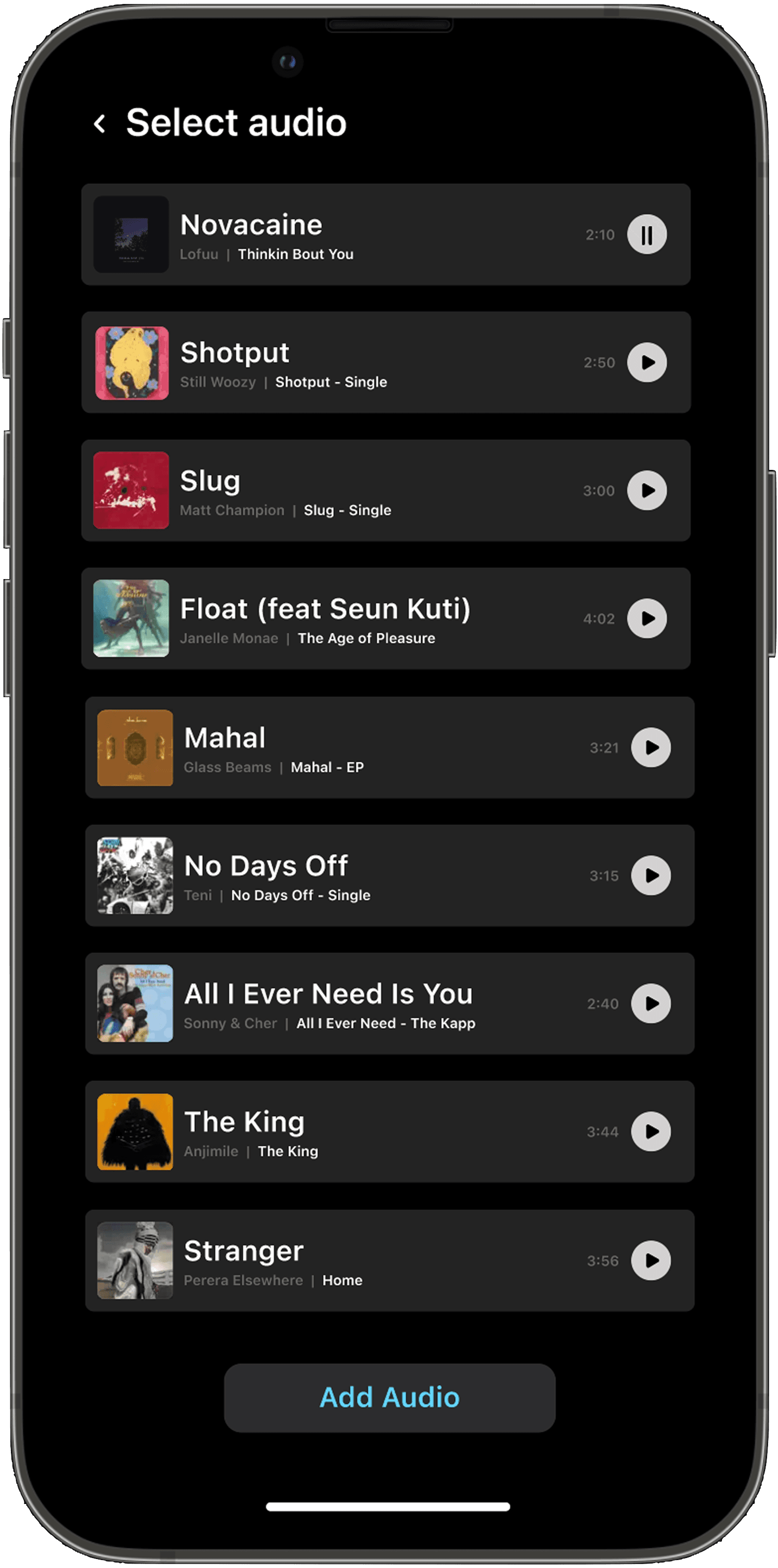
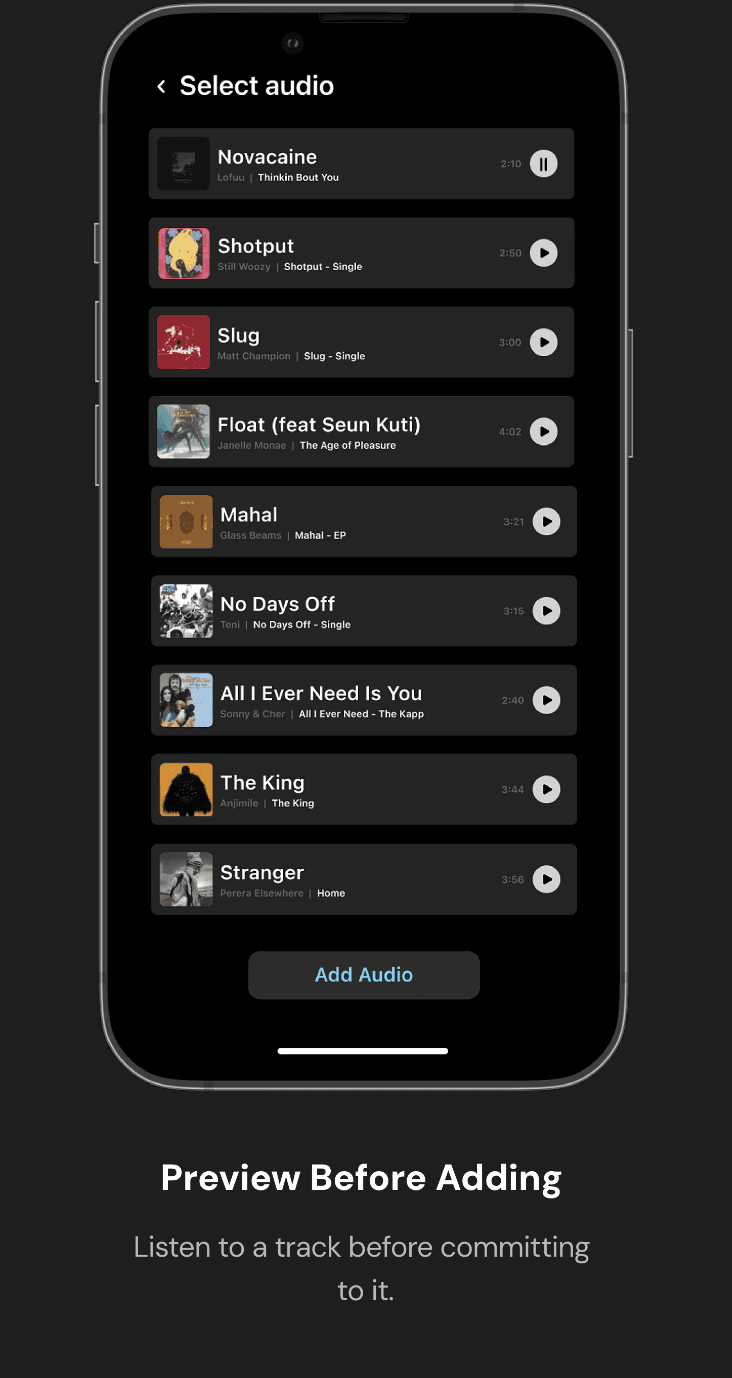
Preview Before Adding
Listen to a track before committing
to it.
Edit Movie Properties
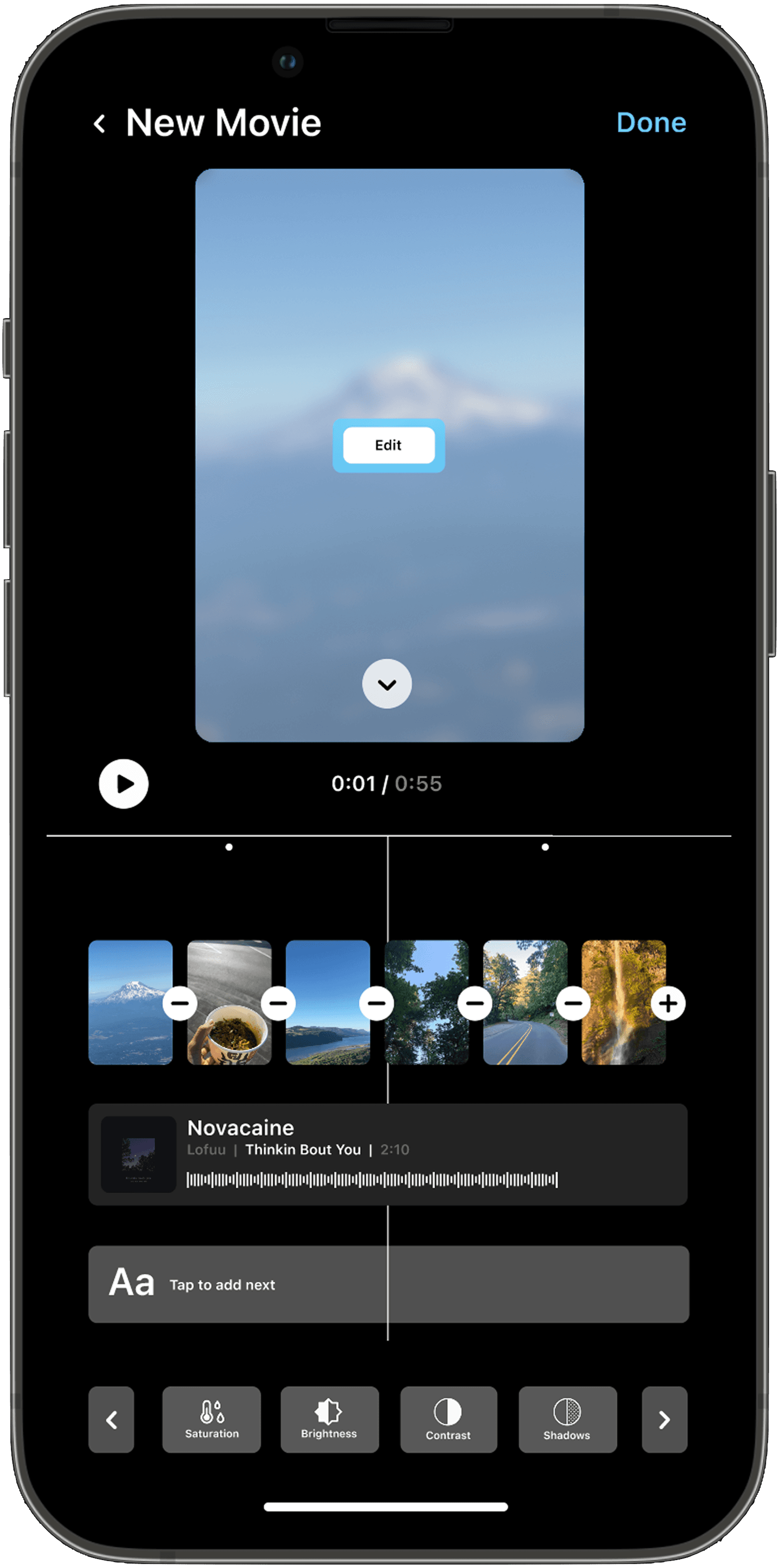
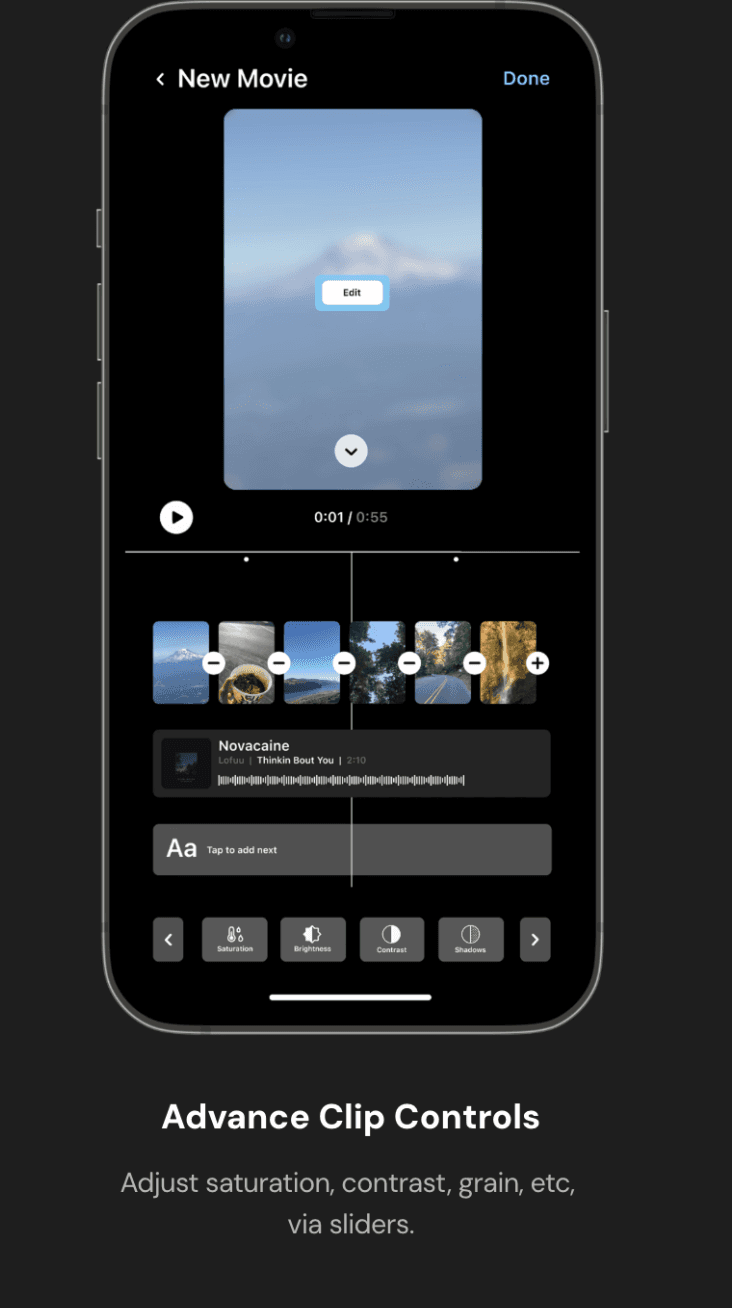
Advance Clip Controls
Adjust saturation, contrast, grain, etc, via sliders.
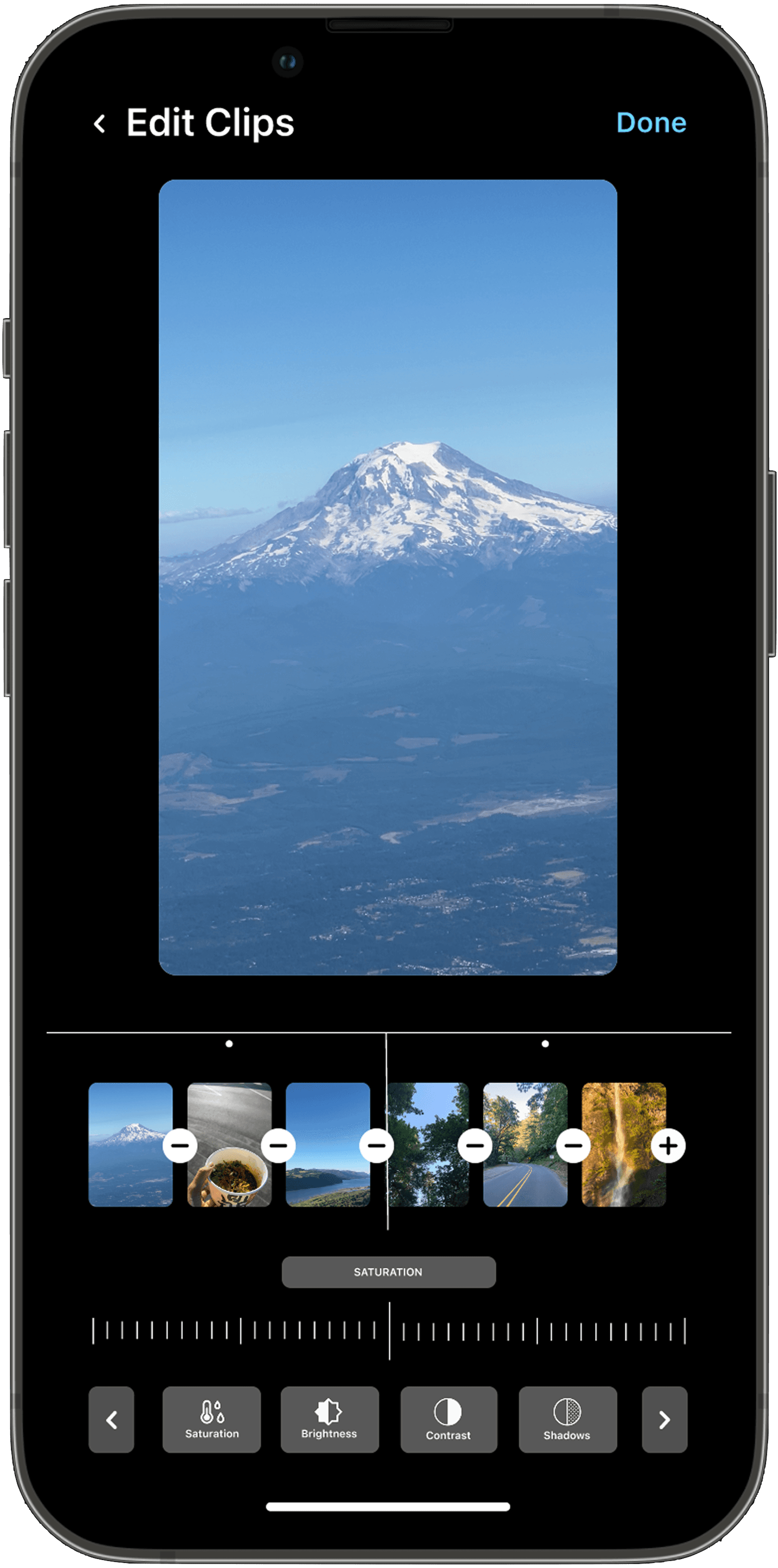
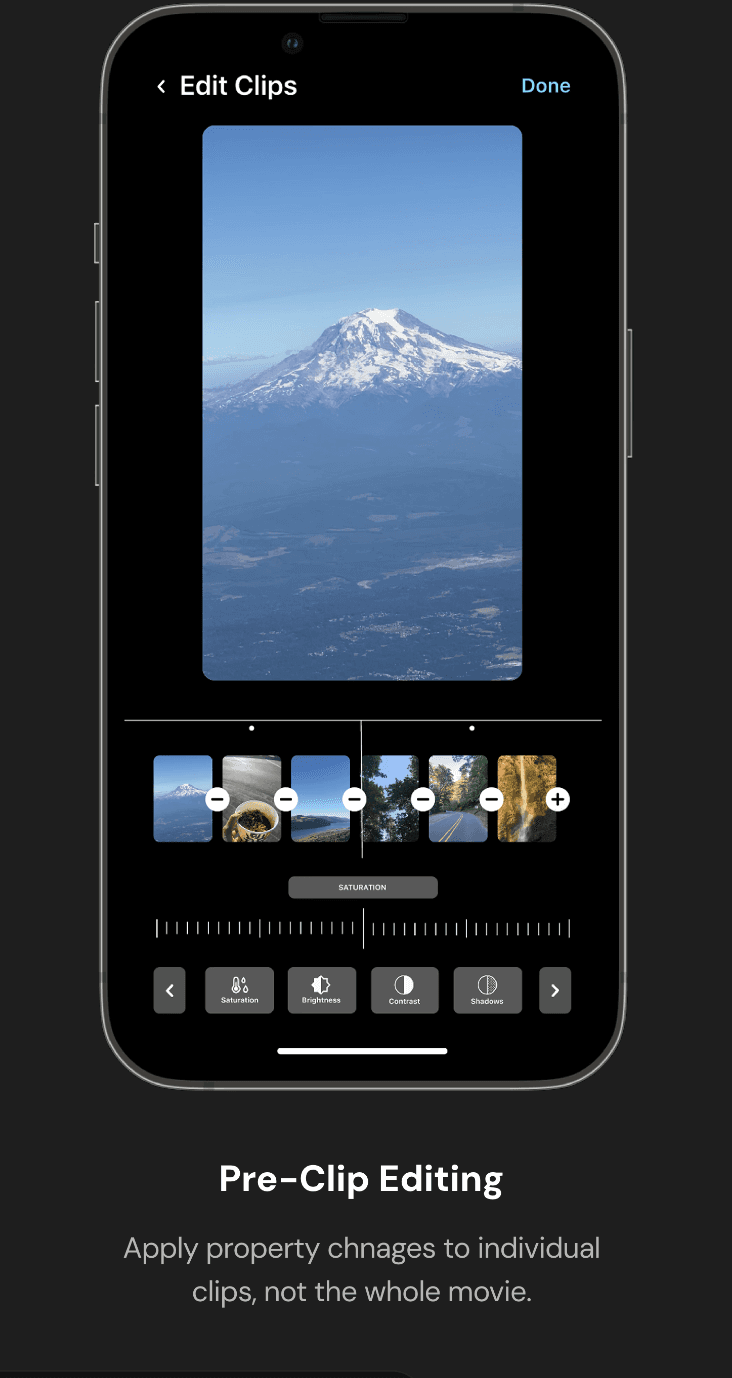
Pre-Clip Editing
Apply property chnages to individual clips, not the whole movie.
Change the Movie Cover
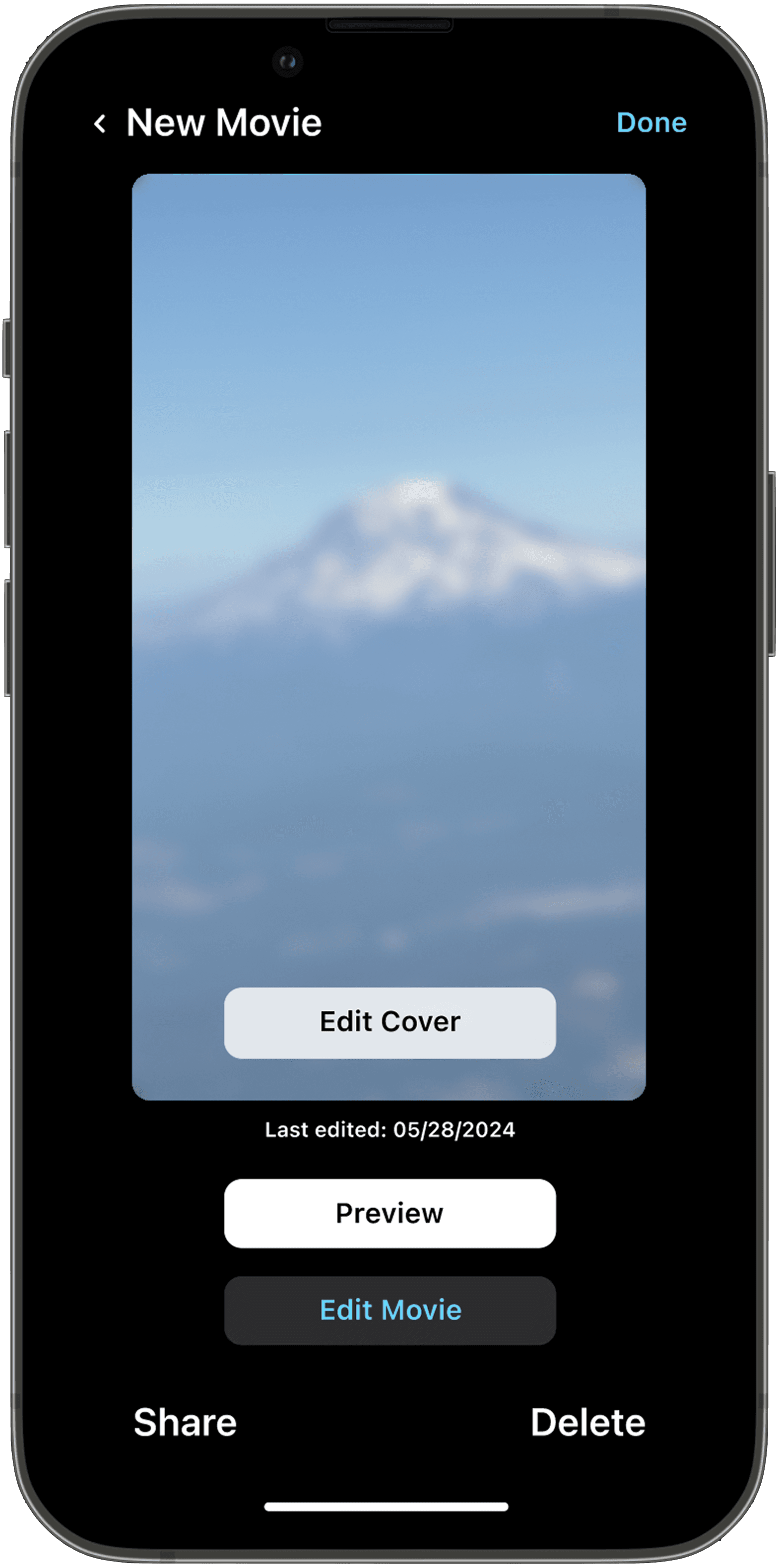
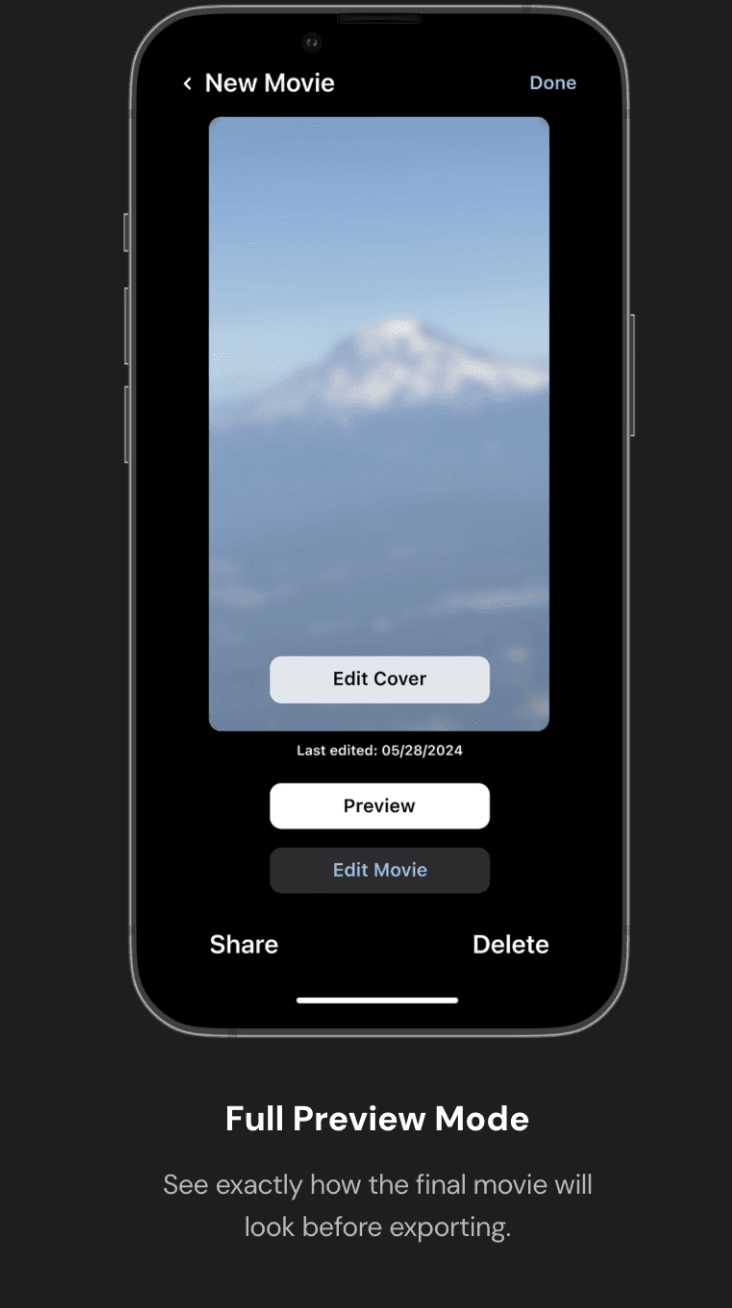
Full Preview Mode
See exactly how the final movie will look before exporting.
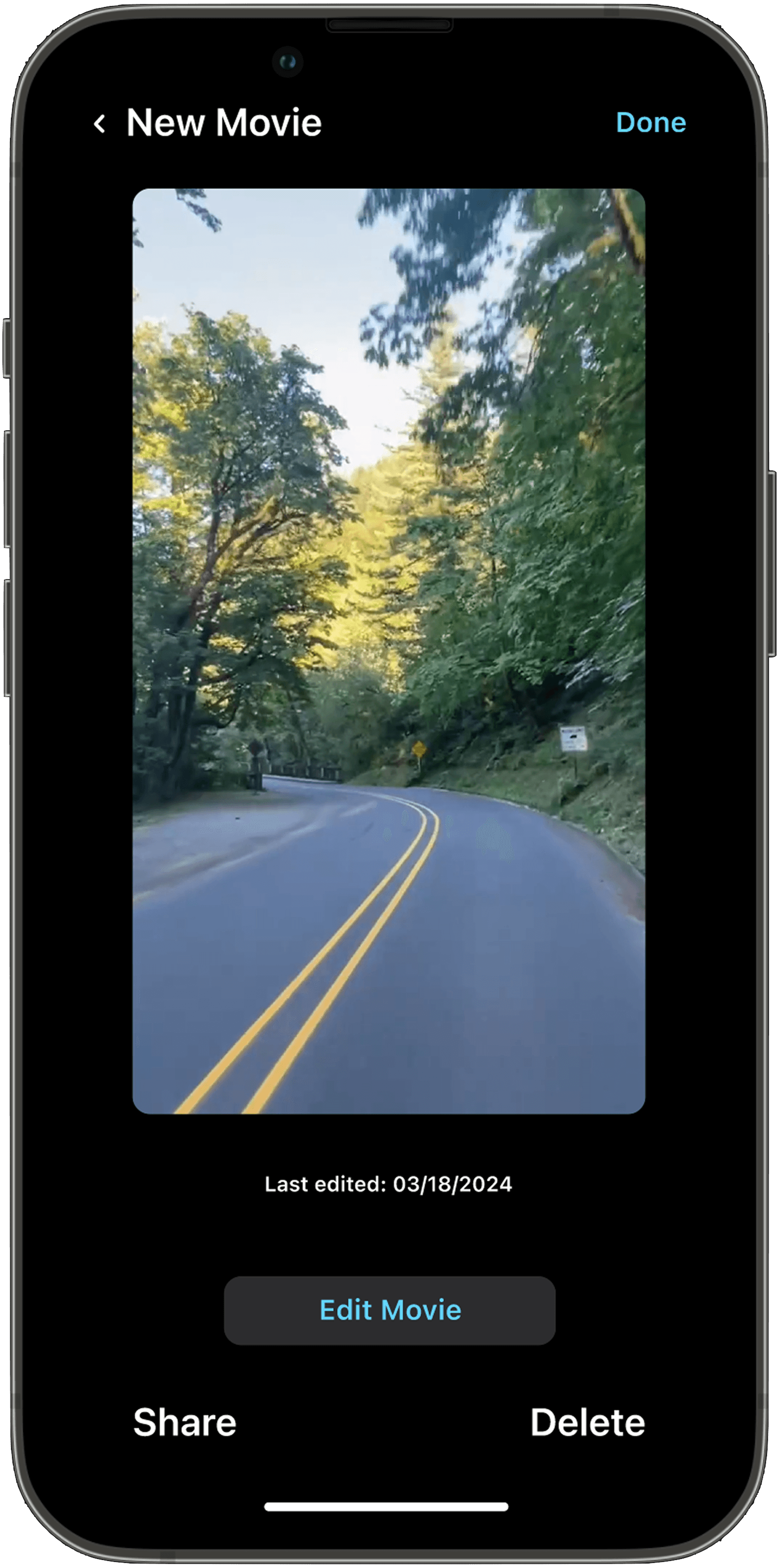
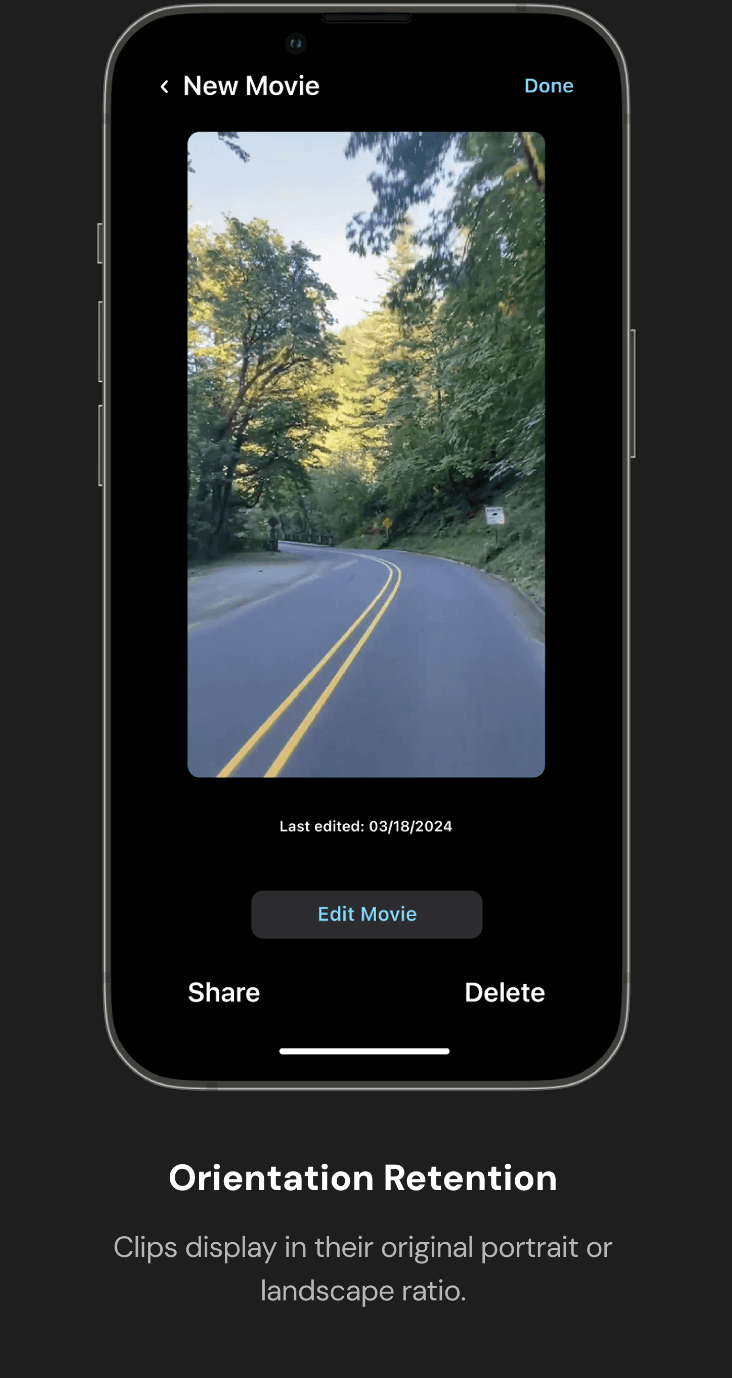
Orientation Retention
Clips display in their original portrait or landscape ratio.
Preview the Movie
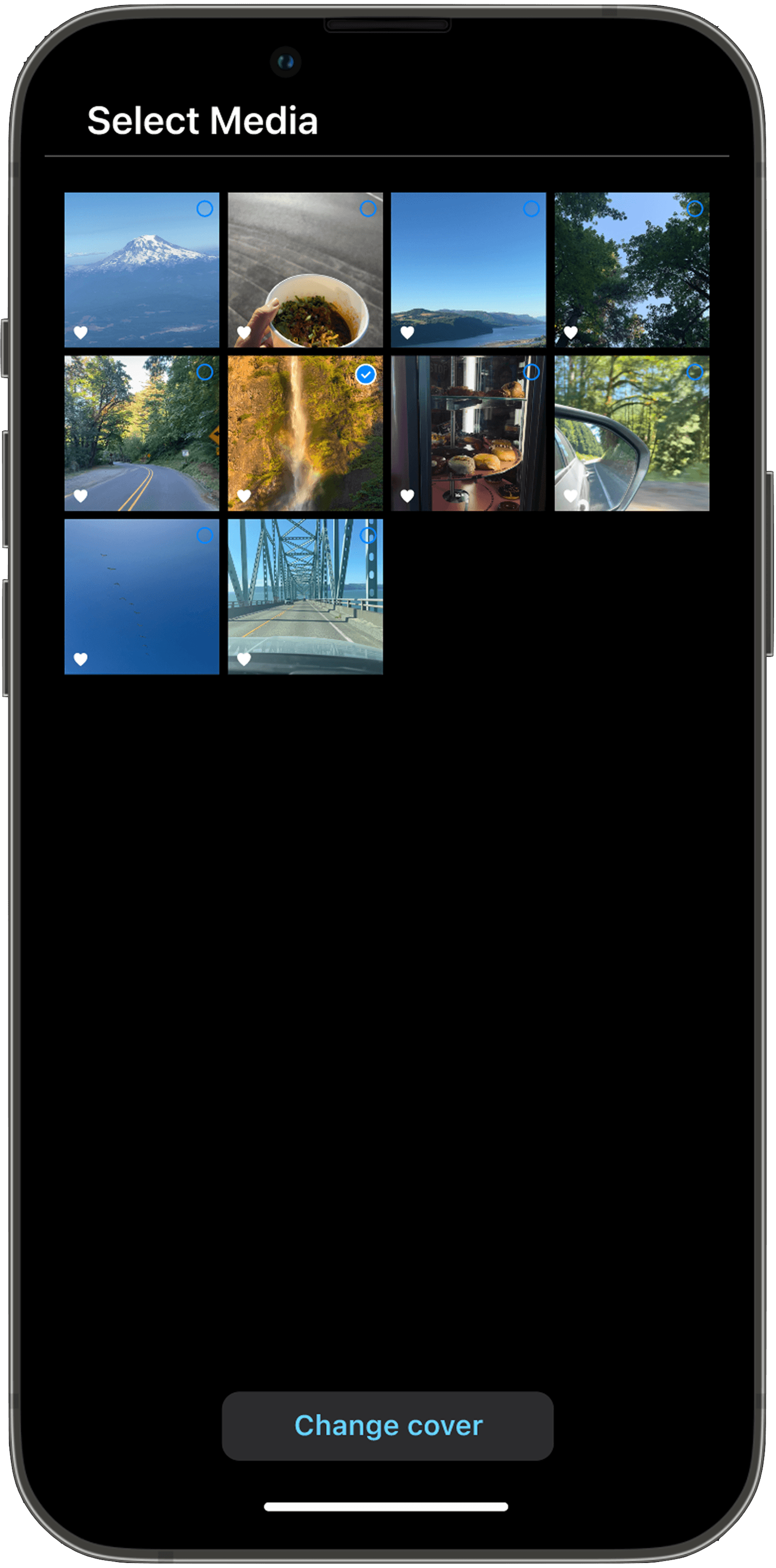
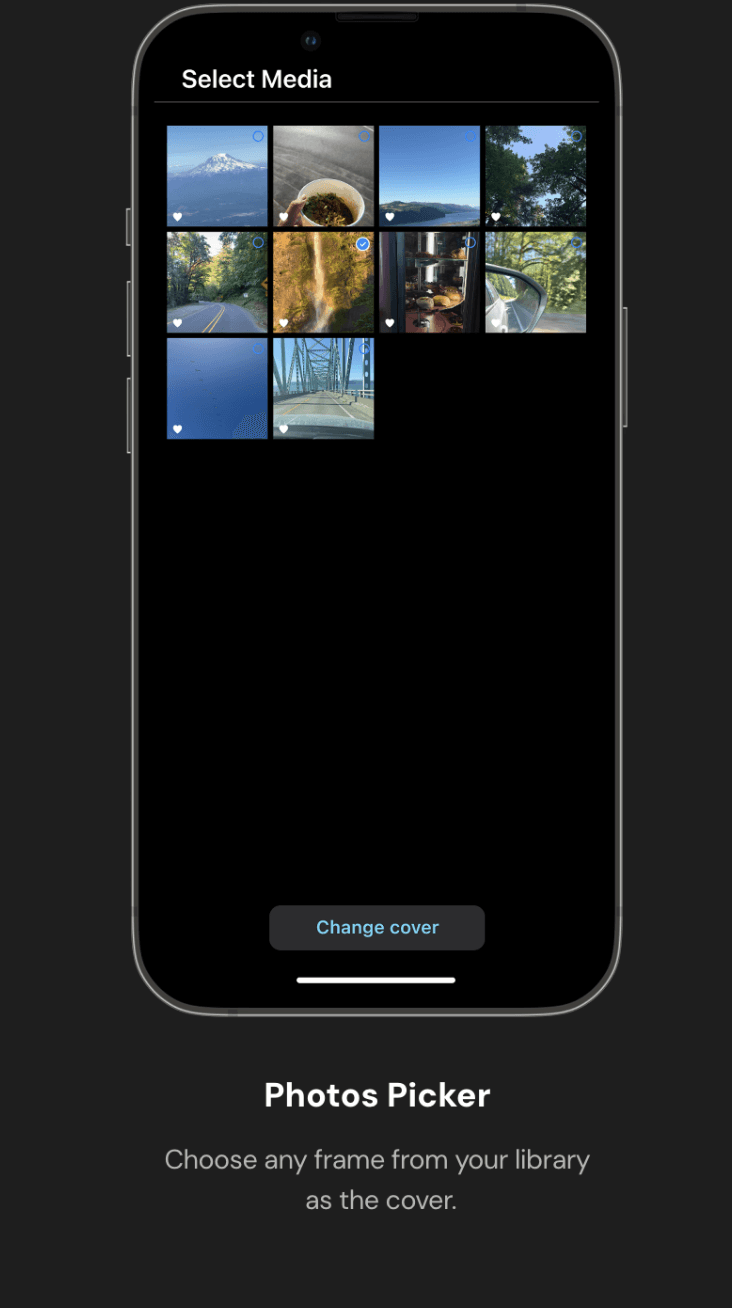
Photos Picker
Choose any frame from your library as the cover.
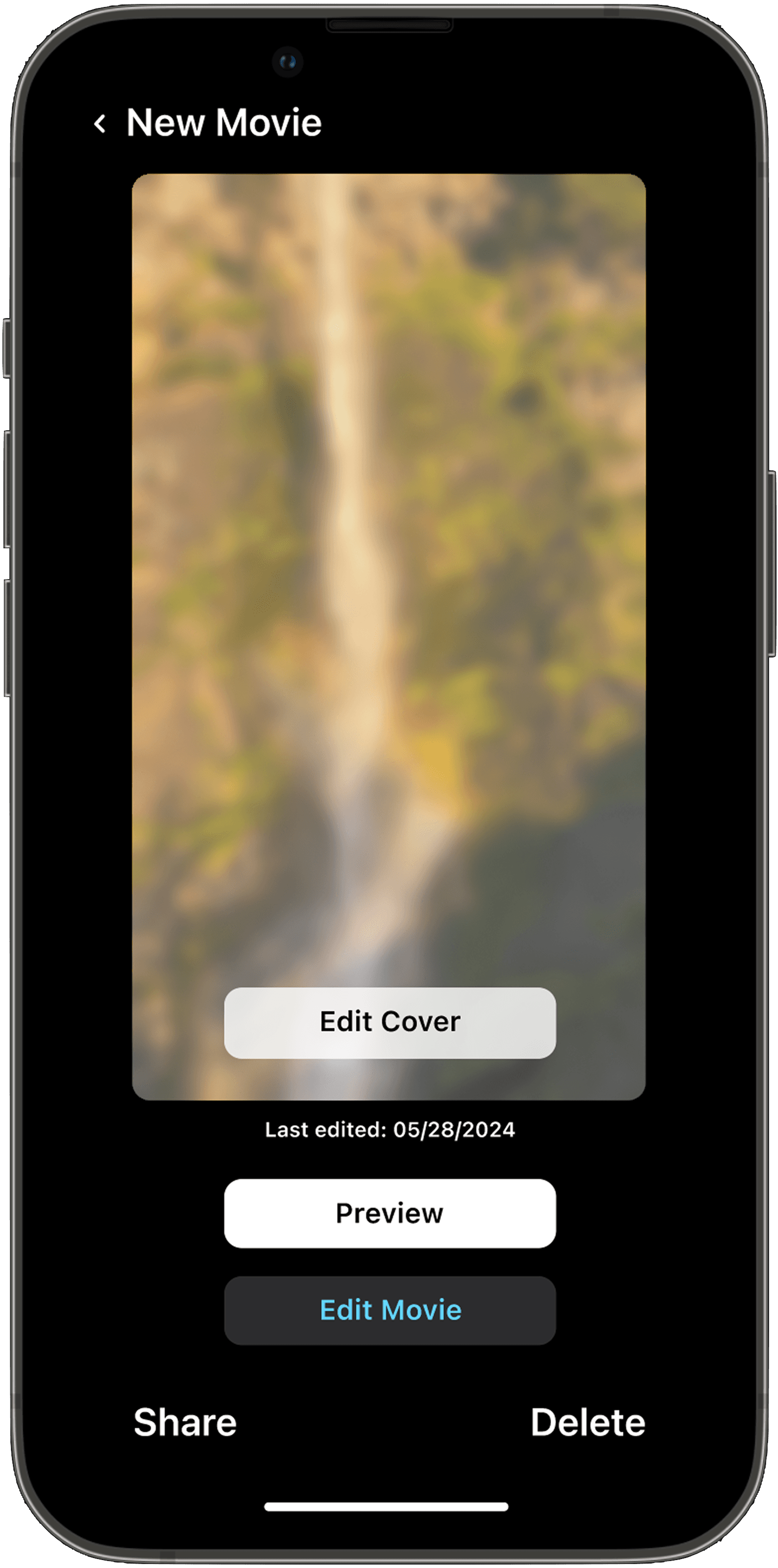
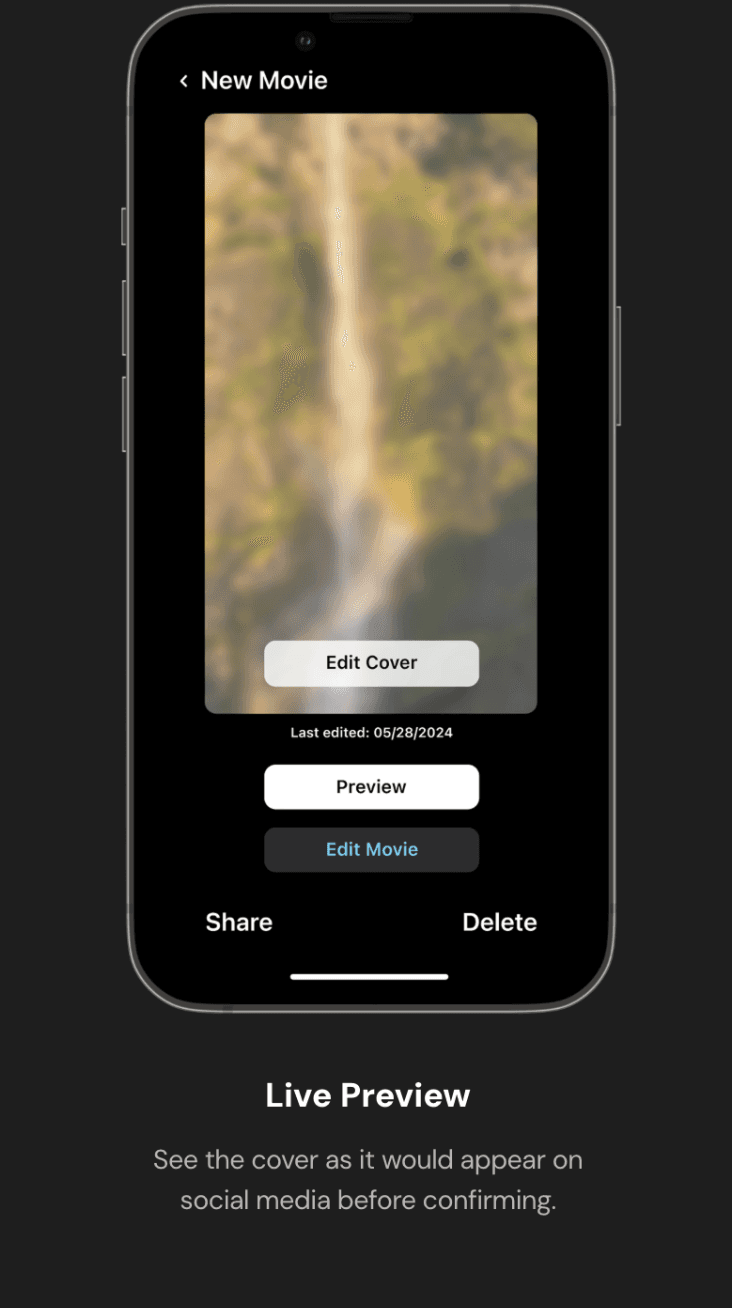
Live Preview
See the cover as it would appear on social media before confirming.
Key Screens
Key Screens
Start the Movie
Prominent Start Button
Clear entry point to begin a new project
Project Thumbnails
Shows last modified date, name, and cover image at a glance
Add Clips
Native Photos Integration
Select multiple clips directly from
Apple Photos
Multi-Select Grid
Familiar iOS picker pattern for
clip selection
Add Audio / Music
Audio Library
Browse by song, artist, album with cover art and duration.
Preview Before Adding
Listen to a track before committing
to it.
Edit Movie Properties
Advance Clip Controls
Adjust saturation, contrast, grain, etc,
via sliders.
Pre-Clip Editing
Apply property chnages to individual clips, not the whole movie.
Preview the Movie
Full Preview Mode
See exactly how the final movie will look before exporting.
Orientation Retention
Clips display in their original portrait or landscape ratio.
Change the Movie Cover
Photos Picker
Choose any frame from your library
as the cover.
Live Preview
See the cover as it would appear on social media before confirming.
Outcomes and Ownership
Outcomes and Ownership
Outcomes
Outcomes
This was a concept project that went from research to high-fidelity prototype, demonstrating what a more native, familiar iMovie could look and feel like across 6 redesigned flows.
This was a concept project that went from research to high-fidelity prototype, demonstrating what a more native, familiar iMovie could look and feel like across 6 redesigned flows.
4
4
User Types Researched
User Types Researched
5
5
Core Flows Designed
Core Flows Designed
4
4
Fidelity Stages Completed
Fidelity Stages Completed
Ownership
Ownership
Sole designer and researcher across the full project, from community research and heuristic evaluation to component design and hi-fi prototyping.
Sole designer and researcher across the full project, from community research and heuristic evaluation to component design and hi-fi prototyping.
Ownership Flow
Ownership Flow
Research

Wireframing
Heuristic
Heuristic
Evaluation
Evaluation
Research
Competitive
Competitive
Analysis
Analysis
Wireframing
System
System
Design
Design
Hi-Fi
Hi-Fi
Prototypes
Prototypes
Context
iMovie is Apple's free, built-in video editing app for iOS, designed to let anyone create polished videos without a learning curve, using a simplified timeline, pre-built themes, and basic audio and clip controls.
Once users go beyond the basics, the app starts to get in the way, limited controls, unfamiliar patterns, and a workflow that doesn't scale.
Stake
Redesign iMovie for all skill levels, not just beginners.
Constraint
Concept project, no access to Apple's design system or real users at scale.
Success
An editing experience that feels native to iOS and grows with the user.
Users found it great for first-time edits
Audio and clip controls felt unfamiliar and buried
Advanced users hit hard feature ceilings
Editing flow didn't match how people actually think about video
Problem & Opportunity
iMovie is capable enough for simple edits, but falls short the moment users want more control, leaving a wide gap between what the app offers and what users actually need.
Before
iMovie = Simplified but limiting
Missing
Familiarity + Creative Control
Opportunity
A native iOS editing experience that grows with the user
Target User
This is for SMBs running their own ads who need speed and results without an agency.
Casual Editor
Freelance Photographer
Social Media Influencer
Film Maker
User Core Needs
Familiar Controls
Familiar Controls
Audio
Feasibility
Audio
Feasibility
Clip
Precision
Clip
Precision
Preview
Accuracy
Preview
Accuracy
Creative
Depth
Creative
Depth
Ideation
Directions Explored
DIRECTION 1
Redesign the Full iMovie Mobile App
Value: Complete, cohesive overhaul
Risk: Too broad for a concept project
DIRECTION 2
Introduce New Features
Value: Adds missing capabilities
Risk: Scope creep, loses iMovie identity
DIRECTION 3
Redesign Core
Editing Flows
Value: Focussed, high-impact changes
Risk: Requires sharp prioritisation
Convergence
Final Plan
Audit Existing Flows
Identify Friction Points
Redesign the core flows
Prototype
Refine
Design System & Visual Language
Since iMovie lives within the Apple ecosystem, I worked within Apple's Human Interface Guidelines, using native iOS components, SF Pro typography, and Apple's color system to ensure every redesigned screen felt like it already belonged.
Typography
Aa
SF Pro
Regular, Medium, and Semibold
Title Text
Title 01
Title 02
SF Pro - Medium
SF Pro - Regular
22 pt
20 pt
Body Text
Body
Body Small
SF Pro - Regular
SF Pro - Regular
14 pt
12 pt
Tab Headings
Main
SF Pro - Medium
14 pt
Buttons
Main
SF Pro - Medium
14 pt
Color Palette
Brand / Accent Colors
Backgrounf Colours
Text & Icon Colours
Addition to Design System
Key Screens
Start the Movie
Add Clips
Add Audio / Music
Edit Movie Properties
Preview the Movie
Change the Movie Cover
See you next time around!
Thank You
GET IN TOUCH
I'm currently open for exciting opportunities.
Let’s connect and talk about the next big thing!
dhvans © 2025
Designed with 🤍 by Dhvani Shah
Thank You
GET IN TOUCH
See you next time around!
I'm currently open for exciting opportunities.
Let’s connect and talk about the next big thing!
dhvans © 2025
Designed with 🤍 by Dhvani Shah
See you next time around!
Thank You
GET IN TOUCH
I'm currently open for exciting opportunities.
Let’s connect and talk about the next big thing!
dhvans © 2025
Designed with 🤍 by Dhvani Shah
Research pointed to one clear direction: iMovie needed to feel like the rest of iOS, familiar patterns, native controls, and an experience that didn't ask users to relearn how to edit every time they opened the app.
User Research
I combined community signals, direct user research, and competitive analysis to understand where iMovie loses users, and what a better experience could look like.
01 Community Signals
People were already trying to stay accountable together through shared presence, check-ins, and informal co-working.
02 Direct User Research
4 user types researched Casual editors, freelancers, influencers, and filmmakers all hit different walls, but shared a common frustration with audio controls and clip management.
03 Heuristic Evaluation
Key usability violations identified Navigation patterns didn't match iOS conventions users already knew, creating unnecessary relearning moments.
04 Competitive Landscape
Apps analysed: CapCut, VN, Splice, Final Cut Competitors offered more familiar patterns and granular controls, showing what iMovie's ceiling was leaving on the table.
VN Video
InShot
Product Goals & Strategy
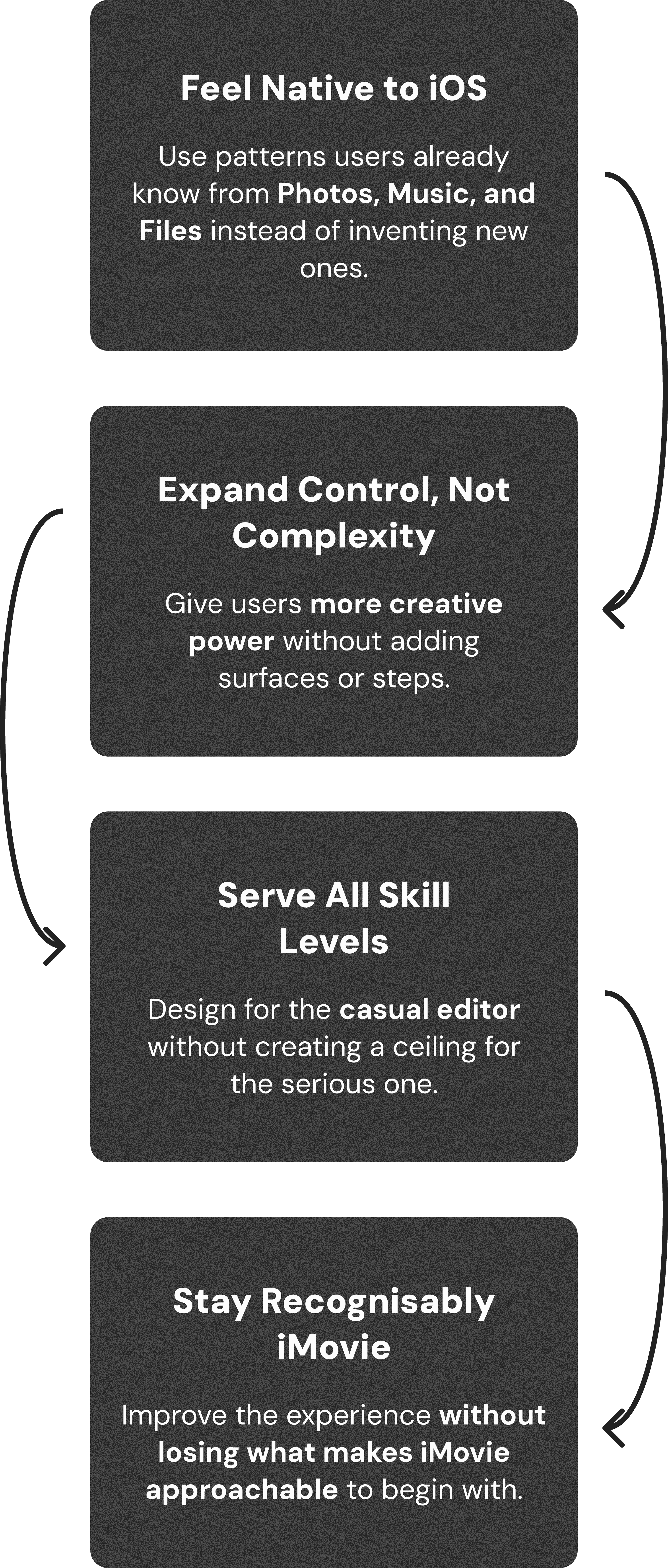
The tradeoff we optimised for:
Outcomes
This was a concept project that went from research to high-fidelity prototype, demonstrating what a more native, familiar iMovie could look and feel like across 6 redesigned flows.
4
User Types Researched
5
Core Flows Designed
4
Fidelity Stages Completed
Outcomes & Ownership
Ownership
Sole designer and researcher across the full project, from community research and heuristic evaluation to component design and hi-fi prototyping.
Ownership Flow
Heuristic Evaluation
Competitive Analysis
Research
System Design
Wireframing
Hi-Fi Prototype